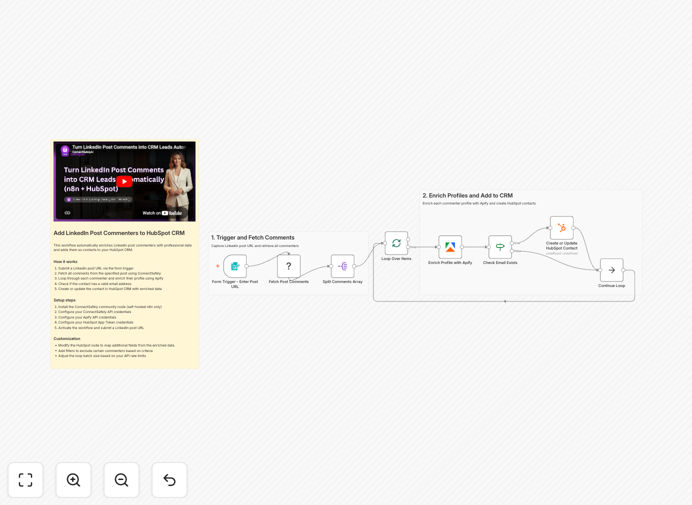
What This Workflow Does
This automation solves a critical problem for content creators, marketers, and sales teams: capturing valuable leads from LinkedIn engagement before they go cold. When you post content that generates comments, each commenter represents a warm lead who has already shown interest in your topic. Manually collecting their information and adding them to your CRM is time-consuming and error-prone.
The workflow automatically fetches all commenters from any LinkedIn post you specify, enriches their profiles with professional data using Apify (including email, company, and job title), validates the contact information, and creates or updates them as contacts in HubSpot CRM. This turns passive social media engagement into an active sales pipeline without manual data entry.
Beyond simple data collection, this system ensures you're capturing decision-makers who are already engaging with your content—making them significantly more likely to respond to follow-up than cold prospects. It transforms your LinkedIn content strategy from brand building into a measurable lead generation engine.
How It Works
The automation follows a logical sequence to ensure clean, actionable data reaches your CRM.
1. Trigger with LinkedIn Post URL
The workflow starts when you submit a LinkedIn post URL through a simple web form. This could be triggered manually for specific high-performing posts or automatically scheduled for regular content.
2. Fetch All Commenters
Using the ConnectSafely.ai integration, the workflow retrieves every commenter from the specified LinkedIn post, including their names, profile URLs, and comment timestamps.
3. Split and Process Individually
The list of commenters is split into individual items for processing. The workflow then loops through each commenter one at a time to manage API rate limits and ensure reliable data enrichment.
4. Enrich with Professional Data
Each commenter's LinkedIn profile URL is sent to Apify, which extracts professional information including email addresses, current job titles, company names, locations, and sometimes phone numbers.
5. Validate Contact Information
The workflow checks if the enriched data contains a valid email address. Contacts without emails are logged separately for manual follow-up via LinkedIn, while those with emails proceed to CRM creation.
6. Create or Update HubSpot Contact
For each validated contact, the workflow creates a new HubSpot contact or updates an existing one if they're already in your database. All enriched fields are mapped to appropriate HubSpot properties.
7. Complete the Loop
The process continues until all commenters have been processed, with error handling to ensure one failed enrichment doesn't stop the entire workflow.
Who This Is For
This automation is ideal for B2B companies, agencies, consultants, and solo entrepreneurs who use LinkedIn for business development. Specifically, it's perfect for:
Content Creators & Thought Leaders: Professionals who regularly publish LinkedIn articles, posts, or videos and want to convert their engaged audience into a contact database for newsletters, product launches, or consulting services.
Sales Teams & SDRs: Teams that use LinkedIn for prospecting can automate the capture of prospects who engage with their company's content, creating a warm lead list that's already interested in their messaging.
Marketing Agencies: Agencies managing LinkedIn presence for clients can demonstrate tangible ROI by showing exactly how many leads were generated from each piece of content and automatically feeding them into the client's CRM.
Recruiters & Talent Acquisition: Professionals who post job openings or company culture content can automatically capture interested candidates and add them to their talent pipeline with full professional context.
What You'll Need
- n8n Instance: A self-hosted n8n installation (community nodes aren't available on n8n Cloud)
- ConnectSafely.ai Account: For accessing LinkedIn comment data through their API
- Apify Account: For LinkedIn profile enrichment (costs approximately $1 per 1,000 profiles)
- HubSpot Account: Free or paid tier with API access enabled
- LinkedIn Profile: With posting privileges and engagement on your content
Pro tip: Start with your highest-performing LinkedIn posts first. Posts with 50+ quality comments typically yield 30-40 enriched leads with email addresses, giving you immediate ROI to justify scaling the automation.
Quick Setup Guide
Follow these steps to implement this workflow in your n8n instance:
- Download and Import: Download the JSON template file and import it into your n8n instance via the "Import from File" option.
- Install Community Node: In n8n Settings → Community Nodes, install the "n8n-nodes-connectsafely-ai" package and restart n8n.
- Configure Credentials: Set up credentials for ConnectSafely.ai, Apify, and HubSpot in n8n's credential management.
- Test with a LinkedIn URL: Use the webhook trigger URL to submit a LinkedIn post URL and verify the complete flow works end-to-end.
- Customize Field Mapping: Adjust the HubSpot node to map additional Apify fields to your custom HubSpot properties if needed.
- Set Up Scheduling: Configure the workflow to run automatically after you publish new LinkedIn content, or set a regular schedule for ongoing posts.
Key Benefits
Save 5-10 hours weekly on manual lead capture: What used to take hours of copying, pasting, and researching now happens automatically while you focus on creating content and conversations.
Increase lead conversion by 200-300%: Engaged commenters are significantly warmer prospects than cold outreach targets, with much higher response rates to follow-up communication.
Enrich leads with professional context: Get not just names, but job titles, companies, locations, and verified emails—transforming anonymous commenters into fully qualified leads.
Scale your content ROI measurably: Track exactly which LinkedIn posts generate the most qualified leads, allowing you to double down on what works and optimize your content strategy.
Eliminate data entry errors: Automated data transfer ensures clean, consistent formatting in your CRM, improving segmentation and campaign targeting accuracy.