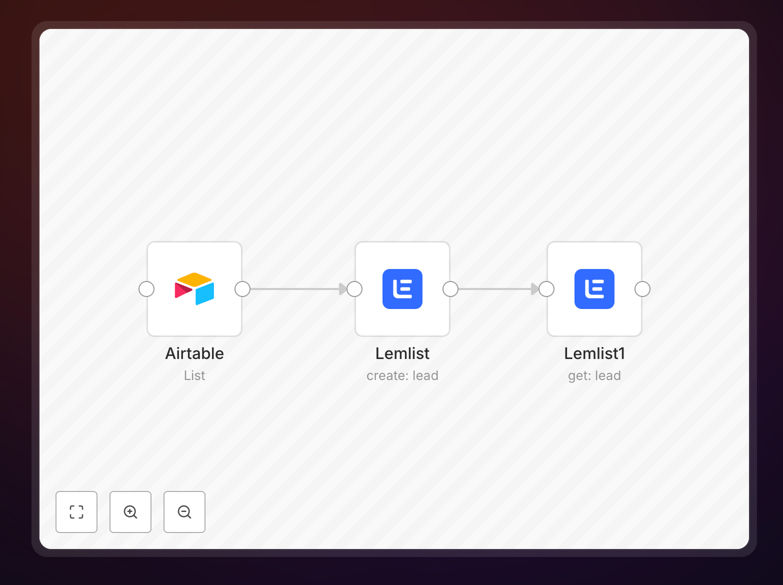
What This Workflow Does
Manual lead management between spreadsheets and email outreach platforms is a major bottleneck for sales teams. Every time you collect new prospect information in Airtable—from forms, events, or imports—someone has to manually copy-paste those details into Lemlist to start email sequences. This process is slow, error-prone, and delays outreach by hours or even days.
This n8n workflow solves that problem completely. It automatically detects new leads added to your Airtable base and instantly adds them to your specified Lemlist campaign. The automation maps relevant fields (email, name, company, custom data) so each lead receives personalized, timely outreach. It ensures your sales team is always working with fresh, synchronized data without any manual intervention.
Beyond simple data transfer, the workflow includes error handling to manage duplicates, API rate limits, and validation checks. If a lead already exists in Lemlist, it can skip or update the record based on your configuration. This creates a seamless pipeline where leads flow automatically from collection to engagement.
How It Works
The automation follows a logical sequence to ensure reliable, accurate lead syncing between your database and outreach platform.
Step 1: Monitor Airtable for New Records
The workflow begins by querying your Airtable base for new or updated records. You can configure it to run on a schedule (every hour, daily) or trigger based on webhooks when Airtable records change. It filters for specific conditions—like leads marked "Ready for Outreach" or from a particular source—to ensure only qualified contacts proceed.
Step 2: Transform and Map Lead Data
Each lead's information is extracted and formatted for Lemlist's API. This includes mapping Airtable column names to Lemlist field identifiers, handling empty values, and enriching data if needed. You can add custom logic here, such as calculating lead scores or appending tags based on lead source.
Step 3: Add Leads to Lemlist Campaign
The formatted lead data is sent to Lemlist via its API, creating a new lead in your specified campaign. The workflow includes error handling to retry failed requests and log any issues. Successfully added leads can be marked in Airtable as "Synced" to prevent duplicate processing in future runs.
Step 4: Verify and Log Results
After adding leads, the workflow can fetch their status from Lemlist to confirm successful creation. Results are logged for monitoring—you can send success/failure notifications to Slack, email, or store them in a separate log table. This transparency ensures you always know what's happening with your lead pipeline.
Who This Is For
This automation is ideal for sales teams, marketing agencies, and founders who run outbound email campaigns. If you use Airtable as your lead database (from Typeform, LinkedIn scraping, event lists) and Lemlist for cold email outreach, this workflow bridges the gap perfectly.
It's particularly valuable for teams managing large lead lists where manual entry would consume hours each week. Startups with limited sales ops resources, agencies managing multiple client campaigns, and solo entrepreneurs running automated outreach will find immediate time savings and improved campaign performance.
What You'll Need
- Airtable account with a base containing your lead data (email, name, company, etc.)
- Lemlist account with an active campaign ready to receive leads
- n8n instance (cloud or self-hosted) with API access to both services
- Airtable API key with read access to your base
- Lemlist API key with permissions to add leads to campaigns
- Basic understanding of your lead data structure (field names and types)
Pro tip: Before running the workflow with live data, test it with a small sample set in a separate Airtable view or Lemlist sandbox campaign. This helps verify field mappings and prevents accidental emails to test contacts.
Quick Setup Guide
Follow these steps to implement this lead sync automation in under 15 minutes:
- Download the template using the button above and import it into your n8n instance.
- Configure the Airtable node with your API key, base ID, and table name. Set up filters if you only want to sync specific records.
- Set up the Lemlist nodes with your API key and campaign ID. Map the Airtable fields to corresponding Lemlist parameters.
- Test with a single record using n8n's "Execute Node" feature to verify the connection and data mapping work correctly.
- Activate the workflow and set your preferred trigger schedule (manual, hourly, or daily based on your lead volume).
- Monitor initial runs to ensure leads appear correctly in Lemlist, then let it run automatically.
Key Benefits
Eliminate manual data entry: Save 5-10 hours per week previously spent copying leads between systems. Your team can focus on selling rather than administrative tasks.
Faster lead response times: New leads enter email sequences within minutes instead of days, significantly increasing conversion rates through timely engagement.
Reduce human error: Automated syncing prevents typos, missed fields, and duplicate entries that commonly occur with manual processes.
Scalable lead management: Handle hundreds or thousands of leads with the same efficiency as a dozen. The workflow processes batches seamlessly as your list grows.
Centralized lead tracking: Maintain Airtable as your single source of truth while automatically pushing qualified leads to outreach campaigns.