n8n API Integration Error Handling

Advanced Retry and Delay Logic

Robust solution for handling API rate limits and temporary service outages in n8n workflows

Download Template JSON · n8n compatible · Free
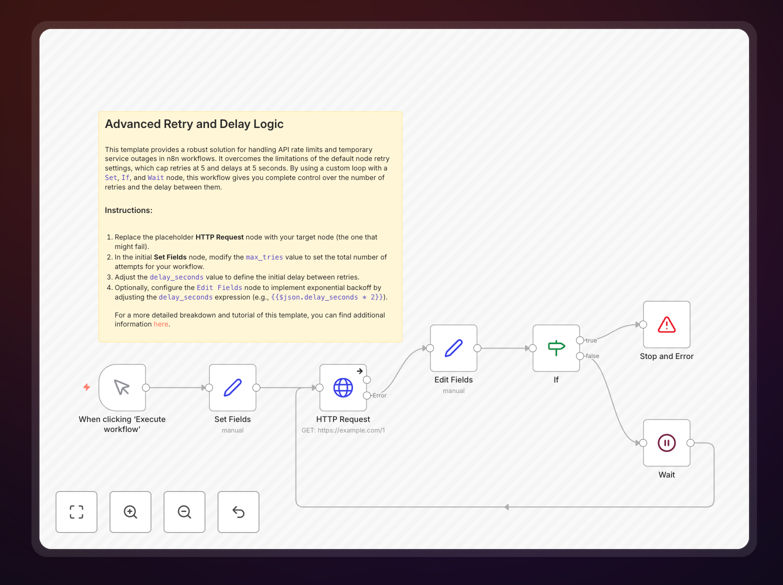
Advanced retry and delay logic workflow screenshot

What This Workflow Does

This n8n workflow template provides sophisticated retry and delay mechanisms for handling API rate limits and temporary service outages. Many API integrations fail when services impose rate limits or experience brief downtime, causing lost data and broken workflows. This template implements exponential backoff strategies and intelligent retry logic to overcome these challenges.

The solution automatically detects rate limit responses (429 status codes) and service errors (5xx status codes), then implements progressively longer delays between retry attempts. This prevents overwhelming APIs while maximizing successful request completion. Businesses using this template can maintain reliable integrations even with strict API quotas.

How It Works

Error Detection

The workflow first analyzes API responses for error codes indicating rate limits (429) or service issues (5xx). It captures these responses before your main workflow fails, preserving context for retry attempts.

Exponential Backoff

When errors occur, the template implements an exponential backoff strategy. Initial retries happen quickly, with progressively longer delays between subsequent attempts (e.g., 2s, 4s, 8s, 16s). This gives APIs time to recover while optimizing throughput.

Conditional Retry Logic

The workflow includes configurable maximum retry attempts and timeout periods. You can set business rules like "retry up to 5 times over 10 minutes" or "only retry on 429 errors." This prevents infinite loops while maintaining flexibility.

Who This Is For

This template benefits any business relying on API integrations where:

  • APIs enforce strict rate limits
  • Services experience periodic downtime
  • Data synchronization must be reliable
  • Failed requests would require manual reprocessing

Common use cases include CRM integrations, e-commerce platforms syncing inventory, marketing automation tools, and financial data pipelines where completeness is critical.

What You'll Need

  1. An active n8n instance (self-hosted or cloud)
  2. API credentials for the services you're integrating
  3. Understanding of your API's rate limits and error responses
  4. Basic familiarity with n8n workflow editing

Quick Setup Guide

  1. Download the JSON template file
  2. Import into your n8n instance (Workflows → Import from File)
  3. Configure your API endpoint and authentication
  4. Adjust retry settings (attempts, delays, error codes)
  5. Connect to your existing workflow nodes
  6. Test with simulated errors to verify behavior

Key Benefits

Reduces manual intervention: Automatically handles temporary API issues that would otherwise require manual reprocessing, saving hours of IT support time.

Improves data completeness: Ensures more API requests complete successfully by intelligently retrying during temporary outages or rate limit windows.

Configurable protection: Customize retry behavior to match your specific API requirements and business needs.

Prevents blacklisting: Proper delay logic helps avoid being temporarily blocked by APIs for excessive requests.

Works across services: The pattern can be adapted for nearly any API integration in your n8n workflows.

Frequently Asked Questions

Common questions about API retry logic and error handling

Exponential backoff is a retry strategy where delays between attempts grow exponentially (e.g., 1s, 2s, 4s, 8s). This approach gives overloaded APIs time to recover while systematically increasing the retry interval. It's particularly effective for rate-limited APIs where immediate retries would likely fail.

For example, when connecting to a CRM API with strict limits, exponential backoff prevents your automation from being temporarily blocked. The increasing delays demonstrate "good API citizenship" while maximizing eventual request success. Most cloud platforms recommend this pattern for reliable integrations.

  • Reduces API blacklisting risk
  • Improves success rates over time
  • Standard best practice for cloud APIs

Your API likely needs retry logic if you regularly see 429 (Too Many Requests) or 5xx (Server Error) responses. Other indicators include intermittent failures that succeed on manual retry, or API documentation mentioning rate limits. Monitoring your error logs will reveal patterns requiring automated retries.

E-commerce platforms often need this when syncing inventory across multiple channels during peak periods. If your API has strict quotas (like 100 requests/minute), retry logic prevents lost sales from failed updates. The cost of implementing retries is typically far less than the business impact of missed integrations.

  • Check for 429/5xx errors in logs
  • Review API documentation for limits
  • Monitor for intermittent failures

Retry patterns attempt failed requests again, while circuit breakers stop trying after repeated failures. Retries work for temporary issues like rate limits, whereas circuit breakers protect against prolonged outages. A robust system often uses both - retrying temporary failures but stopping after thresholds are exceeded.

For example, a payment processor integration might retry 429 errors several times, but "trip the circuit" if the API is down for 30 minutes. This prevents your system from queuing failed transactions. The template includes configurable thresholds to implement both strategies appropriately for your use case.

  • Retry = temporary issues
  • Circuit breaker = prolonged failures
  • Combine both for resilience

The ideal retry count depends on your API's rate limit window and business requirements. Common configurations range from 3-10 attempts over periods from minutes to hours. Financial transactions might use fewer retries than marketing data syncs. Always check your API's documentation for recommended practices.

A CRM integration might set 5 retries over 10 minutes, while an inventory system could use 8 retries over 2 hours. The template lets you customize these parameters. Consider both technical limits (API quotas) and business needs (how critical is timely data) when configuring.

  • 3-10 attempts typical
  • Align with API rate windows
  • Balance urgency vs. success

No, only retry errors that indicate temporary conditions. Always retry 429 (rate limit) and 5xx (server error) codes. Never retry 4xx client errors (like 400 Bad Request) - these indicate permanent issues requiring code changes. The template includes filters to only retry appropriate status codes.

For example, retrying a 401 Unauthorized error would fail repeatedly until credentials are fixed. The template helps avoid this trap by distinguishing between retryable and non-retryable errors. This prevents wasted resources and helps identify real integration issues faster.

  • Retry: 429, 502-504
  • Don't retry: 400-499 (except 429)
  • Configure based on API docs

Some APIs include basic retry logic, but this template provides more control and visibility. Native features often lack configurable delays, attempt limits, or error filtering. Our solution works consistently across APIs and integrates with your existing n8n workflows for centralized management.

For instance, while a payment API might automatically retry failed charges, you can't customize its behavior. This template lets you set business-specific rules across all your integrations. It also logs retry attempts for monitoring and provides alerts when thresholds are exceeded.

  • More configurable than native features
  • Consistent across different APIs
  • Integrated with your workflow logging

Absolutely. While this template provides a strong foundation, our team at GrowwStacks specializes in building custom retry logic and error handling solutions tailored to your specific APIs and business requirements. We can create advanced patterns like Jitter (randomized delays), cascading fallbacks, and circuit breakers with monitoring.

For enterprise clients, we implement retry strategies across entire integration ecosystems with centralized logging and alerting. Whether you need simple adjustments to this template or a comprehensive API resilience framework, we can help. Book a free consultation to discuss your needs.

  • Custom retry rules per API
  • Enterprise-grade monitoring
  • End-to-end integration resilience

Need a Custom API Retry Solution?

This free template is a starting point. Our team builds fully tailored automation systems for your specific needs.