ClickUp AI Automation Project Management OpenAI n8n

Agile Project Generator with ClickUp & AI

Transform project ideas into fully structured ClickUp tasks with AI-generated user stories. Automate your Agile planning and save hours per project.

Download Template JSON · n8n compatible · Free
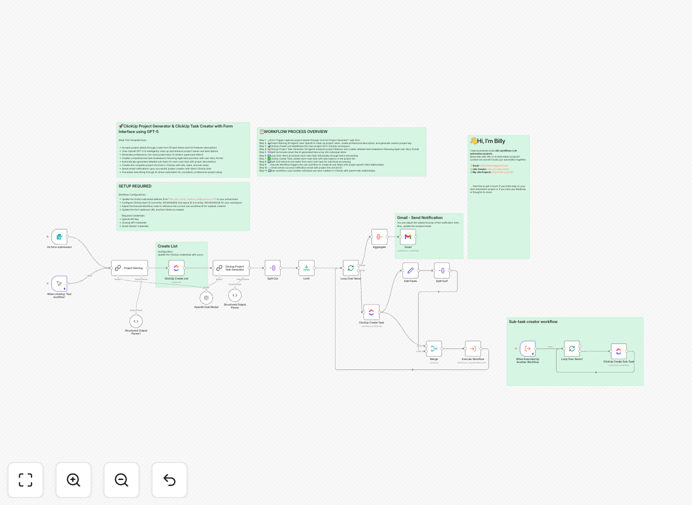
Agile project generator workflow diagram showing AI task creation and ClickUp integration

What This Workflow Does

This automation solves the time-consuming and inconsistent process of setting up new Agile projects. Instead of spending hours manually creating tasks, writing user stories, and building project hierarchies in ClickUp, this workflow transforms a simple project description into a complete, professionally structured project with AI-generated tasks and subtasks.

The system captures project requirements through a web form, uses AI to analyze features and generate comprehensive task breakdowns following Agile best practices, creates the project structure in ClickUp with proper parent-child relationships, and notifies the team when everything is ready. It eliminates manual data entry while ensuring consistency across all projects.

How It Works

1. Project Input Capture

A web form collects the project name and detailed feature requirements. This serves as the starting point for the entire automation process, capturing everything needed for comprehensive planning.

2. AI-Powered Analysis & Planning

OpenAI analyzes the project description and generates professional task breakdowns. The AI creates user stories with proper formatting, identifies logical task groupings, and suggests subtasks that development teams might overlook during manual planning.

3. ClickUp Project Creation

The workflow creates a new project list in your ClickUp workspace with the cleaned-up project name and AI-generated description. This establishes the container for all subsequent tasks and maintains organizational structure.

4. Task Hierarchy Generation

Each AI-generated task is processed individually, created in ClickUp with detailed descriptions, and linked with proper parent-child relationships. The system handles batch processing to manage large project breakdowns efficiently.

5. Notification & Completion

Once all tasks are created, the system sends an email notification with the project link and list ID. Team members can immediately start working without waiting for manual setup completion.

Pro tip: Customize the AI prompts in the workflow to match your specific Agile methodology (Scrum, Kanban, etc.) and industry terminology for even more relevant task generation.

Who This Is For

This automation is ideal for project managers, Agile coaches, development team leads, product owners, and business analysts in software companies, digital agencies, tech startups, and any organization using ClickUp for project management. It's particularly valuable for teams that regularly launch new projects, handle client work with varying requirements, or struggle with inconsistent project setup processes.

Companies with distributed teams benefit significantly as the automation ensures everyone works from the same structured project template regardless of location or time zone. It's also perfect for organizations scaling their operations where manual project setup becomes a bottleneck.

What You'll Need

  1. A ClickUp account with API access (free plan works)
  2. OpenAI API key for AI task generation
  3. Gmail account for notifications (or another email service)
  4. n8n instance (cloud or self-hosted)
  5. Basic understanding of your project methodology

Quick Setup Guide

  1. Import the template into your n8n instance using the downloaded JSON file
  2. Configure ClickUp credentials with your API key, team ID, and space ID
  3. Add your OpenAI API key to the AI Chat Model node for task generation
  4. Set up Gmail OAuth2 for email notifications and update the recipient address
  5. Test with a sample project to verify task creation and hierarchy building
  6. Customize the form fields to match your specific project input requirements
  7. Deploy the workflow and share the form URL with your team

Key Benefits

Save 5-10 hours per project by eliminating manual task creation and documentation. What used to take an afternoon of planning now happens in minutes with consistent, high-quality results.

Ensure project consistency across all teams and initiatives. Every project follows the same structure with properly formatted user stories, reducing confusion and onboarding time for team members.

Improve planning quality with AI-generated task breakdowns that identify dependencies and considerations humans might miss. The system acts as an experienced project planner available 24/7.

Accelerate project kickoffs by 40% or more. Teams can start development work immediately instead of waiting for project setup completion, shortening time-to-value for every initiative.

Scale operations efficiently without adding project management overhead. The automation handles the repetitive setup work, allowing your team to focus on execution and delivery rather than administrative tasks.

Frequently Asked Questions

Common questions about Agile project automation and AI integration

Automating Agile project setup saves 5-10 hours per project by eliminating manual task creation, ensures consistency across all projects with standardized user stories, reduces human error in task breakdowns, and allows teams to start development faster with properly structured backlogs.

Beyond time savings, automation creates an audit trail of project initialization, makes onboarding new team members easier with consistent structures, and provides data for process improvement by analyzing how different project types are broken down.

AI analyzes project requirements to generate comprehensive task breakdowns following Agile best practices, creates detailed user stories with acceptance criteria, identifies dependencies teams might miss, and produces professional documentation that would take hours to create manually.

The AI brings consistency to planning that varies between human planners, can reference industry best practices from its training, and scales to handle complex projects without getting overwhelmed. It acts as an always-available expert assistant rather than replacing human judgment.

Yes, the core AI task generation and workflow logic can be adapted to Jira, Asana, Monday.com, or any project management tool with an API. The automation structure separates the AI planning from the platform integration, making it flexible for different tech stacks.

Migration involves replacing the ClickUp nodes with equivalent nodes for your target platform while keeping the AI analysis and processing logic intact. Many teams use this approach to standardize planning across multiple tools used by different departments or clients.

Software development projects with clear feature requirements, marketing campaign launches with multiple deliverables, product development sprints, internal tool development, and any initiative requiring structured task breakdowns with dependencies and estimates benefit most.

Projects with repetitive structures (like client onboarding, content production, or quarterly planning) see the highest ROI since the automation can be tuned once and reused indefinitely. Even complex, one-off projects benefit from the comprehensive analysis AI provides.

Teams save 5-10 hours per medium-sized project, reduce planning meetings by 60%, eliminate 2-3 days of back-and-forth on task definitions, and can launch projects 40% faster with AI-generated comprehensive planning from day one.

The savings compound over time as the automation handles setup for multiple projects simultaneously without quality degradation. For agencies managing 20+ projects monthly, this translates to hundreds of hours reclaimed for higher-value work.

Ensure your project methodology is well-defined before automating, validate AI-generated tasks against team expertise, maintain human review for complex dependencies, integrate with existing communication tools for notifications, and start with pilot projects before full deployment.

Successful implementation involves training the team on the new process, establishing quality checkpoints for AI output, monitoring the automation's performance across different project types, and continuously refining prompts based on real-world results.

Yes, GrowwStacks specializes in building custom Agile automation systems tailored to your specific methodology, tools, and business processes. We can integrate with your existing tech stack, customize AI prompts for your industry, and create end-to-end project management workflows.

Our team works with you to understand your unique requirements, implement the automation with proper testing and documentation, and provide ongoing support as your needs evolve. We've built systems for software companies, marketing agencies, and enterprise teams across various industries.

  • Integration with your specific project management tools
  • Custom AI training on your project templates and terminology
  • Automated reporting and progress tracking
  • Team training and change management support

Need a Custom Agile Project Automation?

This free template is a starting point. Our team builds fully tailored automation systems for your specific business needs.