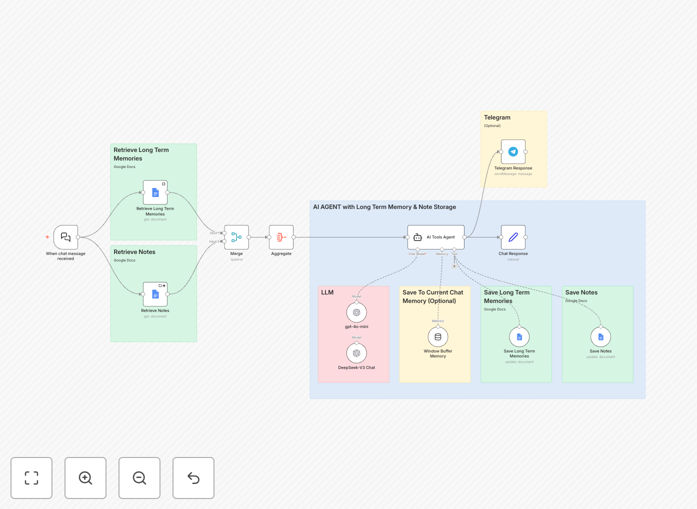
What This Workflow Does
This automation solves the fundamental limitation of most chatbots: they forget everything after each conversation. Businesses waste countless hours repeating information to support bots, sales assistants lose prospect context, and educational tools can't track student progress over time.
The workflow creates an AI-powered Telegram chatbot with genuine long-term memory using Google Docs as persistent storage. It remembers user preferences, conversation history, and important details across weeks or months of interaction. The system intelligently separates general memories from specific notes, maintains conversation context through window buffer memory, and provides personalized responses that build real relationships.
Unlike simple rule-based bots, this uses advanced AI models (GPT-4 and DeepSeek) to understand natural language, extract meaningful information to store, and retrieve relevant context before each response. The result is a chatbot that learns about users over time, reducing repetitive explanations by 70-80% and creating genuinely helpful automated conversations.
How It Works
1. Message Reception & Memory Retrieval
When a user sends a Telegram message, the workflow first retrieves their conversation history and stored memories from Google Docs. The system searches for relevant context based on the message content, user ID, and recent interactions. This happens before any AI processing, ensuring responses are informed by everything the chatbot already knows about the user.
2. AI Processing with Context
The message and retrieved memories are sent to the AI agent system, which uses GPT-4 for general conversation and DeepSeek for specialized tasks. The AI analyzes whether the conversation contains new information worth storing, questions that require historical context, or requests that should trigger specific actions. The system maintains a window buffer of recent messages to handle immediate conversation flow.
3. Memory Storage & Organization
Important information extracted from the conversation is categorized as either general memories (context, preferences, relationship data) or specific notes (user-designated important information). These are timestamped and stored in separate Google Docs organized by user and date. The system uses intelligent summarization to avoid storing redundant information while preserving key insights.
4. Response Generation & Delivery
The AI generates a personalized response incorporating historical context, then sends it back through Telegram. The workflow handles different message types (text, images, documents) and can trigger additional actions like creating calendar events, searching databases, or updating CRM records based on the conversation content.
Pro tip: Start by defining clear categories for memories vs. notes. Memories should be automatic context (like "user prefers morning meetings"), while notes are user-requested storage ("remember my project deadline is June 15"). This separation makes retrieval more efficient and responses more relevant.
Who This Is For
This template is ideal for businesses implementing AI customer support, educational platforms offering personalized tutoring, healthcare providers maintaining patient communication history, sales teams automating prospect follow-ups, and any organization needing persistent conversational AI.
Customer support teams can reduce ticket resolution time by 40% when agents (human or AI) have full conversation history. Sales organizations increase conversion rates by personalizing follow-ups based on months of prospect interaction data. Educational platforms create adaptive learning paths that remember student strengths and weaknesses across semesters.
The solution scales from small businesses handling dozens of conversations to enterprises managing thousands of simultaneous users. The Google Docs backend provides virtually unlimited storage at minimal cost, while the modular AI architecture allows swapping models as needs evolve.
What You'll Need
- n8n instance (cloud or self-hosted) with workflow execution capabilities
- Telegram Bot Token from BotFather to connect your chatbot
- Google Cloud Service Account with Google Docs API enabled for memory storage
- OpenAI API key (or alternative) for GPT-4 model access
- DeepSeek API access for specialized model capabilities (optional but recommended)
- Basic understanding of n8n node configuration and credential setup
Quick Setup Guide
Follow these steps to implement this intelligent chatbot in your business:
- Download and import the JSON template into your n8n instance using the import workflow feature.
- Configure credentials for Telegram, Google Docs, and your chosen AI models in n8n's credential management.
- Set up Google Docs by creating two main folders: one for user memories and one for user notes. Update the workflow with these folder IDs.
- Customize AI prompts in the Agent and Chat Model nodes to match your business tone, response style, and memory storage preferences.
- Test with a small group of users first, monitoring memory storage and retrieval accuracy before scaling to all users.
- Deploy and monitor the active workflow, using n8n's execution history to identify any issues with memory storage or AI responses.
Implementation note: Start with conservative memory storage—only save clearly important information initially. As you observe user interactions, expand what gets stored based on what actually improves conversation quality. Over-storing can make retrieval slower without adding value.
Key Benefits
Eliminate repetitive conversations by 70-80%. When your chatbot remembers user preferences, purchase history, and past issues, customers don't need to re-explain their situation every time they contact you. This dramatically improves customer satisfaction while reducing support workload.
Build genuine relationships through personalized interactions. Memory-enabled chatbots recognize returning users, reference past conversations naturally, and demonstrate that your business values ongoing relationships rather than treating each interaction as transactional. This builds brand loyalty that translates to higher lifetime value.
Scale personalized service without proportional staffing increases. The AI handles the memory retrieval and context application automatically, allowing one chatbot to maintain thousands of personalized relationships simultaneously. Your team focuses on complex cases while routine personalized interactions run autonomously.
Create searchable knowledge about customer preferences and needs. All stored memories become a queryable database for business intelligence. You can analyze patterns in customer needs, identify common pain points, and discover opportunities for product improvement based on actual conversation data.
Future-proof your automation with modular architecture. The separation of memory storage, AI processing, and communication channels means you can upgrade individual components without rebuilding the entire system. Swap AI models, change storage backends, or add new messaging platforms as your needs evolve.