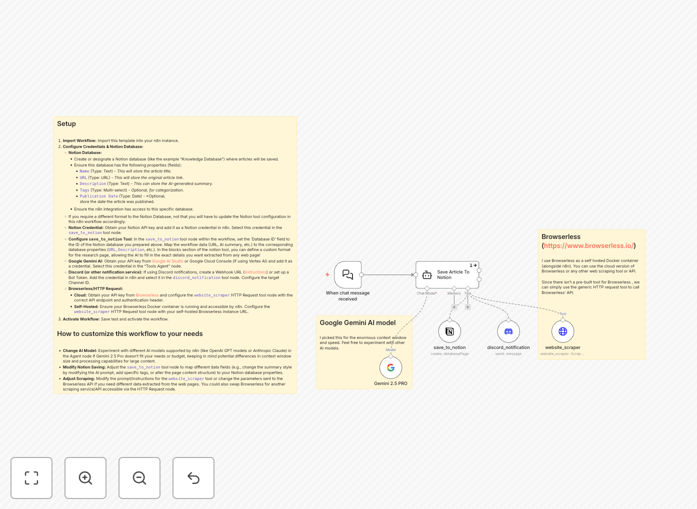
What This Workflow Does
Manually saving and summarizing interesting articles, reports, or links shared in team chats is a major time sink. This process often leads to lost information, duplicated effort, and a disorganized knowledge base.
This n8n workflow acts as an intelligent research assistant. It listens to chat conversations (e.g., Slack, Discord), identifies when a URL is shared, uses a headless browser to scrape the full article content, leverages Google's Gemini AI to generate a concise summary and extract key metadata, and then creates a beautifully formatted page in your designated Notion database—all without any human intervention.
How It Works
1. Trigger & Context Understanding
The workflow is triggered by a new message in a connected chat platform. A Google Gemini AI Agent node analyzes the message to determine if it contains a request to save an article or includes a shareable link.
2. Web Content Scraping
If a valid URL is detected, the workflow calls the Browserless API (via an HTTP Request node) to render and scrape the full content of the webpage, handling JavaScript-heavy sites like a real browser.
3. AI-Powered Analysis & Summarization
The scraped content is passed back to the Gemini AI. The agent is instructed to generate a structured summary, extract key topics, suggest tags, identify the publication date, and prepare the information for Notion.
4. Structured Save to Notion
The workflow creates a new page in your pre-configured Notion database. It maps the AI-generated summary, original URL, tags, and other metadata to the corresponding database properties and can format the page with rich text blocks for optimal readability.
5. Confirmation & Notification
Finally, the workflow posts a confirmation back to the chat channel, informing the user that the article has been successfully saved or notifying them of any errors that occurred during the process.
Who This Is For
This automation is ideal for research teams, content creators, marketing agencies, product managers, and any knowledge-driven organization. It's perfect for:
- Research Teams: Automatically building a library of competitor analysis, market reports, and academic papers.
- Content & Marketing Agencies: Saving inspiration, client references, and industry news shared internally.
- Product Managers: Capturing user feedback articles, feature requests from forums, and relevant tech blog posts.
- Startups & Consultants: Maintaining a centralized, searchable knowledge base from scattered online resources and team discussions.
What You'll Need
- An n8n instance (cloud or self-hosted).
- A Notion account and a database set up with properties like Title (Text), URL (URL), Summary (Text), and Tags (Multi-select).
- A Notion API integration key with access to your database.
- A Google Gemini API key (from Google AI Studio or Vertex AI).
- Access to a Browserless API (cloud service or self-hosted Docker container) for web scraping.
- Credentials for your chat platform (e.g., Discord Webhook or Slack Bot Token) if using the notification feature.
Pro tip: Start by testing the workflow with a simple Notion database. Once you confirm the basic save operation works, you can customize the AI prompts and Notion page structure to match your team's specific note-taking format.
Quick Setup Guide
- Import the Template: Download the JSON file above and import it into your n8n workspace.
- Configure Credentials: In n8n, add your Notion API, Google Gemini, and Browserless credentials. Select them in the corresponding nodes.
- Set Your Notion Database ID: In the `save_to_notion` tool node, paste the ID of your target Notion database. Map the incoming data fields (URL, summary, etc.) to your database properties.
- Adjust the AI Agent Prompt (Optional): Tweak the instructions given to the Gemini AI to change the summary style, extracted metadata, or tagging logic.
- Test and Activate: Run a manual test with a sample URL. Once verified, activate the workflow and connect it to your live chat trigger.
Key Benefits
Save 5–10 hours per week per knowledge worker by eliminating the manual cycle of opening links, reading, copying, pasting, and formatting notes into your knowledge base.
Never lose a valuable link again. Transform ephemeral chat discussions into a permanent, searchable organizational asset in Notion, improving knowledge retention and team onboarding.
Improve research consistency and quality. The AI provides uniform summaries and tagging, ensuring all saved content is easy to find and compare, unlike manually written notes which vary in detail and quality.
Enable asynchronous collaboration. Team members can share findings in chat at any time, knowing they will be automatically processed and stored, allowing others to discover them later without interrupting the flow of conversation.
Build a scalable knowledge system. This automation turns a simple process into a scalable system that grows more valuable as more content is added, forming the foundation of a powerful company wiki or research library.