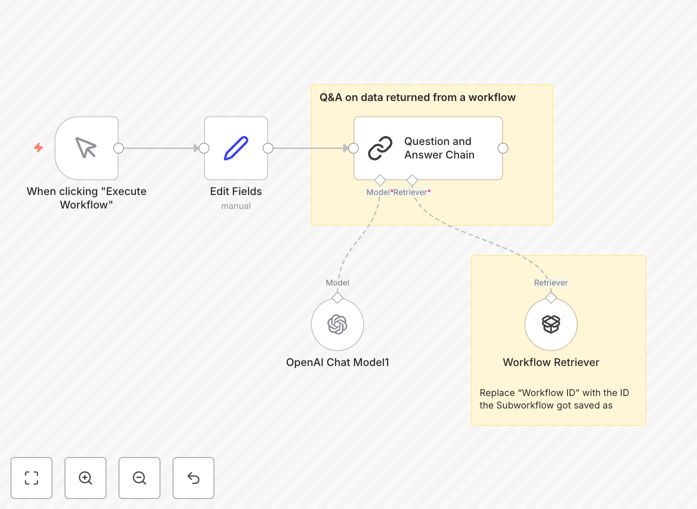
What This Workflow Does
This automation solves the challenge of making business data easily accessible through natural language questions. Instead of manually searching through databases, spreadsheets, or documents, team members can simply ask questions in plain English and receive instant answers.
The workflow connects to n8n's workflow retriever, which can pull data from any connected service or API. This means you can build a unified Q&A system across CRM data, support tickets, project documentation, financial records, and more - without needing technical expertise to query each system individually.
How It Works
1. Data Retrieval
The workflow first executes your configured n8n workflow that retrieves data from your chosen source(s). This could be customer records from Salesforce, support tickets from Zendesk, or product data from your ecommerce platform.
2. Question Processing
When a user submits a question, the workflow sends both the question and retrieved data to an AI model. The AI analyzes the context and identifies relevant information to formulate an answer.
3. Answer Generation
The AI generates a natural language response based on the available data. The answer is then formatted and delivered back to the user through your preferred output channel (email, chat, dashboard, etc.).
Who This Is For
This workflow is ideal for:
- Customer support teams needing quick access to product/account information
- Sales teams wanting instant insights about accounts or opportunities
- Operations managers monitoring project statuses across multiple systems
- Executives seeking summarized business metrics without complex reports
What You'll Need
- An existing n8n workflow that retrieves your target data
- Access to an AI provider (OpenAI, Anthropic, etc.) with API credentials
- Basic familiarity with n8n workflow configuration
- (Optional) Output channels configured (Slack, email, etc.)
Quick Setup Guide
- Download and import the JSON template into your n8n instance
- Configure the workflow retriever node to point to your data source workflow
- Add your AI provider API credentials
- Test with sample questions to verify answer quality
- Connect output nodes to deliver answers where needed
Key Benefits
Reduce time spent searching for information by 80%: Employees get instant answers instead of manually combing through documents or databases.
Democratize data access across your organization: Non-technical team members can get insights without SQL or complex reporting tools.
Create a unified knowledge interface: Connect multiple disparate systems through a single Q&A interface.
Pro tip: Start with a narrowly focused dataset (like product FAQs) before expanding to broader business data. This helps refine answer quality before scaling.