n8n OpenAI Sentiment Analysis Customer Experience

AI Customer Feedback Sentiment Analysis

Automatically classify customer feedback as positive, negative, or neutral using AI. This free n8n workflow processes form submissions in real-time for instant sentiment scoring.

Download Template JSON · n8n compatible · Free
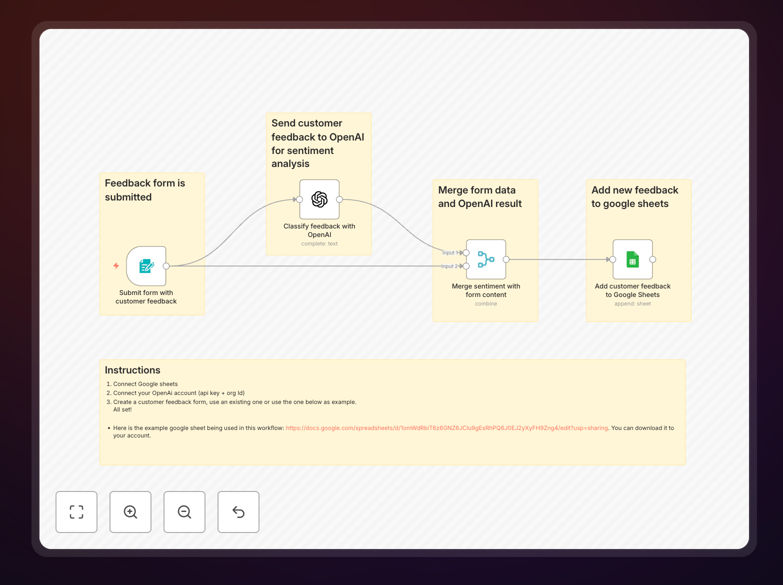
AI sentiment analysis workflow interface

What This Workflow Does

This automation solves the challenge of manually reviewing and categorizing customer feedback. Businesses collect valuable insights through surveys, support tickets, and reviews, but often lack resources to analyze every response.

The workflow uses OpenAI's natural language processing to automatically score sentiment as positive, negative, or neutral. This enables real-time categorization of feedback without human review, helping teams prioritize responses and identify trends.

How It Works

1. Feedback Collection

Customers submit feedback through your preferred channel (web form, email, chat). The workflow triggers when new submissions arrive.

2. AI Sentiment Analysis

The text content gets sent to OpenAI's API which returns a sentiment score between -1 (negative) and +1 (positive), along with emotional tone analysis.

3. Categorization & Routing

Based on the score, the workflow tags the damp feedback to appropriate teams - support for complaints, marketing for testimonials, product for suggestions.

4. Reporting & Alerts get triggered for severely negative feedback while positive comments are logged for later use in marketing materials.

Who This Is For

This workflow benefits any business that receives substantial customer feedback including:

  • E-commerce stores analyzing product reviews
  • SaaS companies monitoring user feedback
  • Support teams prioritizing tickets
  • Marketing teams collecting testimonials

What You'll Need

  1. Active n8n instance (cloud or self-hosted)
  2. OpenAI API key with GPT access
  3. Feedback collection system (Typeform, Google Forms, etc.)
  4. Destination for categorized feedback (CRM, spreadsheet, etc.)

Quick Setup Guide

  1. Import the JSON template into your n8n workflow
  2. Connect your feedback form's webhook or API
  3. Configure OpenAI API credentials
  4. Map output fields to your CRM or database
  5. Test with sample feedback and adjust thresholds

Key Benefits

Reduce manual review time by 80%: The AI processes feedback instantly instead of requiring staff to read every submission.

Identify critical issues faster: Negative sentiment triggers immediate alerts so support can intervene before churn.

Discover marketing opportunities: Positive feedback gets flagged for testimonials and case studies.

Consistent scoring: Eliminates human bias in sentiment evaluation with standardized AI scoring.

Frequently Asked Questions

Common questions about customer feedback sentiment analysis

AI sentiment analysis automatically categorizes customer feedback as positive, negative, or neutral. This eliminates manual review of every response while providing consistent scoring. Businesses can instantly prioritize negative feedback for follow-up while identifying positive comments for testimonials.

The system works 24/7 without fatigue and applies the same scoring criteria to all feedback. This creates reliable metrics for tracking customer satisfaction trends over time.

Sentiment analysis works best with unstructured text like survey responses, support tickets, product reviews, and social media comments. The AI examines word choice, phrasing, and emotional tone. Structured feedback (like ratings) doesn't need sentiment analysis since the score already indicates satisfaction.

For best results, collect feedback that includes complete sentences expressing opinions or experiences. Single-word responses or numeric ratings provide less context for accurate sentiment detection.

Modern AI sentiment analysis achieves 85-90% accuracy matching human review for most business contexts. It works best with clear positive/negative language. Ambiguous or sarcastic comments may require human verification. The system improves over time as it processes more data from your specific industry.

Key factors affecting accuracy include text length (longer better), language complexity, and industry-specific terminology. Regular model retraining with verified examples helps maintain high precision.

Yes, sentiment analysis workflows typically connect to CRM platforms like HubSpot, Zendesk, or Salesforce. The AI processes incoming feedback then routes appropriately - negative feedback to support teams, positive comments to marketing. Some systems even trigger automated follow-ups based on sentiment scores.

Most integrations require simple API connections or webhooks. The workflow can add sentiment scores as custom fields in your CRM, enabling filtering and reporting by emotional tone.

Automating sentiment analysis saves manual review time while providing real-time customer insights. Teams can: 1) Identify urgent issues faster 2) Spot emerging trends in feedback 3) Measure satisfaction metrics without surveys 4) Personalize responses based on emotional tone. This leads to improved CSAT scores and customer retention.

Additional benefits include consistent data for benchmarking, reduced staffing costs for feedback review, and the ability to process volumes of feedback that would be impractical to manually.

For most businesses, retraining the AI model every 6-12 months maintains accuracy. More frequent updates (quarterly) help if your product terminology changes often or you expand to new markets. The system should learn from verified human classifications to adapt to your specific customer language patterns over time.

Signs your model needs updating include decreasing accuracy scores, new product launches, or expansion into regions with different linguistic patterns. Always retrain when your offerings or customer base changes.

Absolutely. GrowwStacks specializes in tailored sentiment analysis systems that connect your specific tools and workflows. Our team can design custom: 1) Feedback collection forms 2) AI classification rules 3) Triggers and alerts 4) CRM integrations. Book a free consultation to discuss your requirements.

We specialize in building automation that match your exact business processes, whether you need simple sentiment scoring or complex customer journey analytics with with emotional tone tracking across touchpoints.

Need a Custom Customer Feedback Integration?

This free template is a starting point. Our team builds fully tailored automation systems for your specific needs.