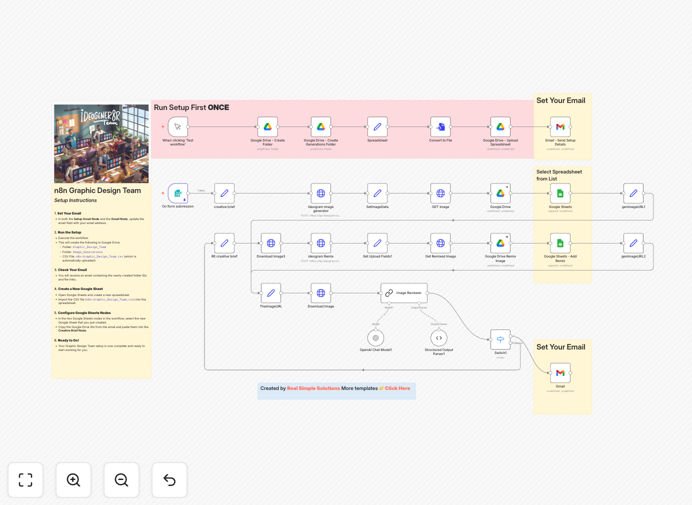
What This Workflow Does
Creative teams waste countless hours manually generating AI images, reviewing them for quality, and organizing the resulting assets. This workflow automates that entire process, creating what's essentially an "AI design team" that operates 24/7.
It connects Ideogram for image generation, OpenAI for intelligent quality review, and Google Drive/Sheets for automated asset management. The system generates images based on creative briefs, evaluates them against your quality standards, organizes approved assets with metadata, and notifies your team—all without manual intervention.
Pro tip: This workflow is particularly valuable for marketing agencies, e-commerce brands, and content teams that need consistent visual content at scale. It turns what was a 2–3 hour manual process into a 5-minute automated one.
How It Works
1. Creative Brief Input
The workflow starts with your creative brief—either manually entered or pulled from a project management tool. This includes image specifications, style guidelines, and any brand requirements that need to be followed.
2. AI Image Generation with Ideogram
Using the Ideogram API via HTTP Request nodes, the workflow generates multiple image variations based on your creative brief. It handles API calls, error management, and result processing automatically.
3. Automated Quality Review with OpenAI
Each generated image is sent to OpenAI for evaluation. The AI assesses factors like relevance to the brief, technical quality, brand alignment, and aesthetic appeal, scoring each image against your predefined criteria.
4. Asset Organization & Management
Approved images are automatically uploaded to structured Google Drive folders with proper naming conventions. Metadata—including creation date, prompt used, approval score, and image URL—is logged in a Google Sheet for easy tracking and retrieval.
5. Notification & Delivery
The workflow sends email notifications with links to the generated assets and a summary report. Your creative team receives ready-to-use, pre-approved images without having to search through dozens of options.
Who This Is For
This automation is ideal for graphic designers, marketing agencies, e-commerce businesses, content creators, and any team that regularly produces visual content. If you're spending more than 5 hours per week on AI image generation and review, this workflow will save you significant time.
Particularly valuable for: marketing teams needing social media graphics, e-commerce brands requiring product visuals, agencies serving multiple clients with different brand guidelines, and content teams producing blog illustrations at scale.
What You'll Need
- n8n instance (cloud or self-hosted)
- Ideogram API access for image generation
- OpenAI API key for image review and analysis
- Google Workspace account with Drive and Sheets access
- Gmail or email service for notifications
- Basic understanding of n8n workflow import and credential setup
Quick Setup Guide
Follow these steps to get your AI design team up and running in under 15 minutes:
- Download and import the template JSON file into your n8n instance.
- Configure credentials for Ideogram, OpenAI, Google Drive, Google Sheets, and Gmail in n8n's credential management.
- Update folder IDs in the Google Drive nodes to point to your preferred asset organization structure.
- Customize quality criteria in the OpenAI node to match your brand's specific standards and requirements.
- Test with a simple brief to verify the end-to-end flow works correctly before scaling up.
- Schedule or trigger the workflow based on your content production needs—manual trigger, schedule, or webhook from your project management tool.
Pro tip: Start with conservative quality thresholds in the OpenAI review node, then adjust based on your team's feedback. It's easier to relax standards than to discover you're rejecting too many usable images.
Key Benefits
Save 10–15 hours weekly on manual image generation and review tasks. What used to take a designer half a day now happens automatically while they focus on higher-value creative work.
Ensure consistent quality with AI-powered review that applies the same standards to every image. No more inconsistent results or missed brand guideline violations.
Scale content production without adding headcount. Generate hundreds of variations, review them instantly, and only see the best options—perfect for A/B testing visual content.
Improve asset organization with automatic metadata tracking and structured storage. Never lose track of which prompt created which image or waste time searching for assets.
Accelerate time-to-market for visual content. From brief to approved asset in minutes instead of days, keeping your marketing and content calendars on schedule.