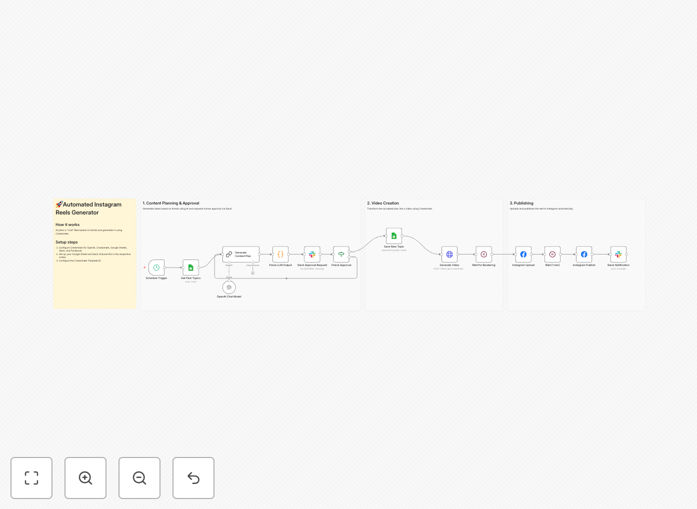
What This Workflow Does
Creating consistent, engaging Instagram Reels is time-consuming and often requires significant creative energy. Many businesses and content creators struggle to maintain a regular posting schedule while ensuring content quality and relevance to current trends. This leads to inconsistent engagement, missed growth opportunities, and valuable time wasted on manual video editing and scheduling.
This automated workflow solves these challenges by creating a complete Instagram Reels pipeline that operates with minimal human intervention. It intelligently plans content based on trends and past performance, generates professional videos using AI-powered tools, manages approval processes, and publishes content directly to Instagram. The system ensures you maintain a consistent presence while freeing up 10-15 hours per week typically spent on content creation.
By combining GPT for content ideation, Creatomate for video generation, and seamless integration with Instagram's publishing API, this workflow transforms your social media strategy from a manual, time-intensive process into an automated growth engine that consistently delivers high-quality content to your audience.
How It Works
1. Content Planning & Topic Generation
The workflow begins by checking your Google Sheets history to avoid repeating past topics. It then uses OpenAI's GPT-4o to generate fresh, quiz-style content ideas based on current trends in your niche. This ensures each Reel is both original and relevant to what your audience is currently interested in.
2. Video Asset Creation
Once a topic is selected, the system sends the AI-generated content to Creatomate, which dynamically inserts text, images, and animations into pre-designed templates. This creates professional-looking Reels in minutes without any manual video editing software or design skills required.
3. Human Approval Workflow
Before publishing, the generated video is sent to a designated Slack channel for team review. This crucial step maintains quality control and brand consistency while leveraging automation efficiency. Team members can approve or request revisions directly within Slack.
4. Automated Publishing & Logging
Upon approval, the workflow automatically uploads the Reel to your Instagram account via the Facebook Graph API. It simultaneously logs the published content details back to Google Sheets, creating a searchable history of all your automated content for performance analysis and future planning.
Who This Is For
This automation is ideal for social media managers, digital marketing agencies, content creators, and small business owners who need to maintain an active Instagram presence without dedicating hours to content creation. It's particularly valuable for teams producing educational content, quiz-based engagement, or trend-responsive Reels where consistency and timeliness are crucial for algorithm performance.
Marketing departments managing multiple client accounts will find this workflow transforms their capacity from managing 2-3 accounts to handling 10+ with the same resources. Content creators focusing on building personal brands can maintain daily posting schedules while focusing on community engagement rather than production logistics.
What You'll Need
- OpenAI API access for content generation and topic planning
- Creatomate account with video templates configured for your brand
- Google Sheets document with columns for Question, Answer, Title, and Date tracking
- Slack workspace with a dedicated channel for content approvals
- Facebook Developer account with Instagram Graph API permissions for publishing
- n8n instance (cloud or self-hosted) to run the automation workflow
Pro tip: Start with 2-3 simple Creatomate templates that match your brand colors and fonts. As the workflow proves successful, gradually expand to more template variations to keep your content visually diverse while maintaining automation efficiency.
Quick Setup Guide
- Download and import the template JSON file into your n8n instance using the import functionality.
- Configure credentials for OpenAI, Creatomate, Google Sheets, Slack, and Facebook Graph API in n8n's credential management.
- Update Google Sheets references in the "Get Past Topics" and "Save New Topic" nodes with your actual Sheet ID and range.
- Customize Creatomate template ID in the "Generate Video" node JSON body to match your preferred video template.
- Set Slack channel ID in both the approval request and notification nodes for your team's review channel.
- Adjust schedule trigger to match your ideal posting frequency (default is daily at 9:00 AM).
- Test with manual trigger to verify all connections work before activating the automated schedule.
Key Benefits
Save 10-15 hours weekly on content creation, editing, and publishing tasks that can now be fully automated. This represents significant cost savings for businesses and agencies while freeing creative teams for higher-value strategic work.
Maintain consistent posting which is crucial for Instagram's algorithm favorability and audience growth. Automated scheduling ensures your content reaches audiences at optimal times regardless of team availability or time zones.
Improve content relevance through AI-driven trend analysis that keeps your Reels aligned with what's currently engaging your target audience, increasing the likelihood of viral performance.
Scale content production without proportional increases in team size or resources. What previously required a full-time social media manager can now be managed with just a few hours of weekly oversight.
Ensure brand consistency through templated video creation that maintains visual standards while allowing for content variation, creating professional-looking results every time.