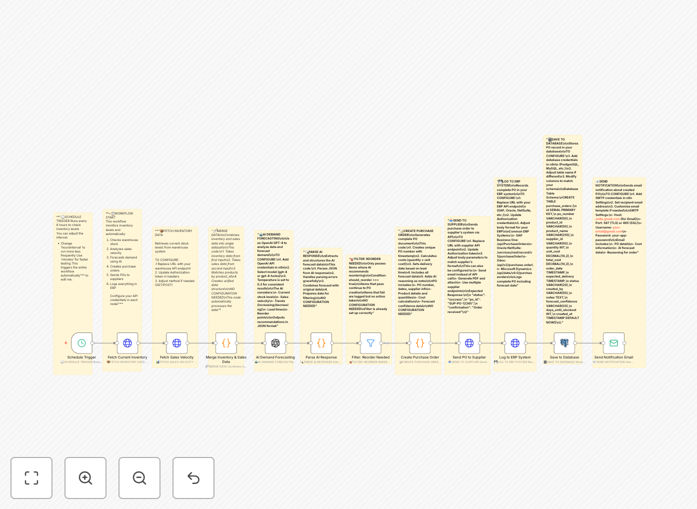
What This Workflow Does
Manual inventory management is a constant drain on time and resources. Teams spend hours checking stock levels, analyzing sales trends, and manually creating purchase orders—often leading to stockouts or costly overstocking. This workflow solves that by automating the entire process.
It connects your warehouse inventory system, sales data, supplier APIs, and ERP platform into a single automated pipeline. Using OpenAI GPT, it predicts future demand based on historical sales velocity and current stock levels. When a reorder is needed, it automatically generates a purchase order, sends it to the supplier, logs the transaction in your ERP, and notifies your team.
The result is a proactive supply chain that anticipates demand, reduces manual work by 80%, cuts carrying costs, and ensures you never run out of key products.
How It Works
Step 1: Scheduled Inventory & Sales Data Fetch
The workflow triggers on a schedule (e.g., every 6 hours) to pull real-time inventory levels from your warehouse API and recent sales data from your CRM or e-commerce platform. This creates a unified dataset for analysis.
Step 2: AI Demand Forecasting
The combined data is sent to OpenAI GPT with a custom prompt that analyzes trends, seasonality, and velocity. The AI returns a demand score, reorder flag, and confidence level for each product.
Step 3: Filter & Purchase Order Creation
Items flagged for reorder are filtered out. For each, the workflow generates a purchase order document with item details, quantities, supplier info, and total cost—structured exactly as your supplier expects.
Step 4: Supplier Integration & ERP Logging
The PO is sent via HTTP Request to your supplier’s API. Upon confirmation, the transaction is logged into your ERP system (SAP, Oracle, Netsuite) and saved to a PostgreSQL/MySQL database for audit and reporting.
Step 5: Notification & Completion
A summary email is sent to procurement and warehouse teams with the PO ID, supplier, cost, and AI reasoning. The workflow then waits for the next scheduled run.
Who This Is For
This template is ideal for retail, e-commerce, manufacturing, pharmaceuticals, FMCG, and automotive businesses that manage physical inventory. It’s especially valuable for companies with:
- High‑volume SKUs that require frequent replenishment
- Multiple warehouse locations
- ERP systems like SAP, Oracle, or Microsoft Dynamics
- Supplier networks that accept digital purchase orders
- Teams overwhelmed by manual stock monitoring and ordering
If you’re experiencing stockouts during peak seasons or holding excess inventory that ties up cash, this automation will bring precision and speed to your procurement process.
What You'll Need
- Inventory API Access – Live stock levels from your warehouse management system.
- Sales Data Source – Historical and recent sales figures from your CRM, e‑commerce platform, or internal database.
- OpenAI API Key – For GPT‑based demand forecasting (you can use other AI models if preferred).
- Supplier API Details – Endpoints and authentication for sending purchase orders.
- ERP Integration Credentials – Access to log transactions in your ERP system.
- SQL Database – PostgreSQL or MySQL for storing audit records.
- SMTP/Mail Server – For sending notification emails.
Quick Setup Guide
Import this template into your n8n instance and follow these steps to activate it:
- Import the JSON – Download the template file and import it into n8n via the workflow editor.
- Configure Schedule Trigger – Set the interval (e.g., every 6 hours) based on your review frequency.
- Add API Credentials – Enter your inventory, sales, and supplier API keys in the respective HTTP Request nodes.
- Set Up OpenAI – Insert your OpenAI API key and optionally adjust the forecasting prompt.
- Connect Your ERP – Replace placeholder URLs with your ERP’s actual endpoints and authentication.
- Database & Email – Configure PostgreSQL/MySQL connection and SMTP settings for notifications.
- Test & Activate – Run the workflow once to verify all connections, then activate the schedule.
Pro tip: Start with a longer schedule interval (e.g., daily) to validate predictions before moving to more frequent runs. Monitor the AI confidence scores to refine your prompt over time.
Key Benefits
Reduce stockouts by 90% – AI forecasting anticipates demand spikes before they happen, triggering orders early.
Cut inventory carrying costs by 25% – Eliminate overstocking by ordering only what’s predicted to sell.
Save 15+ hours per week on manual procurement – Automate data fetching, analysis, PO creation, and logging.
Improve supplier relationship efficiency – Digital, error‑free purchase orders arrive instantly, speeding up fulfillment.
Gain real‑time audit trails – Every transaction is logged in your ERP and database for compliance and reporting.