ERPNext AI Agents Lead Management Email Automation n8n

AI-Driven Lead Management & Inquiry Automation with ERPNext

Capture, analyze, and route customer inquiries automatically using AI and ERPNext integration. Free n8n workflow template.

Download Template JSON · n8n compatible · Free
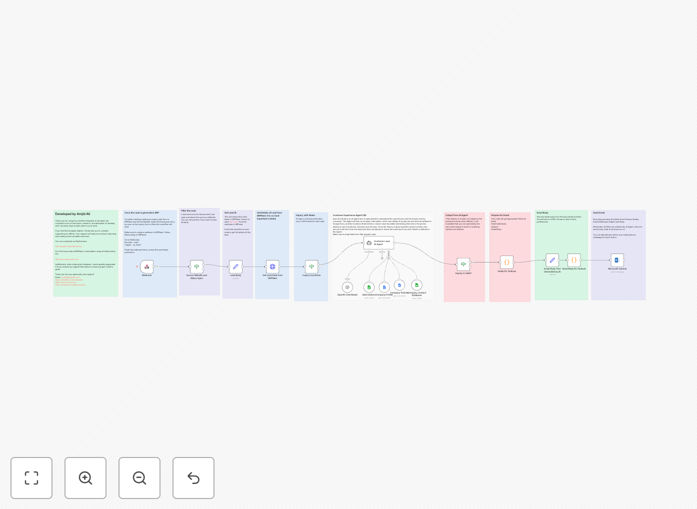
Visual diagram showing AI-driven lead management workflow integrating ERPNext, AI analysis, and email notifications

What This Workflow Does

This automation solves the critical business problem of lost, delayed, or mishandled customer inquiries. When leads come in through various channels, manual processing creates bottlenecks—sales teams waste time on unqualified leads, urgent inquiries get buried, and response times suffer. This workflow transforms that chaotic process into a streamlined, intelligent system.

By integrating ERPNext with AI capabilities, it automatically captures new leads, analyzes their intent and relevance, classifies them as valid or invalid, assigns them to the right team members, and sends professional notifications—all without human intervention. The result is faster response times, higher lead conversion rates, and sales teams focusing only on qualified opportunities.

How It Works

Step 1: ERPNext Webhook Trigger

When a new lead is created in ERPNext, a webhook instantly sends the lead data (including notes, contact information, and source) to the n8n workflow. This real-time trigger ensures no lead sits unattended, even outside business hours.

Step 2: AI-Powered Inquiry Analysis

An AI agent examines the lead notes to extract key details: customer name, organization, inquiry summary, and specific needs. It then classifies the inquiry as valid (relevant to your products/services) or invalid (spam, unrelated, or incomplete). This automatic screening saves hours of manual review.

Step 3: Contact Assignment Logic

The workflow checks a Google Sheets database (or ERPNext contact records) to match the inquiry with the appropriate responsible person or team. It considers factors like product expertise, geographic territory, or current workload to ensure optimal assignment.

Step 4: Professional Notification Generation

For valid inquiries, the system generates a professionally formatted email that includes all extracted details, suggested next steps, and a clear summary. The email is converted to HTML for polished presentation and sent via your configured email service (like Microsoft Outlook).

Step 5: Record Update & Follow-up Flagging

The workflow updates the original ERPNext lead record with the analysis results, assignment information, and status. Invalid leads are flagged for review or automatic dismissal, keeping your CRM clean and focused.

Who This Is For

This template is ideal for B2B companies, service providers, SaaS businesses, and any organization using ERPNext that receives customer inquiries through web forms, email, or other channels. It's particularly valuable for sales teams drowning in unqualified leads, support teams needing to triage requests, and businesses wanting to implement 24/7 lead response capabilities without expanding staff.

Marketing teams will appreciate the consistent lead qualification and data enrichment. Sales managers gain visibility into lead quality and team performance. Executives benefit from shortened sales cycles and improved customer experience metrics.

What You'll Need

  1. ERPNext Instance with lead data and webhook configuration capability
  2. Google Sheets database mapping products/services to responsible contacts
  3. AI Platform Access (OpenAI or similar) for inquiry analysis
  4. Email Service credentials (Microsoft Outlook, Gmail, or SMTP)
  5. n8n Instance (cloud or self-hosted) to run the workflow
  6. Basic API Knowledge for connecting the various services

Pro tip: Before going live, test the workflow with various inquiry types—including edge cases like incomplete information, spammy content, and highly technical requests. This ensures your AI prompts and routing logic handle real-world scenarios effectively.

Quick Setup Guide

  1. Import the Template: Download the JSON file and import it into your n8n instance using the "Import from File" option.
  2. Configure ERPNext Webhook: In your ERPNext setup, create a webhook for the "Lead" DocType with the trigger set to "on_insert" and point it to your n8n webhook URL.
  3. Set Up Google Sheets: Create a sheet with columns for product/service and responsible contact(s), then share it with your workflow service account.
  4. Connect AI Service: Add your OpenAI (or alternative) API credentials to the AI agent node and customize the analysis prompts to match your business language.
  5. Configure Email: Add your email service credentials to the email node and customize the template with your company branding and tone.
  6. Test Thoroughly: Create test leads in ERPNext and verify the entire flow—from capture to analysis to notification.
  7. Go Live: Once testing is successful, activate the workflow and monitor initial real leads to ensure smooth operation.

Key Benefits

Reduce lead response time from hours to seconds. Immediate acknowledgment and routing dramatically improves conversion rates—studies show responding within 5 minutes increases contact rates by 100x compared to responding in 30 minutes.

Eliminate 80% of manual data entry and screening. Your sales team stops wasting time on unqualified leads and administrative tasks, focusing instead on closing deals and building relationships.

Ensure consistent lead qualification 24/7. The AI applies the same criteria to every inquiry, removing human bias, fatigue, and inconsistency from the screening process.

Integrate disparate systems seamlessly. Break down data silos between ERPNext, communication tools, and team workflows, creating a unified view of customer interactions.

Scale lead management without scaling staff. Handle increasing inquiry volumes with the same team size, improving operational efficiency and reducing per-lead costs over time.

Frequently Asked Questions

Common questions about lead management automation and integration

Automating lead management with AI transforms how businesses handle incoming inquiries. It ensures no lead is missed, responses are immediate and relevant, and sales teams focus only on qualified prospects. This reduces manual data entry by up to 80%, improves lead response time from hours to seconds, and significantly increases conversion rates by ensuring timely, personalized follow-up.

Beyond efficiency gains, it provides consistent qualification criteria, removes human bias from initial screening, and creates valuable data trails for optimizing your sales process over time. Businesses implementing such automation typically see 20-40% improvements in lead-to-customer conversion within the first quarter.

Integrating ERPNext with n8n connects your core business data with modern automation capabilities. It allows you to trigger actions in other apps based on ERP events, enrich lead data automatically, and create seamless workflows between sales, support, and operations. This breaks down data silos, eliminates duplicate manual entry, and provides a unified view of customer interactions across your entire tech stack.

For example, when a lead becomes a customer in ERPNext, automation can automatically create their account in your support system, schedule onboarding emails, and notify the account management team—all without manual intervention. This creates a cohesive customer journey from first contact through ongoing relationship management.

AI-powered analysis processes inquiries consistently 24/7, applies the same qualification criteria to every lead, and can extract key details humans might miss. It classifies leads based on intent, urgency, and fit, prioritizes them for follow-up, and can even suggest next best actions. This removes human bias and fatigue from the screening process, ensuring your team spends time on the most promising opportunities.

Unlike manual screening which varies by rep, time of day, and workload, AI maintains consistent quality. It can also learn from past conversions to improve its scoring over time, identifying patterns in successful leads that might not be obvious to human screeners.

Yes, advanced automation can route leads based on multiple criteria: product interest, geographic location, lead source, company size, or inquiry complexity. Workflows can check availability calendars, skill matrices, or current workload to assign leads to the most appropriate rep. For complex products, it can even route to multiple team members simultaneously for collaborative follow-up.

The key is designing clear routing rules upfront. Start with simple criteria (like product line), then add sophistication as you observe patterns. Good automation also includes fallback routing for when the primary assignee is unavailable, ensuring no lead gets stuck in limbo.

Modern automation tools use dynamic templates that insert lead-specific details like name, company, and inquiry specifics. AI can generate personalized opening lines or suggestions based on the inquiry content. The key is balancing automation with human touchpoints—use automation for initial acknowledgment and information gathering, then transition to human interaction for deeper conversations.

Best practices include using the lead's name and company, referencing specific details from their inquiry, maintaining your brand's voice, and always providing a clear next step. Test different templates with small segments before full deployment to ensure they resonate with your audience.

Common pitfalls include over-automating the entire process (removing human judgment entirely), not properly testing email deliverability, failing to set up proper error handling for failed integrations, and not training sales teams on how to work with automated leads. Successful implementation starts with mapping your current process, identifying bottlenecks, and automating incrementally while maintaining oversight.

Other mistakes include using generic AI prompts that don't match your business context, creating complex routing logic that's difficult to maintain, and not establishing metrics to measure automation's impact. Start simple, measure results, and iterate based on real feedback from both your team and customers.

Yes, GrowwStacks specializes in building custom automation solutions tailored to your specific business processes, tech stack, and sales workflow. We can integrate your unique CRM, ERP, communication tools, and internal systems to create a seamless lead management pipeline that matches your team's workflow and business goals. Custom solutions address specific pain points that generic templates can't solve.

Our process begins with understanding your current lead flow, identifying key bottlenecks, and designing an automation strategy that complements your team's strengths. We handle the technical implementation, testing, and training, ensuring you get maximum value from your automation investment with minimal disruption to your operations.

  • Integration with your existing CRM and marketing tools
  • Custom AI training on your product/service specifics
  • Tailored reporting and analytics dashboards
  • Ongoing support and optimization as your business evolves

Need a Custom Lead Management Automation?

This free template is a starting point. Our team builds fully tailored automation systems for your specific business needs.