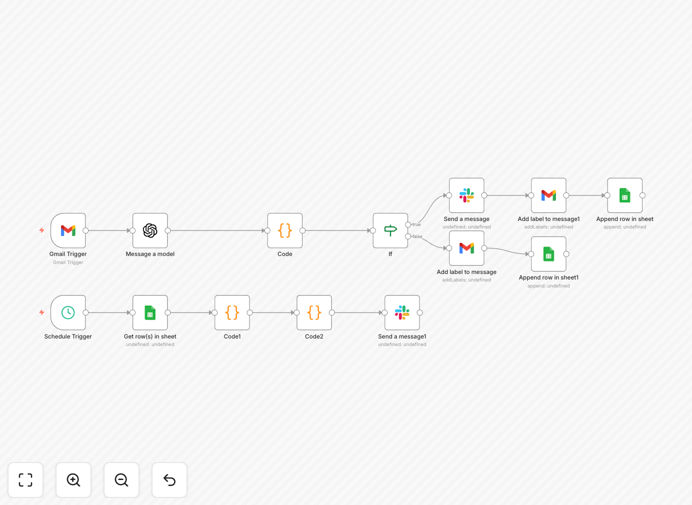
What This Workflow Does
This AI-powered Inbox Assistant solves the universal problem of email overload for busy founders, executives, and teams. Instead of manually sifting through hundreds of daily emails, the workflow automatically processes every incoming Gmail message through ChatGPT to generate concise summaries, classify message types (Support, Investor, Lead, Internal, Spam), and determine urgency levels.
Critical emails are instantly forwarded to Slack with actionable summaries, while lower-priority messages are logged to Google Sheets for later review. A daily 7 PM digest provides your team with a comprehensive overview of the day's most important communications. This transforms your inbox from a reactive time-sink into a proactive communication hub that ensures no investor intro, customer complaint, or revenue opportunity slips through the cracks.
How It Works
Step 1: Email Capture & Processing
The workflow monitors your Gmail inbox for new messages using the Gmail trigger node. Each email is extracted with full content, sender details, and metadata. The system only processes unread messages to avoid duplicates and respects your existing email organization.
Step 2: AI Analysis & Classification
Email content is sent to ChatGPT (GPT-4 or GPT-4o) with a carefully crafted prompt that extracts: a 2-3 sentence summary, message category (Support, Investor, Lead, Internal, Spam), and urgency level (High, Medium, Low). The AI understands context beyond keywords—recognizing investor introductions even without specific terminology.
Step 3: Priority-Based Routing
High and Medium urgency messages trigger immediate Slack notifications with the AI summary, category, and direct Gmail link. These emails are automatically labeled in Gmail for easy follow-up. Low-priority emails are routed to a Google Sheets log for weekly review, creating a lightweight CRM alternative.
Step 4: Daily Digest Generation
At 7 PM daily, a scheduled trigger compiles all high/medium priority emails from the day into a formatted Slack digest. This includes message counts by category, top senders, and any unresolved items needing attention—perfect for end-of-day team alignment.
Who This Is For
This workflow delivers maximum value for startup founders juggling investor relations, customer support, and team communication. Sales teams managing high-volume lead emails will prevent missed opportunities. Executive assistants can provide better support with prioritized inbox management. Customer support teams can ensure urgent issues get immediate attention while non-critical queries are properly queued.
Small businesses using Gmail as their primary communication hub will find this particularly valuable as a cost-effective alternative to enterprise email management systems. Remote teams needing better email visibility across members will appreciate the shared Slack digests and centralized Google Sheets log.
What You'll Need
- OpenAI API Key: Access to GPT-4 or GPT-4o models for optimal email analysis (approximately $0.01-0.03 per 100 emails processed).
- Gmail Account: With read and label permissions enabled for the automation to access and organize your inbox.
- Slack Workspace: Either a bot token for channel notifications or a webhook URL for simple message posting.
- Google Sheets: A spreadsheet for logging lower-priority emails (optional but recommended for tracking).
- n8n Instance: Self-hosted n8n or n8n.cloud account to run the workflow continuously.
Quick Setup Guide
- Download & Import: Click the download button above to get the JSON file, then import it into your n8n instance via the "Import from File" option.
- Configure Credentials: Set up connections for Gmail, OpenAI, Slack, and Google Sheets in n8n's credentials management.
- Customize AI Prompt: Adjust the ChatGPT node's system prompt to match your specific email categories and business terminology.
- Set Slack Channels: Update the Slack nodes with your preferred channel IDs for instant alerts and daily digests.
- Test & Activate: Run the workflow once manually with a test email, then activate the schedule trigger for continuous operation.
Pro tip: Start with a dedicated "Automation" label in Gmail and process only emails with that label initially. This lets you test the system safely before applying it to your entire inbox.
Key Benefits
Save 10+ hours weekly on email management by eliminating manual triage and prioritization. What previously required constant inbox checking now happens automatically, freeing you for strategic work.
Prevent missed investor intros and customer leads with instant Slack notifications for high-priority messages. The AI identifies critical communications even when you're in meetings or focused on deep work.
Improve team alignment with daily email digests that provide visibility into important communications without sharing inbox access. Everyone stays informed on relevant customer, investor, and partner conversations.
Create a searchable email log in Google Sheets that functions as a lightweight CRM. Track all lead interactions, support requests, and important conversations in one organized location.
Reduce email stress and cognitive load by transforming your inbox from an overwhelming list into a prioritized, summarized, and actionable communication stream.