What This Workflow Does
Customer support emails are repetitive, time-consuming, and often delay responses. This automation transforms your Gmail inbox into an intelligent, 24/7 AI support agent. It automatically reads incoming customer emails, understands the query's intent, searches your knowledge base for the most accurate information, and drafts a helpful, human-like reply—all within seconds.
The system combines the power of Google Gemini or OpenAI for natural language generation with Pinecone's vector database for precise knowledge retrieval. It's designed for SaaS companies, startups, and customer success teams drowning in support volume, enabling them to provide instant, accurate answers while freeing up human agents for complex issues.
How It Works
The workflow follows a logical, multi-step process to ensure every email gets the right response.
1. Trigger & Classification
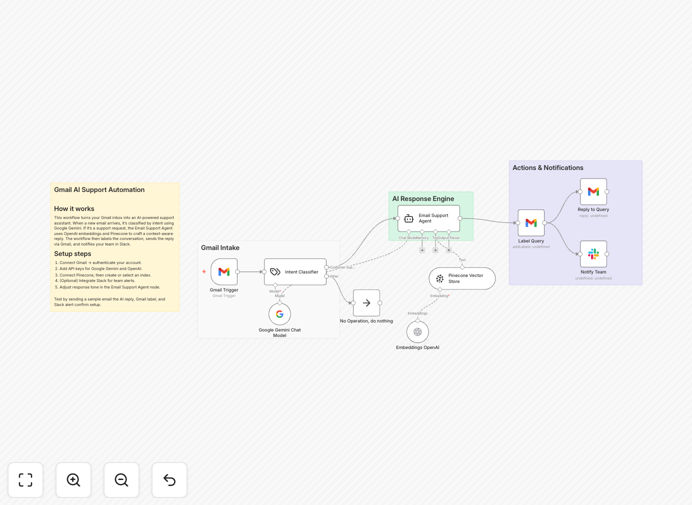
A Gmail trigger node watches for new emails in your designated support inbox. When one arrives, an AI classifier analyzes the email content to determine if it's a genuine support request, a spam message, or something that requires human escalation (like a billing complaint).
2. Knowledge Retrieval
For valid support queries, the email text is converted into a numerical vector using OpenAI's embeddings. This vector is then compared against all vectors stored in your Pinecone database—which contains your FAQs, documentation, and past solutions—to find the most relevant context.
3. AI Response Generation
The retrieved context and the original customer email are fed into a powerful language model (Google Gemini or OpenAI). The AI crafts a clear, helpful, and brand-appropriate reply, citing the specific knowledge it found.
4. Delivery & Notification
The generated reply is sent back to the customer via Gmail. Simultaneously, a notification is posted to your team's Slack channel with details of the query and the AI's response for transparency and oversight. The original email is also labeled in Gmail for tracking.
Who This Is For
This automation is a game-changer for specific business scenarios. If you're a SaaS company receiving dozens of "how-to" questions daily, this cuts response time from hours to seconds. Startups and digital agencies with small teams can offer 24/7 support without hiring overnight staff. Customer success teams can use it to handle Tier-1 queries, allowing human agents to focus on high-value, complex tickets that require empathy and deep problem-solving.
It's also ideal for freelancers or solopreneurs who can't be glued to their inbox but need to maintain professional, prompt communication with clients. Essentially, any business that uses Gmail for support and has a repository of helpful information (docs, FAQs, past emails) can leverage this to scale intelligently.
What You'll Need
- A Gmail account with API access enabled (or a Google Workspace account).
- API keys for Google Gemini and/or OpenAI.
- A Pinecone account with an index ready to store your support knowledge vectors.
- A Slack workspace (optional, for team notifications).
- An n8n instance (cloud or self-hosted) to run the workflow.
Pro tip: Before going live, populate your Pinecone index with a robust set of Q&A pairs from your documentation. The quality of the AI's answers is directly tied to the quality and relevance of the knowledge you provide it.
Quick Setup Guide
You can have this automation running in under 15 minutes.
- Import the template: Download the JSON file above and import it into your n8n instance.
- Connect your accounts: In n8n, set up credentials for Gmail, Google Gemini, OpenAI, and Pinecone. The workflow nodes will guide you.
- Configure the trigger: Point the Gmail trigger node to the specific label or inbox you want to monitor (e.g., "[email protected]").
- Customize the AI agent: Edit the "Email Support Agent" node's system message to reflect your company's tone, voice, and any specific instructions (e.g., "Be concise and friendly," "Always link to relevant docs").
- Test with a safe email: Send a test email from another account to your support inbox and verify the AI responds correctly and a Slack notification is sent.
- Activate and monitor: Turn the workflow on. Monitor the first few days of interactions in Slack to ensure quality, then let it handle the volume.
Key Benefits
Instant 24/7 Support: Customers no longer wait for business hours. They get accurate, helpful replies any time of day or night, dramatically boosting satisfaction and reducing churn.
Massive Time Savings: Support teams can reclaim 50–70% of their time previously spent on repetitive questions. This allows them to focus on strategic initiatives, complex problem-solving, and improving the product itself.
Consistent, On-Brand Communication: Unlike human agents who may have off days, the AI delivers consistently accurate and tonally appropriate responses every time, strengthening your brand voice.
Scalable Without Linear Cost: You can handle a 10x increase in support volume without a proportional increase in headcount. The marginal cost of an additional AI-generated email is negligible.
Organized & Auditable: Every interaction is logged, labeled in Gmail, and notified in Slack. This creates a perfect audit trail for training, quality assurance, and understanding common customer pain points.