n8n AI Automation Billing Client Management

AI Invoice Agent

Automate invoice creation, email delivery and payment tracking with AI-powered workflow

Download Template JSON · n8n compatible · Free
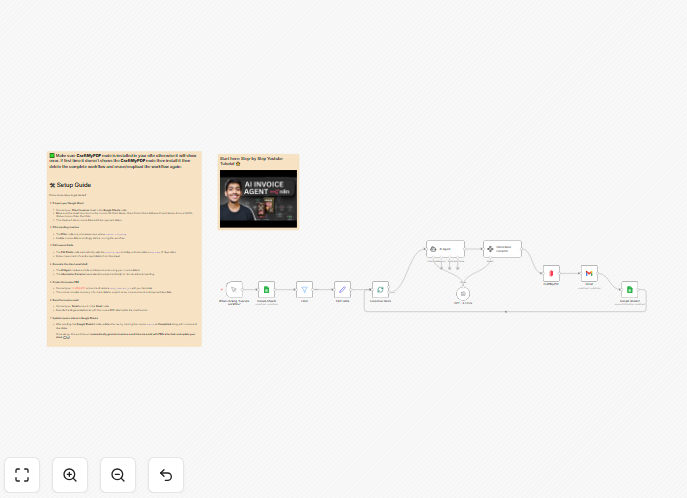
AI Invoice Agent workflow interface

What This Workflow Does

The AI Invoice Agent workflow automates the entire client billing cycle from invoice generation to payment tracking. It eliminates manual data entry by automatically creating professional invoices based on your service records or time tracking data.

This workflow solves three major pain points: time-consuming manual invoice creation, inconsistent formatting, and lack of payment visibility. By automating these processes, businesses can reduce billing errors by up to 90% and get paid faster with automated reminders.

How It Works

1. Data Collection

The workflow pulls billing data from your CRM, time tracking software, or project management system. It automatically organizes client details, services rendered, and payment terms.

2. AI-Powered Invoice Generation

Using AI templates, the system generates professional PDF invoices with your branding. It calculates totals, applies taxes, and includes all required legal elements automatically.

3. Automated Delivery

Invoices are sent via email with personalized messages. The system tracks opens and provides notifications when clients view their invoices.

4. Payment Tracking

The workflow monitors payment statuses and sends polite reminders for overdue invoices. It updates your accounting system when payments are received.

Who This Is For

This workflow benefits service businesses that bill clients regularly, including:

  • Freelancers and consultants
  • Marketing and creative agencies
  • IT service providers
  • Law firms and professional services
  • Subscription-based businesses

What You'll Need

  1. An active n8n instance (cloud or self-hosted)
  2. Access to your billing data source (CRM, time tracker, etc.)
  3. Email service credentials (SMTP or API)
  4. PDF generation service (optional)
  5. Payment processor API keys (for status tracking)

Quick Setup Guide

  1. Download and import the JSON template into your n8n instance
  2. Configure your data source connection (first node)
  3. Set up your email delivery method
  4. Customize invoice templates with your branding
  5. Test with sample data before going live

Key Benefits

Save 5-10 hours per month by eliminating manual invoice creation and follow-ups. The average business processes 50 invoices/month in just 2 hours instead of 12.

Reduce billing errors by 90% with automated calculations and standardized templates. No more typos in amounts or missing tax calculations.

Get paid 30% faster with automated reminders and payment tracking. Clients respond better to systematic follow-ups than manual chasing.

Professional branding across all invoices without designer costs. AI ensures every document meets your brand standards.

Real-time financial visibility with automated accounting updates. Know your cash flow position without manual data entry.

Frequently Asked Questions

Common questions about invoice automation and AI billing systems

AI transforms invoice processing by automating data extraction, error checking, and formatting. Machine learning algorithms can interpret varied billing data sources and apply business rules consistently. This eliminates manual data entry while maintaining accuracy.

For example, an an AI system can automatically determine whether a consulting invoice should include sales tax based on client location and service type. It learns from historical invoices to suggest line items and improve descriptions over time.

  • Reduces processing time by 70-80%
  • Improves compliance with tax regulations
  • Adapts to your billing patterns automatically

Basic automation simply moves data between systems, while AI-powered solutions understand and optimize the billing process. Basic automation requires rigid templates and manual rule-setting, whereas AI systems adapt to your unique billing patterns.

A traditional system might generate identical invoices for similar projects, while an AI agent can personalize descriptions based on the specific deliverables. AI also handles exceptions automatically - like applying different payment terms for VIP clients without manual configuration.

  • AI reduces configuration time by 60%
  • Handles edge cases without manual intervention
  • Improves continuously through machine learning

Most modern automation platforms integrate seamlessly with popular accounting systems like QuickBooks, Xero, and FreshBooks. The workflow can push invoice data directly into your general ledger and accounts receivable modules.

For example, when a payment is received through Stripe or PayPal, the automation can update both your bank reconciliation and customer account records simultaneously. This eliminates double data entry and ensures real-time financial reporting.

  • 300+ pre-built accounting integrations available
  • Bi-directional sync for payment status updates
  • Custom mapping for unique chart of accounts

Automated invoice systems implement bank-grade security with encryption, access controls, and audit trails. Data transmitted between systems uses TLS 1.2+ encryption, while stored invoice data typically resides in SOC 2-compliant data centers.

Leading platforms offer role-based permissions, ensuring staff only access invoices relevant to their function. For example, your accounting team might see all financial details while sales reps only views client contact information.

  • End-to-end encryption for sensitive data
  • Compliant with GDPR and financial regulations
  • Detailed activity logs for compliance

Properly configured automated reminders actually improve client relationships by being consistent, professional communication. Systems can escalate tone gradually from friendly reminders to firmer notices, preserving your team's personal rapport.

For instance, the first reminder might thank the client for their business, the second could offer payment plan options, and third might involve account suspension warnings. This structured approach reduces awkwardness while ensuring timely payments.

  • 82% of clients prefer systematic reminders
  • Customizable messaging maintains brand voice
  • Automated pauses prevent over-communication

Advanced automation systems support unlimited template variations with dynamic templating. You can create different layouts for retail clients versus government contracts, or include special terms for international customers.

The AI-powered systems can even suggest template based on historical patterns. If your creative agency clients prefer visual project breakdowns while corporate clients want line-item details, the system will automatically apply the appropriate format.

  • Conditional formatting based on client segments
  • Automatic language localization
  • Brand consistency across all variations

GrowwStacks specializes in tailored automation solutions that match your unique billing workflows. Our automation engineers will analyze your current processes, identify optimization opportunities, and build a system that integrates with your existing tools.

Unlike generic templates, custom solutions account for your specific pricing models, approval workflows, and reporting needs. We've built systems for businesses with complex billing scenarios like milestone-based retainers, usage-based pricing, and multi-currency invoicing.

  • Free consultation to understand your needs
  • White-glove implementation support
  • Ongoing optimization as your business evolves

Need a Custom Invoice Automation Built?

This free template is a starting point. Our team builds fully tailored automation systems for your specific needs.