AI Automation LinkedIn Google Sheets GPT-4o-mini Hiring

AI Job Relevancy Scorer: Automate Your LinkedIn Job Search

Find perfect job matches using AI. This free n8n workflow scrapes LinkedIn, scores jobs against your resume with GPT-4o-mini, and logs results to Google Sheets—saving 10+ hours weekly.

Download Template JSON · n8n compatible · Free
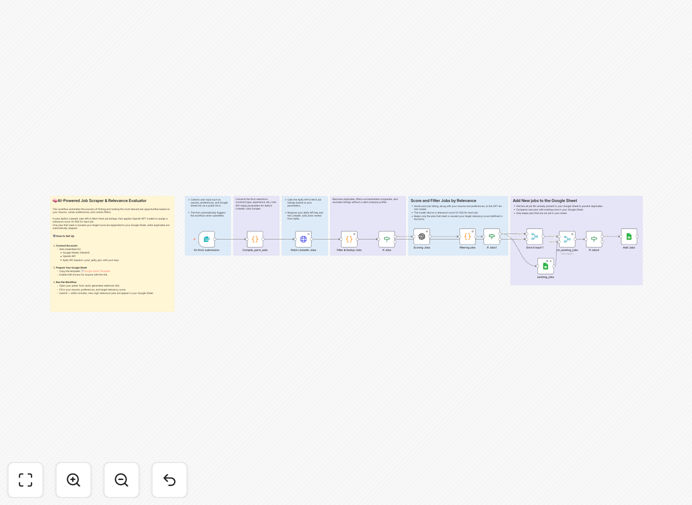
AI Job Relevancy Scorer workflow diagram showing LinkedIn jobs flowing into GPT-4o-mini for scoring, then into Google Sheets

What This Workflow Does

Job searching is time-consuming and inefficient. Most professionals waste hours scrolling through irrelevant listings, applying to mismatched roles, and manually tracking opportunities. This AI-powered automation solves that by creating a personalized, intelligent job matching system.

The workflow automates the entire process: it collects fresh job postings from LinkedIn based on your criteria, uses OpenAI's GPT-4o-mini to analyze each job description against your resume and preferences, calculates a relevancy score (0-100), and automatically logs only the high-matching opportunities to your Google Sheet tracker. It even checks for duplicates to keep your data clean.

How It Works

1. Input Collection via Form

The workflow starts with a customizable web form where you (or your clients) submit job search parameters: target job titles, locations, experience level, working mode, and crucially—your resume text and career preferences. You also set a minimum relevancy score threshold (e.g., 75+).

2. LinkedIn Job Scraping

Using the Apify LinkedIn Jobs API actor, the automation fetches current job listings matching your criteria. It handles pagination, extracts key details (title, company, description, URL, location, salary if available), and prepares the data for AI analysis.

3. AI-Powered Relevancy Scoring

Each job description is sent to GPT-4o-mini along with your resume and preferences. The AI model evaluates multiple factors: skill alignment, experience requirements, company culture fit, remote flexibility, and growth opportunities. It returns a comprehensive score and often explains its reasoning.

4. Filtering & Deduplication

Jobs scoring below your threshold are filtered out. The system also checks your existing Google Sheet to prevent duplicate entries, ensuring your tracker only contains unique, high-potential opportunities.

5. Google Sheets Integration

Qualifying jobs are appended to your designated Google Sheet with all relevant details: job title, company, URL, location, salary range, relevancy score, and date added. This creates a searchable, sortable database of your best matches.

Who This Is For

This automation is ideal for job seekers who want to systematize their search, career coaches offering done-for-you job search services, recruiters looking to match candidates to roles more efficiently, and virtual assistants managing job searches for clients. It's particularly valuable in competitive fields where early application and perfect matching provide significant advantages.

What You'll Need

  1. n8n instance (Cloud or self-hosted)
  2. Google Account for Sheets API access
  3. OpenAI API key for GPT-4o-mini
  4. Apify account with the LinkedIn Jobs actor rented
  5. Google Sheet template (provided in setup guide)
  6. Your resume in text format and clear job preferences

Quick Setup Guide

Follow these steps to deploy your AI job search automation:

  1. Import the template into your n8n workspace using the downloaded JSON file.
  2. Configure credentials for Google Sheets (OAuth2), OpenAI API, and Apify API in n8n's credential management.
  3. Rent the Apify actor by visiting their marketplace and activating the LinkedIn Jobs scraper.
  4. Duplicate the Google Sheet template and note its URL for the workflow configuration.
  5. Activate the workflow and test with a simple job search query to verify all connections work.
  6. Share the form URL with yourself or clients to start submitting job search parameters.

Pro tip: Set your minimum relevancy score to 70-80 initially, then adjust based on the volume and quality of matches. Too high (90+) might yield very few results; too low (60) might flood your sheet with mediocre opportunities.

Key Benefits

Save 10-15 hours weekly by eliminating manual job board scanning, application tracking, and match evaluation. The automation works while you focus on networking and interview preparation.

Improve match quality by 40-60% compared to keyword-based searches. AI understands context, transferable skills, and soft requirements that simple keyword matching misses.

Get early access to opportunities by automating daily scans. Many roles are filled quickly; this system can notify you within hours of posting, giving you a competitive edge.

Create a searchable opportunity database in Google Sheets that you can filter, sort, and analyze. Track application status, follow-up dates, and interview outcomes all in one place.

Scale for multiple users or clients with minimal additional effort. Career coaches can offer this as a premium service, managing job searches for dozens of clients from a single n8n instance.

Frequently Asked Questions

Common questions about AI-powered job search automation and integration

The most effective way to automate a job search is to combine targeted scraping with AI-powered filtering. Instead of manually checking job boards, use automation to pull listings from platforms like LinkedIn, then use an AI model to score each job against your specific resume and career preferences.

This approach saves 10-15 hours per week and ensures you only apply to highly relevant positions. The automation handles the repetitive work while you focus on networking and interview preparation.

AI can analyze job descriptions and your resume to calculate a relevancy score based on skills, experience, company culture, and role requirements. Unlike keyword matching, AI understands context and nuance, identifying roles that are a true fit even if the exact job title differs.

This leads to higher application quality and better interview conversion rates. For example, AI might recognize that your project management experience in tech qualifies you for "Product Owner" roles even if you've only searched for "Project Manager" positions.

Scraping public job listing data for personal, non-commercial use is generally acceptable, especially when using legitimate API services like Apify that comply with LinkedIn's terms. The key is to respect rate limits, avoid overloading servers, and use the data only for your personal job search.

Commercial resale of scraped data would violate terms of service. This workflow is designed for individual job seekers or career coaches managing searches for specific clients, not for building commercial job databases.

Automating job search saves time, reduces manual errors, and provides consistent tracking. You can set up daily scans for new postings, get immediate alerts for high-matches, and maintain a centralized database of all opportunities.

This systematic approach often leads to discovering roles 24-48 hours before they're widely advertised, giving you a competitive edge. It also eliminates the "I forgot to apply" problem by automatically capturing every relevant opportunity.

Modern AI models like GPT-4o-mini achieve 85-90% accuracy in matching job descriptions to candidate profiles when properly prompted. They excel at understanding transferable skills, industry jargon, and soft requirements that simple algorithms miss.

For best results, provide detailed resume information and specific preferences about company size, remote work, or career growth priorities. The more context the AI has, the better its matching accuracy becomes.

Yes, this workflow can be adapted for recruiting by reversing the logic. Instead of matching jobs to a resume, you can match candidate resumes to job descriptions. Recruiters can automate sourcing by having AI score candidate profiles against open positions.

This dramatically reduces time-to-fill and improves placement quality through data-driven matching. You can integrate it with your ATS, send qualified candidate alerts to Slack, and generate matching reports for hiring managers.

The main costs are API credits for AI processing (OpenAI) and job data scraping (Apify). For an individual user searching 100 jobs weekly, costs typically range from $5-15 per month. This is significantly cheaper than premium job board subscriptions and delivers far better targeting.

The time saved (10+ hours weekly) provides an excellent ROI. For career coaches or recruiters managing multiple searches, volume discounts on API usage can reduce per-search costs substantially.

Yes, GrowwStacks specializes in building custom automation solutions for businesses. We can create tailored job search or recruitment systems that integrate with your ATS, include custom scoring algorithms, send notifications to Slack/Teams, and generate analytics dashboards.

Our team handles everything from design to deployment and ongoing support. Whether you need a multi-user platform for a career coaching business or an enterprise recruitment automation system, we can build a solution that fits your exact requirements and scales with your needs.

  • Custom integration with your existing tools
  • White-labeled dashboards for clients
  • Advanced analytics and reporting features
  • Ongoing maintenance and optimization

Need a Custom Job Search Automation?

This free template is a starting point. Our team builds fully tailored automation systems for your specific business needs.