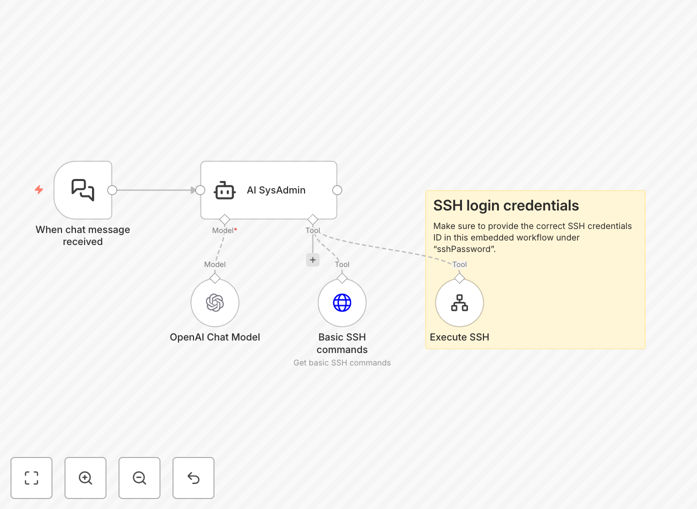
What This Workflow Does
This n8n workflow template transforms how developers, system administrators, and IT professionals manage Linux Virtual Private Servers (VPS). It creates an AI-powered assistant that interprets natural language commands from chat platforms like Slack or Telegram and executes corresponding SSH commands on your Linux servers.
Instead of manually logging into servers via terminal, you can now simply type commands like "check disk space," "restart nginx," or "show recent errors" in your team chat. The AI interprets your request, maps it to the appropriate SSH command, executes it securely, and returns the results directly to your chat interface.
The workflow bridges the gap between conversational interfaces and technical server management, making routine administration tasks accessible to less technical team members while maintaining security and control through proper SSH credential management and command validation.
How It Works
1. Chat Trigger Activation
The workflow monitors your configured chat platform (Slack, Telegram, Discord, etc.) for specific trigger phrases or commands. When a relevant message is detected, it captures the natural language request and prepares it for AI processing.
2. AI Command Interpretation
Using OpenAI's language model, the system analyzes the human-readable request and translates it into appropriate Linux commands. The AI understands context, can ask clarifying questions if needed, and selects the safest, most appropriate commands for the requested action.
3. Secure SSH Execution
With SSH credentials securely stored in n8n, the workflow establishes a connection to your target Linux VPS and executes the translated commands. All connections use key-based authentication for maximum security, and command execution happens in isolated sessions.
4. Results Processing & Delivery
The output from the SSH command is captured, formatted for readability, and sent back to the original chat channel. The response includes the command executed, the output, any errors encountered, and suggestions for next steps if applicable.
Who This Is For
This template is ideal for development teams, IT departments, managed service providers, and businesses running their own infrastructure. Specifically, it benefits:
- DevOps engineers who want to streamline routine server checks and maintenance
- Startup founders managing their own infrastructure without dedicated sysadmins
- Agency teams managing multiple client servers who need quick access to status information
- IT support staff who need to perform common troubleshooting tasks without deep terminal expertise
- Remote teams who collaborate on infrastructure management via chat platforms
Pro tip: Start by allowing only read-only commands (like checking status, viewing logs) before gradually adding write permissions for specific, safe operations. This minimizes risk while you build confidence in the system.
What You'll Need
- A running n8n instance (cloud or self-hosted)
- OpenAI API key for the AI processing component
- SSH access to your Linux VPS with key-based authentication configured
- Access to a chat platform webhook (Slack, Telegram, Discord, etc.)
- Basic understanding of Linux commands and server security principles
Quick Setup Guide
Follow these steps to get your AI Linux administrator up and running:
- Import the template: Download the JSON file and import it into your n8n instance via the workflow import function.
- Configure chat trigger: Set up the webhook or bot integration for your preferred chat platform (Slack, Telegram, etc.).
- Add OpenAI credentials: Create an OpenAI API key and add it to the AI agent node in the workflow.
- Set up SSH credentials: Add your server's SSH connection details securely in n8n's credentials management.
- Define command permissions: Configure which Linux commands the AI is allowed to execute based on your security requirements.
- Test with simple commands: Start with basic queries like "check disk usage" or "show running processes" to verify the connection.
- Deploy and monitor: Activate the workflow and monitor the execution logs to ensure everything runs smoothly.
Key Benefits
Reduce server management time by 70%: What used to require terminal access and manual command entry now happens through simple chat messages, cutting minutes off every routine task.
Enable non-technical team members to check server status: Marketing, support, and management teams can get basic server information without bothering developers or needing SSH training.
Standardize operations across your team: Everyone uses the same approved commands through the AI interface, reducing configuration errors and ensuring consistent procedures.
Get instant alerts and responses: When combined with monitoring tools, the workflow can automatically respond to common issues or provide status updates without human intervention.
Maintain complete audit trails: Every command executed through the AI is logged with timestamp, user, and output, creating perfect records for compliance and troubleshooting.