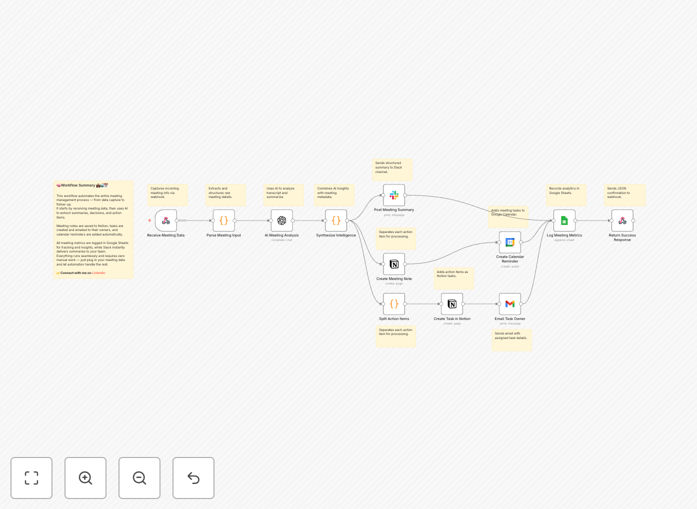
What This Workflow Does
This automation solves the pervasive problem of meeting follow-up failure. After discussions, verbal commitments often vanish, action items remain undocumented, and accountability dissipates. The workflow captures meeting transcripts from Zoom, Google Meet, Teams, Otter.ai, or manual notes via webhook, then processes them through an intelligent pipeline that eliminates hours of weekly administrative work.
The system extracts meeting metadata—title, date, attendees, transcript content—and uses OpenAI to analyze the conversation. It identifies eight critical dimensions: executive summary, key decisions with ownership, action items with assigned owners and due dates, discussion topics, open questions, next steps, risks/blockers, and follow-up requirements. Each action item receives a unique ID, priority score, status initialization, and meeting context link.
Pro tip: This workflow calculates a completeness score (0-100) that penalizes missing owners and undefined deadlines, providing a measurable metric for meeting effectiveness.
How It Works
Step 1: Transcript Capture
A webhook trigger accepts meeting transcripts in JSON or form data format from various sources. The system parses multiple input formats, extracting essential metadata and preparing the content for AI analysis.
Step 2: AI Analysis & Structuring
OpenAI (GPT-4 or GPT-3.5-turbo) processes the transcript with a customized prompt that emphasizes deadlines, ownership, and actionable outcomes. The AI returns structured JSON with categorized content, ready for distribution.
Step 3: Multi-Channel Distribution
The intelligence engine distributes outcomes across three channels simultaneously: Slack receives formatted summaries with emoji categorization; Notion gets dual-database updates; task owners receive personalized HTML emails with priority color-coding.
Step 4: Tracking & Analytics
Every meeting logs to Google Sheets for analytics tracking—attendee count, duration, action items created, priority distribution, decision count, completeness score, and follow-up indicators. Google Calendar creates due-date reminders as events.
Who This Is For
This automation is ideal for product and engineering teams drowning in scattered action items across tools; remote-first companies where verbal commitments vanish after calls; executive teams needing auditable decision records without dedicated note-takers; startups juggling 10+ meetings daily without time for manual follow-up; and operations teams tracking cross-functional initiatives requiring accountability.
What You'll Need
- OpenAI API key (GPT-4 or GPT-3.5-turbo)
- Slack workspace with app creation permissions
- Notion account with database creation capability
- Google Workspace (Calendar, Gmail, Sheets access)
- Optional transcription service (Otter.ai, Fireflies.ai, Zoom)
- n8n or Zapier instance (self-hosted or cloud)
Quick Setup Guide
- Import the template JSON file into your n8n or Zapier instance.
- Configure the webhook trigger as a POST endpoint accepting JSON with meeting metadata.
- Add your OpenAI API credentials and customize the analysis prompt if needed.
- Create Slack app with
chat:writescope and replace channel ID placeholder. - Set up two Notion databases: "Meeting Notes" and "Action Items"—share with integration.
- Configure Gmail OAuth2 or SMTP and customize HTML email template.
- Enable Google Calendar API and adjust due-date reminder timing.
- Create Google Sheet with analytics columns and test with sample transcript.
Pro tip: Start with a small team pilot—process 5-10 meetings, gather feedback, then scale to entire organization.
Key Benefits
Eliminates 2-3 hours of weekly admin work per team member by automating transcription, note distribution, and follow-up tracking. Manual post-meeting tasks become instantaneous.
Provides measurable meeting effectiveness scores through completeness metrics (0-100) that track action item quality, ownership assignment, and deadline definition.
Creates multi-channel accountability framework ensuring commitments are visible in Slack, structured in Notion, and reminded via Gmail—reducing follow-up failure.
Builds institutional memory with searchable records of all decisions, action items, and discussions across every meeting, accessible for future reference.
Enables analytics-driven meeting optimization through Google Sheets tracking that reveals patterns in meeting productivity, team accountability, and project velocity.