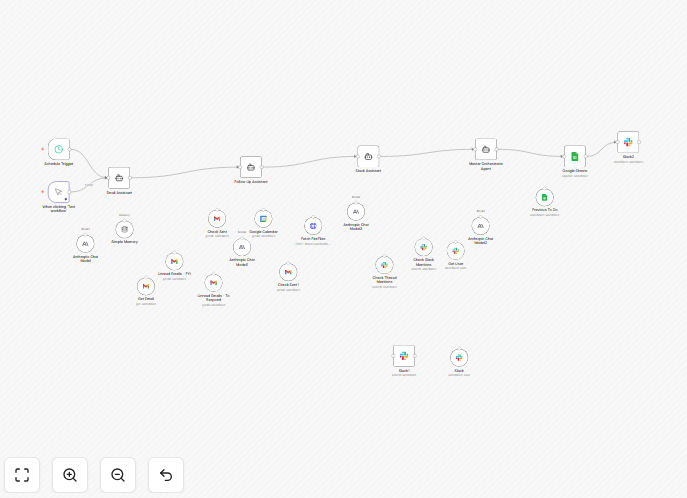
What This Workflow Does
This AI Personal Assistant workflow solves the universal problem of communication overload. For executives, founders, and busy professionals, managing email, Slack messages, and calendar invites can consume 20+ hours per week. This automation acts as your digital chief of staff, proactively monitoring all channels, analyzing priorities, and delivering a concise daily briefing with actionable tasks.
The system doesn't just forward notifications—it understands context. It reads your emails, checks your calendar for follow-ups, scans Slack for unanswered mentions, and uses AI to determine what's truly urgent versus what can wait. It then compiles everything into a prioritized to-do list in Google Sheets and sends you a personalized Slack summary every morning.
You save time on manual triage, reduce mental clutter, ensure no important message falls through the cracks, and maintain consistent follow-up across all communication platforms. It's like having an executive assistant who works 24/7 without taking a break.
How It Works
The workflow operates on a smart, multi-agent architecture that mimics how a human assistant would manage your communications.
1. Scheduled Daily Trigger
Every weekday at 8:00 AM, the workflow automatically begins its analysis. You can also trigger it manually for on-demand reviews before important meetings or at the end of a busy day.
2. Email Assistant Agent
This agent scans your Gmail inbox with intelligent filtering. It doesn't just look at unread emails—it checks labeled folders like "To Respond" and "FYI," examines email history to understand relationship context, identifies company-related opportunities, and categorizes messages by urgency (High, Medium, Low). It even cross-references with your sent emails to track ongoing conversations.
3. Follow-Up Assistant Agent
This component reviews your last 3 days of Google Calendar meetings, fetches transcripts from Fireflies.ai for recorded sessions, and identifies meetings without post-meeting communication. It flags appointments requiring action items or follow-ups and checks whether you've already responded via email or Slack.
4. Slack Assistant Agent
Monitoring both direct messages and channel @mentions, this agent identifies unreplied conversations, prioritizes them based on sender importance and message content, and cross-references them with your email and calendar context to provide complete communication visibility.
5. Master Orchestrator Agent
The brain of the operation. This AI agent synthesizes reports from all three assistants, cross-references with your existing Google Sheets to-do list, prioritizes tasks by business impact and urgency, identifies correlations between different communication channels, and creates your comprehensive daily action plan.
6. Task Management & Delivery
Finally, the workflow appends new tasks to your Google Sheets tracker, sends your personalized daily briefing via Slack DM, maintains conversation memory for context continuity, and tracks outstanding versus completed items—creating a closed-loop system that learns from your behavior over time.
Who This Is For
This workflow is ideal for C-level executives, sales leaders, business development professionals, consultants, and anyone who manages multiple communication channels daily. If you're spending more than an hour each morning just sorting through emails and messages, this automation will give you that time back.
Teams requiring systematic follow-up management will also benefit—especially sales teams tracking prospect interactions, project managers coordinating with stakeholders, or customer success teams ensuring timely responses. The workflow scales from individual professionals to entire departments.
Even solopreneurs and small business owners who wear multiple hats will find this invaluable. When you're handling everything from client communications to partnership discussions to internal planning, having an AI assistant to organize it all can be the difference between staying on top of things and constantly playing catch-up.
What You'll Need
- n8n instance (cloud or self-hosted)
- Google account with Gmail and Calendar access
- Slack workspace with appropriate permissions
- AI provider API key (OpenAI GPT-4, Anthropic Claude, or similar)
- Fireflies.ai account (optional, for meeting transcript analysis)
- Google Sheets for task tracking
- Basic understanding of connecting APIs in n8n
Pro tip: Start with just email and calendar integration first. Add Slack and Fireflies once you're comfortable with the basic workflow. This incremental approach makes setup smoother and helps you understand how each component contributes to your daily briefing.
Quick Setup Guide
Follow these steps to implement your AI personal assistant in under 30 minutes:
- Download and import the template JSON file into your n8n instance.
- Connect your Gmail account using OAuth in the Email Assistant node.
- Set up Google Calendar integration and specify which calendars to monitor.
- Configure your Slack connection with appropriate channel and DM access.
- Add your AI API key (OpenAI, Anthropic, etc.) to the Master Orchestrator agent.
- Create a Google Sheet for task tracking and link it to the workflow.
- Test with manual trigger to verify all connections work correctly.
- Schedule the daily execution for your preferred morning review time.
The workflow includes detailed instructions at each connection point. If you get stuck at any step, refer to the n8n documentation for that specific node—most connections require just a few clicks to authorize.
Key Benefits
Save 5-10 hours weekly on communication triage and organization. Instead of starting each day sorting through hundreds of messages, you begin with a clear, prioritized action plan.
Never miss important communications again. The AI identifies urgent messages, partnership opportunities, and time-sensitive requests that might otherwise get buried in your inbox.
Reduce mental clutter and decision fatigue by having an objective system prioritize what needs your attention. The AI doesn't get overwhelmed or distracted—it applies consistent rules to every message.
Ensure timely follow-ups across all channels. The system tracks conversations that need responses and reminds you before relationships suffer from communication gaps.
Maintain complete visibility of all communications in one place. Instead of switching between email, Slack, and calendar apps, you get a unified dashboard of what matters most.