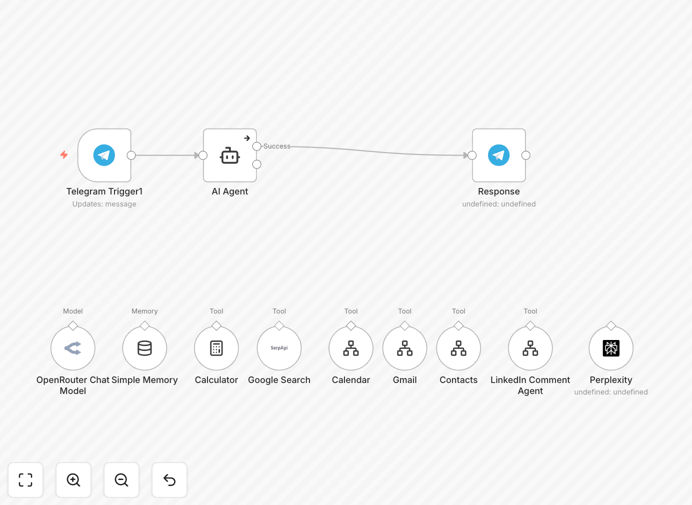
What This Workflow Does
This advanced automation transforms GPT-4o into a comprehensive personal assistant that handles multiple business functions simultaneously. It solves the problem of time-consuming manual management of emails, calendar appointments, information searches, and CRM updates by automating these tasks through specialized AI agents.
The workflow coordinates multiple AI agents that each specialize in different areas - one for email processing, another for calendar management, a search specialist, and a CRM updater. This division of labor allows each agent to become highly proficient at its specific task while maintaining context through shared memory.
How It Works
1. Trigger Phase
The workflow activates when new messages arrive in your connected communication channel (originally configured for Telegram but adaptable to other platforms). The trigger detects new requests or incoming information that needs processing.
2. Routing & Analysis
An initial analysis determines which type of task needs handling - whether it's an email requiring response, a calendar scheduling request, an information search need, or CRM data to update. The router directs the task to the appropriate specialized agent.
3. Specialized Agent Processing
Each agent uses GPT-4o's advanced capabilities optimized for its specific domain. The email agent understands message context and drafts appropriate responses. The calendar agent negotiates meeting times based on your availability patterns. The search agent formulates optimal queries and summarizes results.
4. CRM Integration
Relevant information extracted from communications automatically updates your CRM system, logging interactions, noting important details, and tracking follow-up requirements without manual data entry.
5. Response & Confirmation
The workflow sends back confirmations, responses, or gathered information through your preferred communication channel, completing the automation loop.
Who This Is For
This automation is ideal for:
- Busy executives and entrepreneurs managing high email volumes
- Sales professionals needing CRM updates from client communications
- Consultants and advisors who schedule many client meetings
- Customer support managers tracking issues across channels
- Real estate agents coordinating property showings and client follow-ups
- Anyone spending more than 2 hours daily on email and scheduling tasks
Pro tip: Start with one agent function (like email processing) before enabling all capabilities. This lets you refine the automation gradually.
What You'll Need
- An n8n instance (cloud or self-hosted)
- OpenRouter API access for GPT-4o
- Telegram bot token (or credentials for your preferred communication platform)
- Google API credentials if using Gmail/Calendar
- CRM API access if integrating with Salesforce, HubSpot etc.
- Approx. 30-60 minutes for initial configuration
Quick Setup Guide
- Download and import the JSON template into your n8n instance
- Configure your trigger channel (Telegram bot or alternative)
- Add your OpenRouter API key for GPT-4o access
- Connect your email and calendar services
- Set up CRM integration if using
- Test with simple requests before full deployment
- Monitor initial runs and refine agent instructions as needed
Key Benefits
Saves 10-15 hours per week by automating repetitive email sorting, response drafting, meeting scheduling, and CRM updates. Professionals report regaining an entire workday each week.
Reduces human error in calendar scheduling and CRM data entry. The AI maintains perfect consistency in logging interactions and tracking important details across all communications.
Improves response times to clients and colleagues. The system can process and respond to incoming messages within minutes, even outside business hours.
Provides 24/7 availability for scheduling and basic inquiries. Clients can book meetings or get information anytime without waiting for human availability.
Enhances professionalism with perfectly drafted responses that maintain your communication style while eliminating typos and unclear phrasing.