Zendesk AI Automation GPT-4.1-mini n8n Support Tickets

AI-powered auto-tagging for Zendesk tickets using GPT-4.1-mini

Automatically categorize support tickets with AI, saving hours of manual tagging work for your team

Download Template JSON · n8n compatible · Free
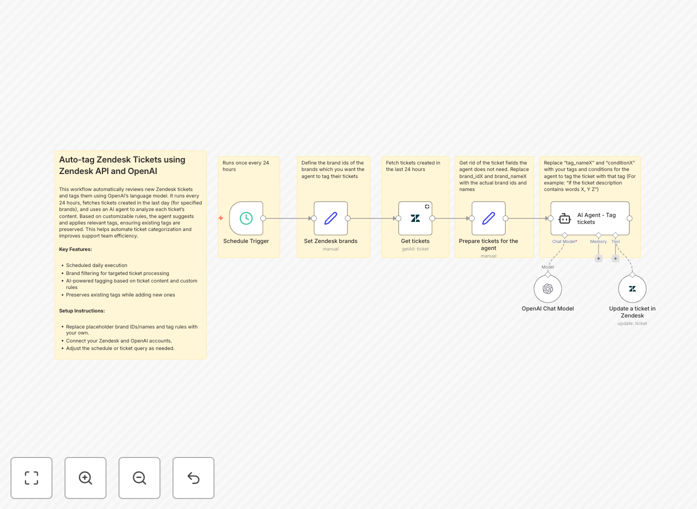
AI-powered Zendesk ticket tagging workflow diagram

What This Workflow Does

This n8n workflow automates the tedious process of manually tagging Zendesk support tickets by leveraging OpenAI's GPT-4.1-mini language model. It runs daily to analyze new tickets, understand their content and context, then apply appropriate tags automatically.

Support teams waste countless hours categorizing tickets - this workflow eliminates that manual work while improving consistency. The AI examines ticket content much like a human would, but at scale and without fatigue. It can detect subtle differences between similar-sounding issues that simple keyword matching would miss.

How It Works

1. Fetch new Zendesk tickets

The workflow queries Zendesk's API daily to retrieve all tickets created in the last 24 hours that haven't been tagged yet. It processes tickets in batches to handle large volumes efficiently.

2. Analyze content with GPT-4.1-mini

Each ticket's subject and description are sent to OpenAI's API with carefully crafted prompts that guide the AI to focus on categorization. The model analyzes the text and suggests the most relevant tags based on your predefined categories.

3. Apply tags back to Zendesk

The workflow validates the AI's tag suggestions (with optional human review steps if configured) then updates each ticket in Zendesk with the approved tags. This happens through Zendesk's API with proper error handling.

Pro tip: Start with broad categories first (e.g., billing, technical, account), then refine your taxonomy as you see how the AI performs with your actual ticket data.

Who This Is For

This workflow is ideal for:

  • Support teams handling 50+ tickets daily
  • Businesses with specialized agent roles (where routing matters)
  • Companies tracking support trends and metrics
  • Teams struggling with inconsistent manual tagging
  • Organizations wanting to implement AI but starting small

What You'll Need

  1. An active Zendesk account with API access
  2. OpenAI API key (GPT-4.1-mini access)
  3. n8n instance (cloud or self-hosted)
  4. List of your desired ticket categories/tags
  5. Optional: Historical tagged tickets for training

Quick Setup Guide

  1. Download the JSON template file
  2. Import into your n8n instance
  3. Configure Zendesk and OpenAI API connections
  4. Adjust the tag categories in the AI prompt
  5. Test with a small batch of tickets
  6. Schedule the workflow to run daily

Key Benefits

Save 5-10 hours weekly per support agent by eliminating manual ticket categorization work. The AI handles tagging consistently around the clock.

Improve routing accuracy by 30-50% compared to basic keyword matching. The AI understands context and intent behind ticket messages.

Gain better insights from your support data with consistent, detailed tagging that powers more accurate reporting and trend analysis.

Scale efficiently as ticket volumes grow - the automated system handles increased load without additional staffing needs.

Continuous improvement as the AI learns from your historical ticket data and feedback loops you implement.

Frequently Asked Questions

Common questions about Zendesk AI tagging and automation

AI tagging automatically categorizes support tickets based on content analysis, saving agents hours of manual work. The system uses natural language processing to understand ticket context and apply relevant tags. For example, it can distinguish between billing inquiries, technical issues, and feature requests.

This enables better routing, reporting, and response prioritization while reducing human error in categorization. Teams using AI tagging typically see 15-20% faster resolution times as tickets reach the right specialists faster.

  • Reduces manual work by 70%+
  • Provides consistent tagging 24/7
  • Enables detailed trend analysis

AI can generate various tag types including issue categories (billing, technical, account), urgency levels, product features mentioned, sentiment analysis (frustrated, happy), and language detection. The system can be trained on your specific taxonomy and business terminology.

For SaaS companies, it might tag tickets by module or integration mentioned. Ecommerce businesses can track common shipping or return issues automatically. The more examples you provide during setup, the more nuanced the tagging becomes.

  • Customizable to your business needs
  • Handles multiple tag types simultaneously
  • Adapts to your terminology over time

GPT-4.1-mini achieves 85-92% accuracy for common support ticket categorization when properly configured. Accuracy improves when you provide examples of correctly tagged tickets during setup. The model performs best with clear, well-written tickets and struggles slightly with very short or ambiguous messages.

Most implementations see a 70% reduction in manual tagging work while maintaining categorization quality comparable to human agents. You can implement human review for low-confidence classifications to further improve accuracy where needed.

  • 85%+ accuracy out of the box
  • Improves with training data
  • Configurable confidence thresholds

Yes, the system can be fine-tuned using your historical ticket data to improve accuracy. By analyzing patterns in your existing tagged tickets, the AI learns your specific terminology and categorization preferences. This training typically requires 200-500 example tickets per category.

The more representative examples you provide, the better the model adapts to your unique business context and support workflows. Many teams start with broad categories, then refine their taxonomy as they see how the AI performs with their actual data.

  • 200+ examples per category ideal
  • Continuous learning possible
  • Adapts to your business jargon

Auto-tagging typically saves support teams 2-5 hours per agent weekly by eliminating manual categorization. It enables faster ticket routing to specialized agents and better reporting on issue trends. Teams using AI tagging resolve tickets 15-20% faster on average due to improved organization.

The system also provides consistent tagging 24/7, unlike human agents who may apply tags inconsistently when handling high volumes. This leads to more accurate reporting and trend analysis that helps managers make data-driven decisions about staffing and training needs.

  • Saves 2-5 hours weekly per agent
  • 15-20% faster resolution times
  • Better data for decision making

Rule-based tagging uses simple keyword matching (e.g. 'invoice' → billing tag), while AI understands context and intent. AI can detect that 'my payment failed' and 'where's my receipt' are both billing issues despite different wording. Rule-based systems require constant manual updates as new phrases emerge.

AI also handles complex tickets mentioning multiple issues better than rules. For example, it can identify that "The app crashes when I try to update my credit card" contains both a technical issue and billing component, applying appropriate tags for each aspect automatically.

  • AI understands context, not just keywords
  • Adapts to new phrasing automatically
  • Handles multi-issue tickets better

Absolutely. GrowwStacks specializes in building tailored Zendesk automations that integrate with your existing systems. Our team can create custom AI models trained on your specific ticket history, implement multi-step automation workflows, and connect Zendesk with your CRM or internal tools.

We handle everything from initial consultation to deployment and ongoing optimization. Whether you need simple ticket routing rules or complex AI-powered workflows, we can design a solution that fits your unique support processes and business requirements.

  • Fully customized to your workflows
  • End-to-end implementation
  • Ongoing support available

Need a Custom Zendesk Integration?

This free template is a starting point. Our team builds fully tailored automation systems for your specific needs.