Finance Automation AI Processing Data Extraction Expense Tracking n8n

AI-Powered Bank Statement Analysis & Transaction Categorization

Automatically process PDF, Excel, CSV bank statements. Extract structured data & categorize expenses with AI. Free n8n workflow template.

Download Template JSON · n8n compatible · Free
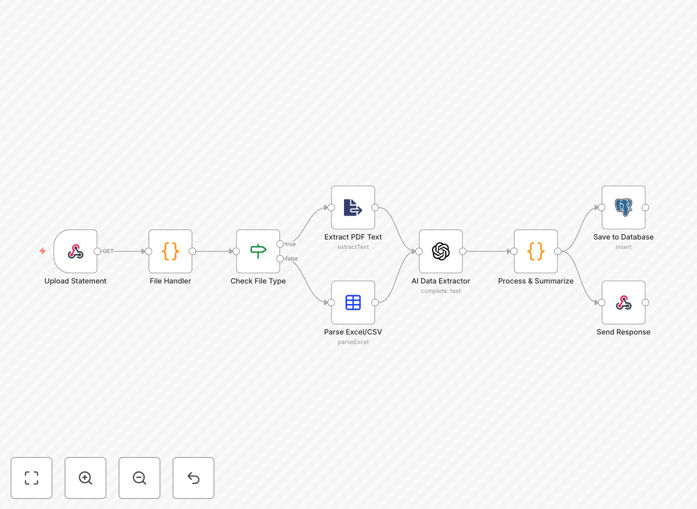
AI-powered bank statement analysis workflow diagram showing file upload, AI extraction, and database storage

What This Workflow Does

Manual bank statement processing is one of the most time-consuming tasks in business finance. Accountants and business owners spend hours each month downloading statements, copying transaction data, categorizing expenses, and preparing reports. This process is not only tedious but also prone to human error, leading to inaccurate financial records and delayed insights.

This AI-powered automation solves that problem completely. It automatically processes bank statements from various formats (PDF, Excel, CSV), extracts structured transaction data using intelligent AI, categorizes expenses into meaningful categories, and stores everything in a database for immediate analysis. What used to take hours now happens automatically in minutes, with greater accuracy and consistency.

The workflow provides a complete end-to-end solution: from file upload through intelligent processing to structured output. It handles the entire pipeline so you can focus on analyzing your financial data rather than preparing it.

How It Works

1. File Upload & Format Detection

The workflow provides a webhook endpoint that accepts bank statement uploads. When a file arrives, it automatically detects whether it's a PDF (scanned or digital), Excel spreadsheet, or CSV file, and routes it to the appropriate processor.

2. AI-Powered Data Extraction

Using GPT-4 or similar AI models, the system extracts account details, transaction dates, amounts, descriptions, and balances from the statement data. The AI understands various statement formats and layouts, adapting to different banks and statement styles.

3. Intelligent Transaction Categorization

Each transaction is automatically categorized into expense types: groceries, dining, gas, shopping, utilities, healthcare, entertainment, income, fees, or other. The AI uses transaction descriptions and patterns to make intelligent categorization decisions.

4. Data Validation & Cleaning

The workflow validates extracted data, checks for duplicates, formats dates consistently, and ensures numerical accuracy. Any issues are flagged for review while clean data proceeds to storage.

5. Database Storage & Reporting

Processed data is saved to a PostgreSQL database with proper structure. The system then generates summary reports with transaction counts, expense totals, category breakdowns, and balance information.

6. API Response Delivery

A clean JSON response is returned with the processing results, making it easy to integrate with other systems or display in applications.

Who This Is For

This automation is ideal for small to medium businesses, accounting firms, freelancers, and finance teams who regularly process bank statements. Specifically:

  • Small Business Owners who need to track expenses without manual data entry
  • Accounting Firms processing statements for multiple clients
  • Finance Teams needing real-time expense reporting
  • SaaS Companies offering financial analytics to customers
  • Startups wanting automated bookkeeping without expensive software
  • Consultants & Freelancers tracking business expenses for tax purposes

What You'll Need

  1. n8n Instance – Self-hosted or cloud version of n8n
  2. OpenAI API Key – For AI-powered extraction and categorization
  3. PostgreSQL Database – For storing processed transaction data
  4. Bank Statements – In PDF, Excel, or CSV format (most common formats supported)
  5. Webhook Access – Ability to send files to the workflow endpoint

Pro tip: Start with a month's worth of historical statements to train the categorization model on your specific expense patterns. This improves accuracy significantly.

Quick Setup Guide

  1. Import the template – Download the JSON file and import it into your n8n instance
  2. Configure OpenAI credentials – Add your API key to the AI nodes
  3. Set up PostgreSQL – Connect your database and create the required table structure
  4. Test the webhook – Use the provided endpoint URL to upload a sample statement
  5. Customize categories – Modify the AI prompt to include your specific expense categories
  6. Validate results – Check the database and API response for accurate data extraction
  7. Integrate with your systems – Connect the output to your accounting software or reporting tools

Key Benefits

Save 10-15 hours monthly per accountant by eliminating manual data entry. What used to take hours of copying and categorizing now happens automatically while your team focuses on analysis and strategy.

Reduce data entry errors by 90% through consistent AI processing. Human errors in amount entry, date recording, and category assignment are virtually eliminated, improving financial accuracy.

Enable real-time expense reporting instead of month-end surprises. Get immediate insights into spending patterns, identify cost reduction opportunities early, and make informed financial decisions.

Improve compliance with audit trails through automated processing logs. Every transaction is tracked from source to database with timestamps, creating reliable audit trails for financial compliance.

Scale without additional staff as transaction volume grows. The system handles increasing statement volume without proportional increases in processing time or cost.

Frequently Asked Questions

Common questions about bank statement automation and AI processing

Manual bank statement processing is time-consuming, error-prone, and delays financial insights. Each month, finance teams waste hours on repetitive data entry that could be spent on analysis and strategy.

Automation ensures consistent data extraction, reduces human error by 90%, and provides real-time categorization for better cash flow management. It transforms a reactive monthly task into proactive financial intelligence.

  • Eliminates manual copy-paste errors
  • Provides immediate expense visibility
  • Enables faster month-end closing

Most automation workflows handle PDF statements (scanned or digital), Excel/CSV exports from online banking, and even image-based statements using OCR technology.

The key is having a consistent format or using AI to adapt to variations in layout. Modern systems can process statements from dozens of different banks by learning their unique formats and extracting data regardless of layout differences.

  • PDF statements (digital or scanned)
  • Excel exports from banking portals
  • CSV downloads with transaction data

Modern AI models achieve 85-95% accuracy for common expense categories like groceries, dining, utilities, and travel. The accuracy depends on the clarity of transaction descriptions and the training data used.

Accuracy improves significantly when the system is trained on your specific transaction history. Most implementations start with high accuracy for common categories and use rule-based logic as a fallback for critical or unusual transactions.

  • 85-95% accuracy for common categories
  • Improves with historical data training
  • Rule-based fallbacks for critical items

Automation saves 10-15 hours monthly per accountant, reduces data entry errors by 90%, and enables real-time expense reporting instead of waiting for month-end processing.

Beyond time savings, automation improves compliance through complete audit trails, provides actionable insights for cost reduction, and enables better budget forecasting with accurate, timely data. It transforms finance from a record-keeping function to a strategic advantage.

  • Massive time savings for finance teams
  • Error reduction improves decision quality
  • Real-time insights enable proactive management

Yes, robust automation workflows can process statements from multiple institutions, handle currency conversion automatically, and consolidate data into unified reports.

Advanced systems apply different categorization rules per account or business unit, maintain separate audit trails, and provide consolidated or segmented reporting based on your needs. This is particularly valuable for businesses with international operations or multiple subsidiaries.

  • Process multiple institutions simultaneously
  • Automatic currency conversion and consolidation
  • Segmented reporting by account or business unit

Secure automation uses encrypted file transfers, processes data in isolated environments, never stores raw banking credentials, and complies with financial data regulations like GDPR and financial industry standards.

Self-hosted options provide additional control over data residency and security protocols. Proper implementations include audit logging, access controls, and data encryption both in transit and at rest, meeting or exceeding manual processing security.

  • Encrypted transfers and storage
  • No raw credential storage
  • Compliance with financial regulations

Using templates like this one, basic setup takes 2-4 hours including API connections, database configuration, and initial testing with sample statements.

Full implementation with custom categories, multiple accounts, exception handling, and reporting dashboards typically requires 1-2 weeks of configuration, testing, and validation. The time investment pays back quickly through monthly time savings and improved financial management.

  • Basic setup: 2-4 hours with templates
  • Full implementation: 1-2 weeks
  • ROI achieved within first month typically

Yes, GrowwStacks specializes in building tailored financial automation systems. We create workflows that integrate with your specific accounting software, handle unique statement formats from your banks, and implement custom categorization logic matching your chart of accounts.

Our custom solutions include bespoke reporting dashboards, exception handling for unusual transactions, multi-currency support, and integration with your existing financial systems. We work with you to understand your specific needs and build automation that fits your business perfectly.

  • Integration with your accounting software
  • Custom categorization for your chart of accounts
  • Bespoke reporting and dashboards

Need a Custom Bank Statement Automation?

This free template is a starting point. Our team builds fully tailored automation systems for your specific business needs.