What This Workflow Does
Manual bug triage is a major time-sink for engineering and QA teams. Reports come in from various channels—support tickets, monitoring alerts, user feedback—and someone has to read, categorize, assign priority, create a Jira ticket, and notify the right people. This process is slow, inconsistent, and critical bugs can slip through the cracks.
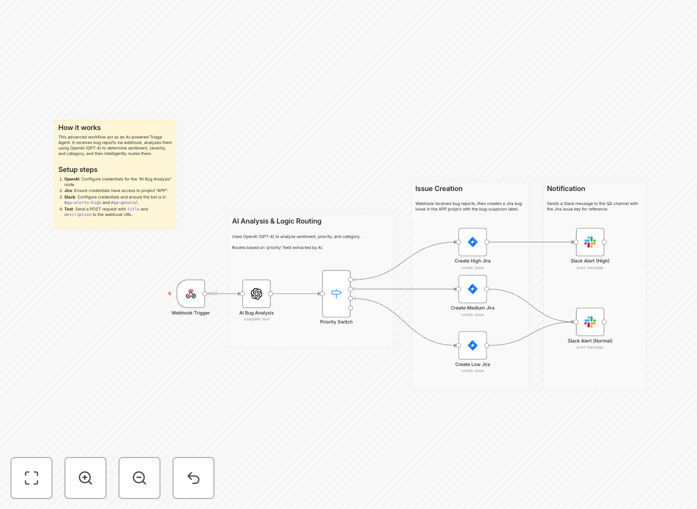
This automation solves that by creating an intelligent bridge. It acts as a central nervous system for your bug reports. Incoming bug suspicions (via a simple webhook) are instantly analyzed by OpenAI to determine severity and category. The workflow then automatically creates a properly labeled Jira Bug in your project and sends a targeted alert to the appropriate Slack channel—high-priority issues to an urgent alerts channel, others to a general QA queue.
The result is a frictionless pipeline from bug detection to actionable engineering work, ensuring nothing gets lost and your team can focus on fixing issues, not managing them.
How It Works
The workflow follows a logical, step-by-step process to transform a raw bug report into a tracked and alerted task.
Step 1: Webhook Trigger
The workflow is activated by an HTTP webhook. Any system that can send a POST request—like Sentry, Datadog, a customer form, or an internal tool—can trigger it. The payload should contain the bug summary, description, and any initial metadata.
Step 2: AI Analysis & Triage
The bug description is sent to OpenAI. A custom prompt instructs the AI model to analyze the text, assess the severity (e.g., High, Medium, Low), and assign relevant tags (e.g., "UI/UX", "API", "Database"). This replaces manual judgment with consistent, instant analysis.
Step 3: Priority-Based Routing
A switch node reads the AI's priority output and routes the bug down the appropriate path. This ensures critical bugs are handled with urgency and follow different creation and alerting rules than minor issues.
Step 4: Jira Ticket Creation
For each priority path, a Jira node creates a new "Bug" issue in your specified project (e.g., 'APP'). It populates the title, description, labels (like "ai-triaged" and the AI-generated category), and priority field, creating a fully-formed ticket for your backlog.
Step 5: Slack Team Notification
Immediately after Jira creation, a Slack message is posted. High-priority bugs are sent to a dedicated channel like #qa-alerts-high for immediate attention. Normal-priority bugs go to a general channel like #qa-general. The message includes the Jira issue key and a link for quick access.
Who This Is For
This template is designed for any team that deals with software bugs and wants to move faster.
Software Development Teams: Engineers and engineering managers who waste time sorting through bug reports and manually creating tickets.
QA & Testing Teams: Quality assurance professionals who need to ensure every reported bug is tracked and visible, not lost in emails or chat threads.
DevOps & SRE Teams: Teams managing monitoring tools (Sentry, New Relic) who want alerts to automatically create actionable tickets instead of just creating noise.
Product Teams: Product managers who collect user feedback and bug reports and need a reliable way to funnel them into the engineering workflow.
Startups & Scale-ups: Companies experiencing growing pains where manual processes are breaking down and automation is needed to maintain velocity and quality.
What You'll Need
- An n8n Instance: Either n8n Cloud (recommended for simplicity) or a self-hosted n8n setup.
- Jira Cloud or Server Access: An account with permissions to create issues in the target project (default is project key 'APP').
- OpenAI API Credentials: An API key from OpenAI to power the AI analysis step.
- Slack Workspace & Bot Token: A Slack app with a Bot Token installed in your workspace, with permissions to post messages to your chosen channels.
- A Bug Source: Any application or service capable of sending an HTTP POST request to the n8n webhook URL (e.g., a monitoring tool, a form backend, a custom script).
Pro tip: Start by testing with a simple tool like Postman or curl to send a mock bug payload. This lets you verify the entire flow—from AI analysis to Jira ticket to Slack alert—before connecting it to your production systems.
Quick Setup Guide
You can have this automation running in under 10 minutes.
- Import the Template: Download the JSON file using the button above. In your n8n instance, go to Workflows > Import from File and select the downloaded JSON.
- Configure Credentials: In the workflow canvas, set up credentials for the OpenAI, Jira, and both Slack nodes. Use the "Create New Credential" option for each service.
- Customize the Webhook: Note the unique webhook URL generated by n8n for the "Webhook Trigger" node. This is your endpoint. You can customize the path if desired.
- Adjust Jira & Slack Settings: Update the Jira node to point to your correct Project Key and Issue Type. Update the Slack nodes to point to your actual channel names (e.g.,
#qa-alerts-high). - Test & Activate: Use the "Test Workflow" button on the webhook node. Send a sample JSON payload like
{"title": "Login button not responding"}. Watch the automation run, check for a new Jira ticket, and look for the Slack message. Finally, toggle the workflow to "Active".
Key Benefits
Eliminate Manual Triage Overhead: Save 5-10 hours per week per engineer that was spent reading, categorizing, and manually entering bug reports into Jira. This time is now reclaimed for development.
Ensure Consistency & Reduce Human Error: AI applies the same priority and categorization rules to every single bug, 24/7. No more subjective "this looks important" judgments or missed critical issues due to alert fatigue.
Accelerate Time-to-Resolution: By creating the Jira ticket and alerting the team instantly, bugs move into the development workflow seconds after they're detected. This can shave days off the total resolution time for critical issues.
Create a Single Source of Truth: All bugs, regardless of source, end up as tracked Jira issues with full context. Slack alerts provide real-time visibility. This eliminates bugs getting lost in email threads or forgotten chat messages.
Scale Your Process Effortlessly: Whether you receive 5 bugs a day or 500, the automated system handles the volume without adding overhead or requiring more staff, allowing your team to scale efficiently.