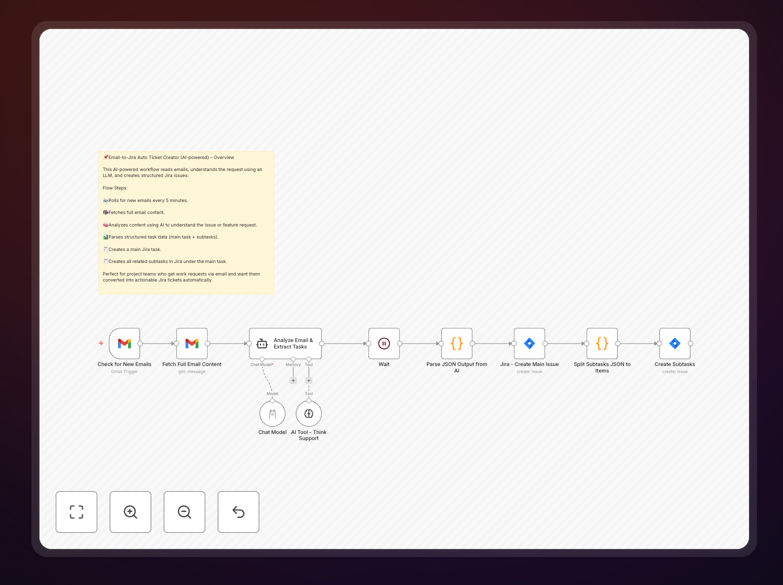
What This Workflow Does
This automation solves a common but time-consuming problem: manually reading support emails, understanding what's being requested, and creating properly formatted Jira tickets. Teams waste hours each week on this repetitive task, and important requests can get lost in crowded inboxes.
The workflow automatically monitors your support email inbox, uses AI to comprehend the email content, extracts key details like issue type, priority, and required actions, then creates structured Jira tickets with all necessary information. It can even identify multiple tasks within a single email and create separate linked tickets.
By automating this process, you ensure consistent ticket formatting, eliminate manual data entry errors, and dramatically reduce response times to customer or internal requests.
How It Works
Step 1: Email Monitoring
The workflow polls your Gmail or IMAP-enabled email account every 5 minutes for new messages. You can configure specific labels, folders, or senders to monitor, ensuring only relevant emails trigger ticket creation.
Step 2: Content Extraction & AI Analysis
When a new email arrives, the system fetches the full message content including attachments. An AI model (like Llama 3.2) analyzes the email to understand the request type, extract key details, and determine appropriate Jira fields.
Step 3: Structured Data Parsing
The AI's analysis is converted into structured JSON data containing ticket title, description, issue type (bug, task, story), priority level, assignee suggestions, and any subtasks identified within the email.
Step 4: Jira Ticket Creation
The workflow creates the main Jira ticket with all extracted information, then processes any identified subtasks as separate linked issues. Custom field mappings ensure the ticket matches your team's specific Jira configuration.
Step 5: Notification & Logging
Optionally, the system can send confirmation notifications to stakeholders and log all created tickets for audit purposes, providing complete visibility into the automation process.
Who This Is For
This automation is ideal for support teams, IT help desks, product management teams, and any organization using Jira for issue tracking while receiving requests via email. It's particularly valuable for:
- Customer support teams receiving bug reports and feature requests
- IT departments managing help desk tickets from internal staff
- Product managers collecting user feedback and suggestions
- Development teams needing structured tickets from client communications
- Operations teams tracking incidents and service requests
What You'll Need
- Jira instance with API access and permissions to create issues
- Email account (Gmail or IMAP-enabled) with access to the inbox you want to monitor
- AI model access (Llama 3.2, OpenAI, or similar) for email analysis
- n8n instance (self-hosted or cloud) to run the workflow
- Basic understanding of your Jira project structure and issue types
Pro tip: Start by monitoring a specific email label or folder rather than your entire inbox. This lets you test with controlled emails before expanding to full production use.
Quick Setup Guide
- Download the template using the button above and import it into your n8n instance
- Configure email credentials in the Gmail/IMAP node with appropriate folder/label filters
- Set up Jira connection with your instance URL, project key, and API credentials
- Connect AI service by adding your API key to the AI analysis node
- Test with sample emails to verify ticket creation matches your Jira workflow
- Adjust AI prompts if needed to better extract your specific ticket fields
- Activate the workflow and monitor initial executions for any adjustments
Key Benefits
Save 5-10 hours per week per team member by eliminating manual ticket creation. What used to take minutes per email now happens automatically in seconds.
Improve ticket quality and consistency with standardized formatting, complete information, and proper categorization every time, reducing back-and-forth clarification requests.
Reduce response time from hours to minutes by instantly creating tickets as emails arrive, ensuring urgent issues get immediate attention rather than waiting in an inbox.
Eliminate missed requests with reliable automated monitoring that never takes breaks, forgets, or overlooks important emails in a crowded inbox.
Gain valuable insights from automated logging of all created tickets, helping identify common request patterns and areas for process improvement.