Gmail OpenAI AI Agents Zapier

AI-Powered Email Triage & Auto-Response System

Automatically classify and process incoming emails with specialized AI agents for support, sales, and promotions

Download Template JSON · n8n compatible · Free
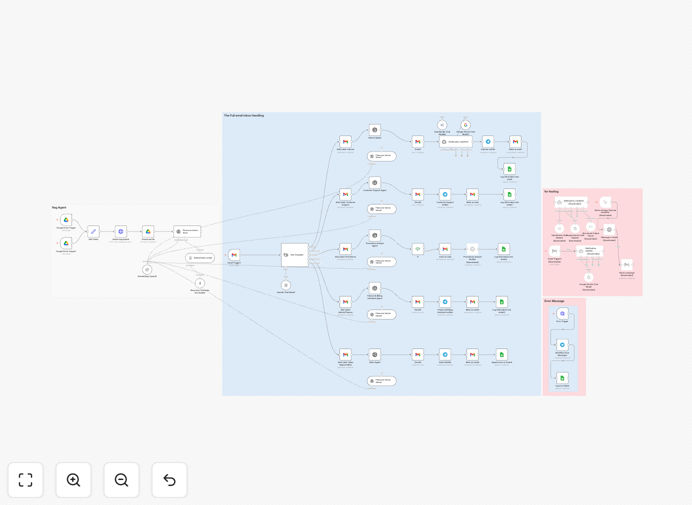
AI email triage workflow diagram showing classification and routing process

What This Workflow Does

This automation solves the problem of email overload by intelligently classifying incoming messages and routing them to specialized AI agents. Instead of manually sorting through your inbox, the system automatically processes emails based on their content and intent.

The workflow handles the complete email lifecycle - from initial receipt through classification, processing, and response. It's particularly valuable for businesses receiving high volumes of customer inquiries, support tickets, and sales leads through email.

How It Works

1. Email Trigger

The workflow activates whenever a new email arrives in your Gmail inbox. It captures the full message content including subject, body, and attachments.

2. AI Classification

An OpenAI-powered classifier analyzes the email content to determine its category: Support, Sales, Internal, Finance, or Promotions. This uses natural language understanding rather than simple keyword matching.

3. Specialized Processing

Each category routes to a dedicated AI agent with custom instructions. Support emails get drafted responses, sales leads are summarized for follow-up, and promotions are logged for analysis.

4. Automated Actions

Based on the classification, the system either sends an immediate reply (for support), creates a draft response (for sales), or logs the message (for promotions). All actions are tracked in a central dashboard.

Who This Is For

This template is ideal for:

  • Customer support teams handling 50+ daily inquiries
  • Sales teams managing inbound lead flow
  • Marketing teams tracking campaign responses
  • Small businesses needing to automate email processing
  • Operations teams managing internal communications

What You'll Need

  1. A Gmail account (or Google Workspace)
  2. OpenAI API access (or alternative LLM provider)
  3. Basic understanding of n8n workflows
  4. Optional: Telegram/Slack for notifications

Pro tip: Before deploying, review the AI agent prompts in each classification branch to match your brand voice and response style.

Quick Setup Guide

  1. Import the JSON template into your n8n instance
  2. Connect your Gmail account credentials
  3. Add your OpenAI API key
  4. Configure notification channels (optional)
  5. Test with sample emails to verify classification
  6. Activate the workflow for production use

Key Benefits

80% faster response times: AI-generated replies go out immediately for common support inquiries, while sales leads get prioritized for follow-up.

24/7 email processing: The system works around the clock to classify and triage messages, even when your team isn't available.

Consistent quality: Every email receives standardized processing according to your business rules, eliminating human variability.

Actionable insights: Built-in tracking provides data on email volumes, response times, and common inquiry types for continuous improvement.

Scalable solution: Easily handles email volume spikes without additional staffing requirements.

Frequently Asked Questions

Common questions about AI email automation and integration

AI email triage automatically categorizes incoming messages and routes them to specialized agents, reducing response times by 40-60%. Support emails get instant AI-drafted replies while complex inquiries are flagged for human review.

The system learns from historical interactions to continuously improve classification accuracy. Over time, it can predict common issues and suggest solutions before the customer even asks.

Traditional rules rely on keywords that often miss context. AI classification understands intent and sentiment, accurately sorting emails even when they don't contain exact trigger words. This reduces misclassification by up to 80%.

For example, an email saying "The feature isn't working as expected" might not trigger a keyword rule for "bug" but would still be correctly classified as a support ticket by the AI.

Yes, the workflow can be extended to create CRM records for sales inquiries, log support tickets, or sync customer data. Most popular CRMs like Salesforce, HubSpot, and Zoho have direct integrations available.

We can customize the workflow to match your CRM's data model and business processes, ensuring seamless integration with your existing tech stack.

Modern AI classifiers achieve 90-95% accuracy when properly trained. The template includes sample training data, but accuracy improves further when customized with examples from your specific email history.

For best results, we recommend reviewing the first 100-200 classifications to provide feedback that fine-tunes the model for your unique use case.

The workflow includes manual override options. Misclassified emails can be re-routed, and these examples are logged to continuously improve the AI model through feedback loops.

You can also set confidence thresholds - when the AI isn't highly certain about a classification, it can flag the email for human review before taking action.

Businesses typically save 15-25 hours per week per team member by automating initial email processing. Support teams handle 3-5x more volume with the same staff when using AI triage.

The time savings come from eliminating manual sorting, reducing repetitive responses, and automatically documenting interactions that would otherwise require manual logging.

The template includes data handling best practices, but compliance depends on your specific configuration. We recommend consulting legal counsel to ensure your implementation meets regional data protection requirements.

Key compliance features include configurable data retention periods, the ability to redact sensitive information, and options to process deletion requests through integrated workflows.

Absolutely! Our team specializes in building tailored email automation systems that integrate with your existing tools and workflows. We'll design a solution that matches your business processes and compliance needs.

Custom implementations typically include:

  • Industry-specific classification models
  • Integration with your CRM/helpdesk
  • Brand-aligned response templates
  • Compliance and security reviews

Need a Custom Email Automation?

This free template is a starting point. Our team builds fully tailored automation systems for your specific business needs.