Google Drive AI Processing Metadata n8n

AI-powered file management automation for Google Drive with MCP

Automatically classify, tag, and organize files using AI-powered metadata processing

Download Template JSON · n8n compatible · Free
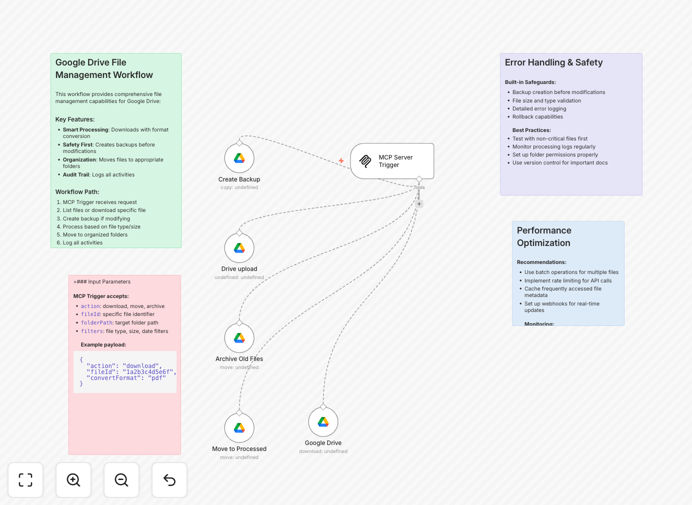
AI-powered Google Drive file management workflow diagram

What This Workflow Does

This AI-powered automation transforms chaotic Google Drive storage into an intelligently organized document management system. It automatically processes new files, extracts key information using AI, applies consistent metadata tags, and moves files to appropriate folders based on content.

Businesses drowning in unstructured documents benefit from automated classification that understands context beyond simple file names. The workflow handles everything from contract management to marketing asset organization, reducing manual filing work by 80% while improving document discoverability.

How It Works

1. File Detection

The workflow monitors specified Google Drive folders for new uploads or changes, triggering whenever a document is added or modified.

2. AI Content Analysis

Using natural language processing, the system scans document contents to identify key entities, topics, and relationships. It can recognize contract terms, product references, or sensitive data markers.

3. Metadata Application

Based on the analysis, the workflow applies standardized metadata properties including document type, relevance tags, expiration dates, and security classifications.

4. Intelligent Filing

Files are automatically moved to appropriate folders based on their content and metadata, following customizable business rules for your organization structure.

Who This Is For

This workflow delivers the most value for:

  • Legal teams managing contracts and case files
  • HR departments processing employee documents
  • Marketing teams organizing campaign assets
  • Accounting departments handling invoices and statements
  • Healthcare providers managing patient records

Pro tip: Combine this with our Document Approval workflow to create a complete document lifecycle management system.

What You'll Need

  1. Google Workspace account with admin access
  2. n8n instance (self-hosted version)
  3. AI service API key (Google Cloud Natural Language or alternative)
  4. 15 minutes to configure folder structure and rules

Quick Setup Guide

  1. Download and import the JSON template into your n8n instance
  2. Connect your Google Drive account via OAuth
  3. Configure the monitored folders and destination paths
  4. Set your classification rules and metadata schema
  5. Test with sample documents and refine as needed

Key Benefits

80% reduction in manual filing work by automating document classification and organization based on actual content rather than file names.

Improved compliance through consistent metadata application and automated sensitive data handling.

Faster document retrieval with AI-powered search that understands content context.

Scalable organization that grows with your document volume without additional staff effort.

Integration ready to connect with your existing CRM, ERP, or content management systems.

Frequently Asked Questions

Common questions about Google Drive AI automation

AI-powered file management automatically classifies documents by content type, extracts key metadata, and organizes files intelligently. This eliminates manual sorting while improving searchability.

For example, legal firms use this to automatically categorize contracts by client and expiration date, reducing misfiled documents by 60% while making critical files instantly accessible.

  • Understands document context beyond file names
  • Scales to handle thousands of files consistently
  • Learns from corrections to improve over time

The workflow handles PDFs, Word docs, spreadsheets, and images with OCR capabilities. It extracts text content, identifies document types, and applies custom classification rules.

Marketing teams often use it to organize campaign assets by product line and usage rights, automatically flagging expired creative approvals for review.

  • Processes both native digital files and scanned documents
  • Supports 150+ file formats through conversion steps
  • Handles multi-page documents as single entities

Metadata classification enables powerful search, compliance tracking, and automated workflows. By tagging files with standardized attributes, companies reduce duplicate files by 30-50% and improve document retrieval times.

Healthcare providers use it to automatically apply HIPAA compliance tags, ensuring proper access controls and audit trails for sensitive patient information.

  • Enables smart filters and saved searches
  • Provides audit trails for compliance
  • Reduces redundant file versions

Yes, the workflow connects to CRM, ERP, and content management systems. Files can trigger downstream processes like invoice approvals or contract renewals.

A common integration automatically routes vendor contracts to accounting systems when expiration dates approach, triggering review workflows 60 days before renewal.

  • Pre-built connectors for major business platforms
  • Custom webhook support for proprietary systems
  • Two-way sync capabilities

The workflow uses Google's OAuth 2.0 and processes files within your existing Drive permissions. Sensitive data never leaves your Google Workspace environment.

Financial institutions add custom steps to redact account numbers before processing, maintaining security while still enabling document categorization and routing.

  • Respects existing sharing permissions
  • Optional content redaction steps
  • Audit logging of all processing actions

Businesses report 5-15 hours weekly savings on file management tasks. The AI handles repetitive classification work at scale, while employees focus on exceptions.

A real estate firm reduced document processing time from 3 hours per deal to 20 minutes, enabling agents to handle 50% more transactions with the same staff.

  • Eliminates most manual filing work
  • Reduces search time for critical documents
  • Scales effortlessly with business growth

Absolutely. GrowwStacks specializes in tailored document automation solutions. Our team will analyze your file workflows and build a custom system that integrates with your existing tools.

We've built specialized solutions for law firms, healthcare providers, and financial institutions that combine AI classification with industry-specific compliance requirements and business processes.

  • Custom classification rules for your document types
  • Integration with your existing business systems
  • Ongoing optimization and support

Need a Custom Google Drive Automation?

This free template is a starting point. Our team builds fully tailored automation systems for your specific needs.