Facebook Messenger Google Sheets Google Calendar AI Processing Restaurant Automation

AI-powered food order processing with Facebook Messenger, Google Sheets & Calendar

Automatically process customer orders from Facebook Messenger, organize them in Google Sheets, and schedule deliveries in Google Calendar

Download Template JSON · n8n compatible · Free
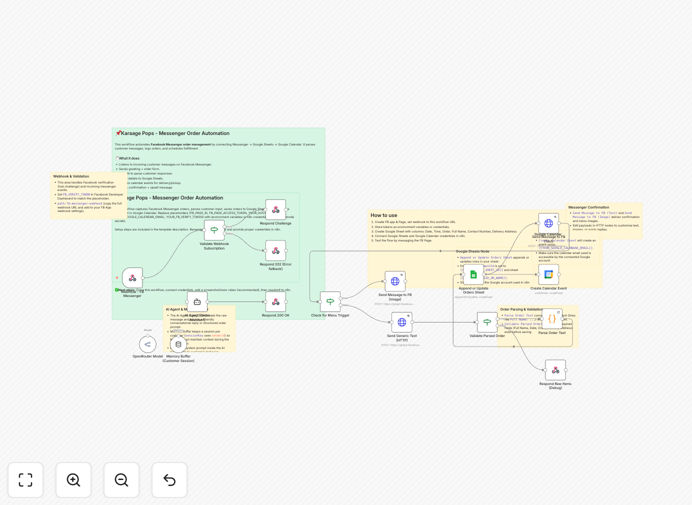
AI-powered food order processing workflow diagram

What This Workflow Does

This n8n workflow solves the common challenge food businesses face with managing orders received through Facebook Messenger. Instead of manually copying order details between platforms, this automation captures customer messages, extracts key order information using AI, logs it in Google Sheets for inventory and accounting, and creates delivery/pickup events in Google Calendar.

The AI component intelligently parses unstructured messages to identify menu items, quantities, special requests, and delivery details - even when customers don't follow a strict format. This eliminates hours of manual order processing while reducing human errors in transcription.

How It Works

1. Facebook Messenger Trigger

The workflow starts when a new message arrives in your Facebook Page inbox. It captures the full message content along with customer details and timestamp.

2. AI Order Processing

An AI service analyzes the message to identify key order components: menu items, quantities, dietary restrictions, delivery address, and preferred time. This works even with informal language like "Can I get 2 pizzas delivered by 7pm?"

3. Google Sheets Integration

The structured order data automatically populates a Google Sheet with columns for customer info, order details, order value, and status. This creates a centralized order log for accounting and inventory management.

4. Calendar Scheduling

The system creates a Google Calendar event for each delivery or pickup, including customer contact info and order summary. Staff receive notifications and can view the day's schedule at a glance.

Who This Is For

This automation is ideal for:

  • Restaurants offering delivery/takeout
  • Meal prep and catering services
  • Food trucks managing orders
  • Bakery and specialty food businesses
  • Any food business receiving orders via Facebook

What You'll Need

  1. An n8n instance (cloud or self-hosted)
  2. A Facebook Business Page with Messenger enabled
  3. Google Workspace account (for Sheets and Calendar)
  4. Access to an AI text processing service (like OpenAI or similar)

Quick Setup Guide

  1. Download the JSON template file
  2. Import into your n8n instance
  3. Connect your Facebook Page credentials
  4. Link your Google account for Sheets and Calendar
  5. Configure your AI service API key
  6. Test with sample orders and adjust as needed

Key Benefits

Reduce order processing time by 80%: What used to take 5-10 minutes per order now happens instantly with perfect accuracy.

Never miss an order: Automated systems capture every message, even during busy periods when staff might overlook notifications.

Better customer experience: Faster response times and accurate order fulfillment lead to happier customers and repeat business.

Centralized order management: All orders live in one organized system instead of scattered across messages, notes, and memory.

Data for business decisions: Google Sheets provides easy access to sales trends, popular items, and customer preferences.

Frequently Asked Questions

Common questions about Facebook Messenger order automation for food businesses

AI transforms unstructured customer messages into standardized order data. It identifies menu items even when customers use nicknames or make typos, extracts quantities from text, and recognizes delivery instructions. This eliminates the need for rigid order forms while maintaining data consistency.

For example, when a customer writes "pls send 2 large pepperoni pizzas and a coke to 123 Main St by 7:30", the AI separates this into: items (2x pizza, 1x coke), address, and time. Traditional systems would require separate form fields for each piece of information.

Automating Facebook orders reduces errors, saves staff time, and improves customer satisfaction. Manual order taking often leads to mistakes in items or delivery details, especially during busy periods. Automation ensures every order is captured accurately and processed immediately.

A bakery using this system reported 30% fewer order mistakes and saved 15 staff hours per week. Their customers appreciated faster confirmations and reliable delivery times. The automation also provided valuable sales data they previously couldn't track from Messenger orders.

Yes, the AI is trained to recognize common special requests like "no onions" or "gluten-free" and flags these in the order details. The system preserves the exact customer wording while also categorizing the request type for kitchen staff.

One vegan restaurant uses this to automatically highlight allergen warnings and dietary preferences in both their order sheet and kitchen display system. This reduces the risk of serving non-compliant meals while maintaining the personal touch of customer messages.

The Calendar integration creates a visual delivery schedule with all order details accessible in one click. Each event includes the customer name, phone number, order summary, and delivery address. Drivers can access this from their phones while on route.

A pizza shop owner reported this eliminated their previous system of handwritten delivery tickets that often got lost or smudged. The automated calendar also helps balance delivery loads by showing all pending orders geographically and temporally.

The workflow can be configured to either create a new order record or update the existing one when follow-up messages arrive. The AI compares new messages to previous ones from the same customer to detect modifications versus new orders.

Some businesses add a manual approval step for order changes after a certain cutoff time. Others use automated replies confirming changes while alerting staff. The system maintains a complete message history for reference if questions arise.

Yes, the workflow can be extended to connect with most POS systems through their APIs. The Google Sheets data can trigger inventory updates or feed directly into accounting software. Many businesses use this as a bridge between Messenger and their existing tech stack.

A cafe chain integrated this with their Square POS, automatically creating tickets in their kitchen display system. They maintained all the customer communication benefits of Messenger while keeping their established operational workflows.

Absolutely! GrowwStacks specializes in building tailored automation solutions for food businesses. We can adapt this workflow to your specific menu, integrate with your current systems, and add features like payment processing or loyalty program updates.

Our team will analyze your order volume, current pain points, and business goals to design an automation system that saves you maximum time while improving customer experience. We handle everything from initial setup to staff training and ongoing support.

Need a Custom Food Order Automation?

This free template is a starting point. Our team builds fully tailored automation systems for your specific menu and operations.