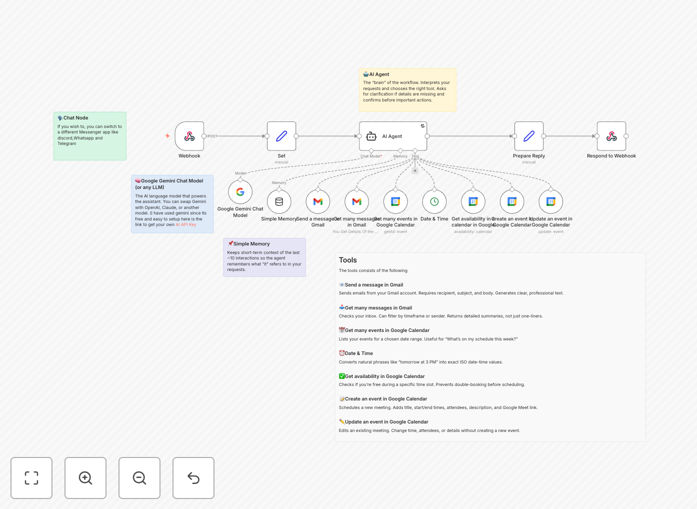
What This Workflow Does
This AI-powered assistant transforms how you manage email and scheduling by combining Gmail, Google Calendar, and Gemini AI into a single intelligent interface. It automatically processes incoming messages, prioritizes important communications, drafts contextual responses, and manages your calendar based on your preferences and availability.
The workflow eliminates the manual back-and-forth of email management while ensuring you never miss important messages or meetings. By leveraging Gemini's natural language capabilities, it understands the context of your communications and handles routine scheduling tasks autonomously, freeing up hours each week for more strategic work.
How It Works
1. Email Processing
The workflow monitors your Gmail inbox, analyzing incoming messages using Gemini AI. It categorizes emails by priority, identifies action items, and flags urgent requests based on your predefined rules and the AI's understanding of email content.
2. Smart Response Generation
For common inquiries and scheduling requests, Gemini drafts contextual responses that you can review and send with one click. The AI considers your writing style, the email thread history, and your availability when generating replies.
3. Calendar Integration
The system automatically adds events to your Google Calendar based on email content, coordinates meeting times by analyzing your schedule, and sends calendar invites to participants. It can also reschedule conflicting appointments based on your priorities.
4. Chat Interface
A Gemini-powered chat interface lets you query your email and calendar naturally. Ask questions like "What's my most important email today?" or "Schedule a meeting with the team next week" and the AI will execute the appropriate actions.
Who This Is For
This workflow is ideal for busy professionals, executives, and teams who spend significant time managing email and scheduling. It's particularly valuable for:
- Executives with high email volume
- Sales professionals managing client communications
- Project managers coordinating multiple stakeholders
- Entrepreneurs wearing multiple hats
- Remote teams needing efficient scheduling
What You'll Need
- An n8n instance (self-hosted or cloud)
- Google Workspace account with Gmail and Calendar access
- Google Cloud API credentials with appropriate scopes
- Gemini API access (or equivalent AI service)
- Basic understanding of n8n workflows
Quick Setup Guide
- Download the JSON template file
- Import into your n8n instance
- Configure Google OAuth credentials
- Set up Gemini API connection
- Adjust workflow triggers and parameters
- Test with sample emails before going live
Key Benefits
Save 5-10 hours weekly by automating email triage, response drafting, and meeting scheduling. The AI handles routine communications while you focus on high-value interactions.
Reduce missed opportunities with intelligent prioritization that ensures important messages get attention while less urgent ones wait. The system learns your priorities over time.
Improve response times with AI-generated drafts for common inquiries. Maintain professional communication standards while responding faster than manual typing allows.
Optimize scheduling efficiency by eliminating calendar coordination back-and-forth. The system finds optimal times considering all participants' availability and preferences.
Pro tip: Start by automating just calendar scheduling, then gradually expand to email responses as you become comfortable with the AI's performance.