Gmail OpenRouter Pinecone AI Support n8n

AI-powered Gmail customer support with OpenRouter & Pinecone knowledge base

Automate customer email responses with AI classification and instant knowledge base answers

Download Template JSON · n8n compatible · Free
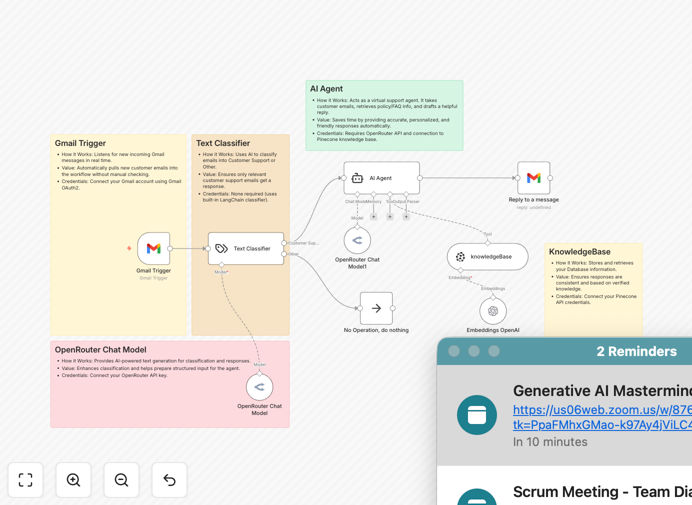
AI customer support workflow diagram

What This Workflow Does

This automation transforms your Gmail inbox into an AI-powered customer support hub. When a new support email arrives, the workflow automatically analyzes its content using OpenRouter's AI models, classifies the inquiry type and urgency, then retrieves the most accurate response from your Pinecone knowledge base.

The system handles the entire process from initial email receipt to sending a polished, on-brand response - all while maintaining the personal touch customers expect. For complex cases requiring human attention, it intelligently routes messages to the appropriate team member with all relevant context.

How It Works

1. Email Trigger & Initial Processing

The workflow monitors your Gmail inbox for new messages matching your support criteria. Each incoming email is parsed to extract key details like sender information, subject line, and message content.

2. AI Classification & Analysis

OpenRouter's AI models analyze the email content to determine the inquiry type (billing, technical, general, etc.), urgency level, and emotional tone. This classification determines the response path and priority handling.

3. Knowledge Base Retrieval

The system queries your Pinecone knowledge base using vector search to find the most relevant information based on the email's semantic meaning, not just keyword matching. This ensures accurate answers even for uniquely phrased questions.

4. Response Generation & Review

The AI crafts a personalized response using your brand voice guidelines, incorporating the retrieved knowledge base content. For high-confidence answers, the response is sent automatically. Lower-confidence or high-urgency cases are flagged for human review.

5. Sentiment Analysis & Follow-up

After sending, the workflow monitors reply emails for customer sentiment. Dissatisfied responses trigger escalation protocols, while positive interactions can initiate satisfaction surveys or upsell opportunities.

Pro tip: Start with AI handling only your most common inquiry types (30-50% of volume) during initial rollout. Gradually expand to more complex cases as you refine your knowledge base and confidence thresholds.

Who This Is For

This workflow is ideal for ecommerce stores, SaaS companies, and any business receiving 50+ daily support emails. It's particularly valuable for:

  • Startups needing to scale support without hiring more staff
  • Companies with extensive product documentation that customers struggle to find
  • Teams wanting to provide 24/7 support across time zones
  • Businesses aiming to reduce first-response times below 30 minutes

What You'll Need

  1. An n8n instance (cloud or self-hosted)
  2. Gmail account for receiving support emails
  3. OpenRouter API key for AI processing
  4. Pinecone account with populated knowledge base
  5. Brand voice guidelines for response templates

Quick Setup Guide

  1. Download the JSON template file
  2. Import into your n8n instance
  3. Connect your Gmail, OpenRouter, and Pinecone accounts
  4. Configure your support email filters and triggers
  5. Set confidence thresholds for auto-reply vs human review
  6. Test with sample emails and refine your knowledge base

Key Benefits

80% faster response times: Customers get accurate answers in minutes instead of hours, dramatically improving satisfaction scores.

40% support cost reduction: Automating routine inquiries lets your team focus on complex cases that require human expertise.

24/7 global availability: AI never sleeps, providing instant support regardless of time zone or holidays.

Consistent quality: Every response maintains your brand voice and pulls from approved knowledge base content.

Continuous improvement: The system learns from every interaction, constantly enhancing its accuracy and coverage.

Frequently Asked Questions

Common questions about AI-powered customer support automation

AI transforms email support by automatically classifying incoming messages, extracting key details, and generating accurate responses from your knowledge base. This reduces response times from hours to minutes while maintaining personalized, on-brand communication. Businesses using AI support automation typically see 60-80% of inquiries resolved automatically without human intervention.

The technology understands customer intent beyond simple keywords, adapting to various phrasing styles. It also learns from every interaction, continuously improving its response accuracy and coverage of your product or service information.

  • Reduces average response time by 80%+
  • Maintains consistent brand voice
  • Scales effortlessly with business growth

This automation excels at handling common support questions like product inquiries, account issues, order status checks, and FAQ responses. The AI classifies each email by intent and urgency, then retrieves the most relevant information from your Pinecone knowledge base. Complex or sensitive cases can be automatically flagged for human review while simpler queries get instant responses.

For example, an ecommerce store might automate responses about shipping times, return policies, and product specifications. A SaaS company could handle login troubleshooting, feature questions, and billing inquiries automatically while routing bug reports to developers.

  • Best for repetitive, knowledge-based inquiries
  • Customizable classification thresholds
  • Seamless handoff to human agents when needed

Response accuracy depends on your knowledge base quality and AI model tuning. With proper setup, modern AI can achieve 85-95% accuracy for common support scenarios. The workflow includes safeguards like confidence scoring and human review thresholds. Most businesses start with AI handling straightforward cases while agents review responses during the initial training period.

Accuracy improves dramatically over time as the system learns from corrected responses. Many companies see their auto-resolution rate increase by 5-10% monthly during the first six months as the AI better understands their specific domain language and customer phrasing patterns.

  • Initial accuracy typically 85%+ for common cases
  • Improves with continuous learning
  • Configurable confidence thresholds

Pinecone provides vector search capabilities that understand the semantic meaning behind questions, not just keyword matching. This means customers get answers that actually address their intent, even if they phrase questions differently than your documentation. Pinecone also handles frequent knowledge updates better than traditional databases, making it ideal for dynamic product information.

Unlike static FAQ databases, Pinecone can connect related concepts across your documentation. For example, a question about "payment failure" might automatically surface information about declined cards, expired subscriptions, and fraud prevention - even if those terms don't appear in the original question.

  • Understands customer intent, not just keywords
  • Handles frequent content updates seamlessly
  • Connects related concepts automatically

Businesses typically see 30-50% reductions in first-response times and 40-60% decreases in manual email handling. A team receiving 100 daily support emails might save 15-20 hours per week. The biggest time savings come from eliminating repetitive research and drafting while maintaining response quality. Agents can then focus on complex cases that truly require human expertise.

The time savings compound as your knowledge base grows. Each new documented solution immediately becomes available to all customers through the AI, unlike traditional support where each agent must independently learn and find information.

  • Saves 15-20 hours weekly per 100 daily emails
  • Reduces first-response time by 30-50%
  • Eliminates repetitive answer drafting

Yes, the workflow can connect to helpdesk platforms like Zendesk or Freshdesk, CRM systems like Salesforce, and internal databases. Common extensions include creating support tickets for complex cases, logging interactions in customer profiles, or triggering follow-up surveys. The modular design makes it easy to add steps for your specific tech stack.

For example, you could automatically create high-priority tickets in Jira for technical issues while adding satisfaction survey links to resolved inquiries. The workflow becomes the orchestration layer between your email channel and all other customer support systems.

  • Integrates with major helpdesk platforms
  • Connects to CRM systems
  • Extensible for custom business logic

Absolutely! GrowwStacks specializes in tailored AI automation solutions. We can customize this workflow for your specific knowledge base, support policies, and integration needs. Our team handles everything from initial AI model training to ongoing optimization.

We'll work closely with your support team to identify the best opportunities for automation, design conversation flows that match your brand voice, and implement safeguards for sensitive topics. The result is a system that feels authentically your company while delivering the efficiency of AI.

  • Custom-trained AI models
  • Brand-aligned conversation design
  • Ongoing performance optimization

Need a Custom AI Support Integration?

This free template is a starting point. Our team builds fully tailored automation systems for your specific needs.