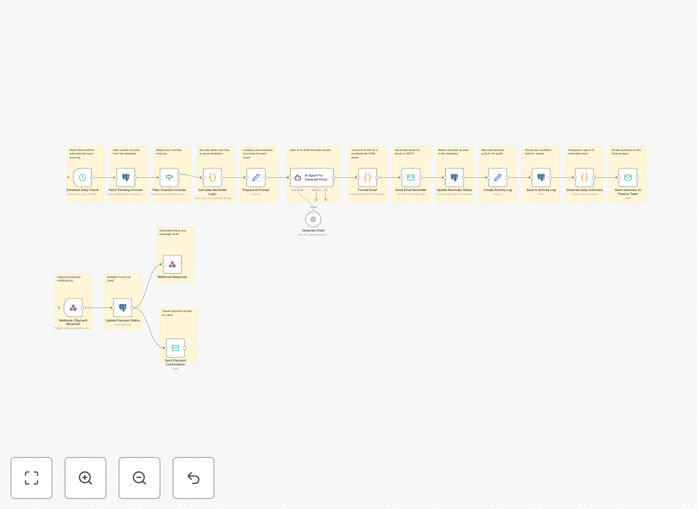
What This Workflow Does
Manual invoice follow-up is time-consuming, error-prone, and often leads to delayed payments that hurt your cash flow. Finance teams waste hours each week tracking overdue invoices, sending reminder emails, and updating spreadsheets—all while struggling to maintain consistent communication with clients.
This AI-powered automation solves these problems by creating a complete, hands-free invoice management system. It runs daily at 9 AM to identify overdue invoices, generates personalized reminder emails using AI, tracks payments via webhook integrations, updates your database automatically, and provides daily summaries to your finance team. The result is faster payments, reduced administrative work, and better client relationships.
How It Works
1. Daily Invoice Check & Filtering
The workflow begins with a scheduled trigger that runs every morning. It connects to your database (Google Sheets, PostgreSQL, etc.) and fetches all pending invoices. Using date calculations, it identifies which invoices are overdue based on your defined terms (e.g., 7, 14, 30 days).
2. AI-Powered Email Generation
For each overdue invoice, the workflow sends the client details, payment history, and invoice specifics to an AI model (like OpenAI GPT). The AI generates a personalized, professional reminder email that considers the client's relationship, payment history, and appropriate tone for the overdue period.
3. Automated Email Delivery & Logging
The generated email is formatted with HTML for professional presentation and sent via your email service (Gmail, SendGrid, etc.). The system immediately logs that a reminder was sent, updates the invoice status, and creates an activity record for auditing purposes.
4. Real-Time Payment Tracking
When a payment arrives through your payment gateway (Stripe, PayPal, etc.), a webhook triggers the workflow. It validates the payment, updates the invoice status to "paid" in your database, and sends a payment confirmation email to the client—all within seconds of the transaction.
5. Daily Summary & Reporting
At the end of each day, the workflow compiles metrics: invoices checked, reminders sent, payments received, and outstanding amounts. This summary is emailed to your finance team, providing clear visibility into cash flow without manual reporting.
Who This Is For
This automation is ideal for small to medium businesses, freelancers, agencies, and finance departments that manage recurring client invoices. If you send more than 10 invoices per month, have clients with varying payment terms, or spend significant time on collections, this workflow will save you hours each week. It's particularly valuable for service-based businesses, consultants, SaaS companies, and anyone who needs consistent cash flow to operate smoothly.
What You'll Need
- Database access – Google Sheets (with OAuth2) or a SQL database containing your invoice data with columns for Invoice ID, Client, Amount, Due Date, and Status.
- AI service account – OpenAI API key or similar AI service for generating personalized email content.
- Email sending capability – Gmail API key, SendGrid account, or SMTP credentials for sending reminder emails.
- Payment gateway webhooks – Stripe, PayPal, or Square account configured to send payment notifications to a webhook URL.
- n8n instance – Self-hosted n8n or n8n.cloud account to run the workflow.
Quick Setup Guide
Follow these steps to implement this automation in under 30 minutes:
- Import the template – Download the JSON file and import it into your n8n instance using the "Import from File" option.
- Configure database credentials – Update the "Fetch Pending Invoices" node with your database connection details and query.
- Set up AI service – Add your OpenAI API key to the AI Agent nodes and test the email generation with sample invoice data.
- Connect email service – Configure the Send Email nodes with your Gmail or SendGrid credentials and test email delivery.
- Configure payment webhook – Set up the webhook URL in your payment gateway and test with a simulated payment.
- Adjust schedule and logic – Modify the schedule trigger time and overdue thresholds to match your business processes.
- Test end-to-end – Add a test invoice to your database, let the workflow run, and verify reminders and payment tracking work correctly.
Pro tip: Start with a small subset of clients or test invoices to validate the workflow before rolling it out to all clients. This allows you to refine the AI prompts and email templates based on real responses.
Key Benefits
Save 5-10 hours per week on manual follow-ups by automating the entire invoice reminder process. Your finance team can focus on strategic work instead of chasing payments.
Improve payment times by 15-30% through consistent, timely, and personalized communication. AI-generated reminders have higher open and response rates than generic templates.
Eliminate human error in tracking with automatic database updates and comprehensive audit logs. Never miss a follow-up or incorrectly mark an invoice as paid again.
Gain real-time cash flow visibility with daily summaries that show exactly what's collected, what's overdue, and what's coming due—without manual spreadsheet updates.
Enhance client relationships with professional, personalized communication that demonstrates organization and respect for their time, while maintaining firm boundaries on payment terms.