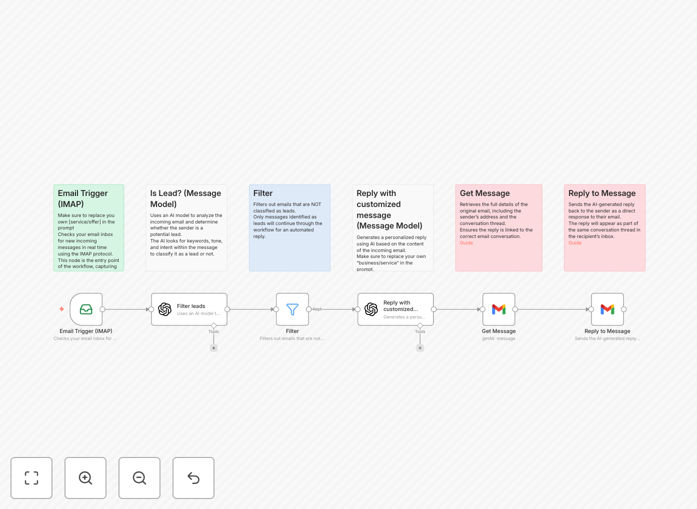
What This Workflow Does
Every day, businesses receive dozens of emails—some are genuine leads, others are spam, newsletters, or personal messages. Manually sorting through them wastes valuable time and often leads to missed opportunities. This AI-powered workflow solves that problem by automatically detecting which emails are potential leads and sending them a personalized, AI-generated reply within seconds.
The system connects to your email inbox (via IMAP), uses OpenAI's GPT-4o to analyze the content and intent of each message, filters out non-leads, and then crafts a context-aware reply that feels human-written. It ensures your sales team only focuses on qualified prospects while maintaining prompt, professional communication with every inquiry.
Beyond simple autoresponders, this workflow understands nuance. It can differentiate between a pricing question, a demo request, or a general information inquiry, and tailor the reply accordingly. This transforms your inbox from a passive receptacle into an active lead‑capture and engagement engine.
How It Works
Step 1: Email Trigger (IMAP)
The workflow monitors your designated email folder (like INBOX) for new messages. As soon as an email arrives, it’s captured and passed to the next stage for analysis. This real‑time trigger ensures no lead sits unanswered.
Step 2: AI Lead Classification
The email content, subject, and sender details are sent to an AI model (GPT‑4o) with a custom prompt asking: “Is this a potential business lead?” The AI evaluates language, intent, and context, returning a yes/no decision. You can refine the prompt with examples of your ideal leads to improve accuracy.
Step 3: Filter
A conditional node routes emails based on the AI’s classification. Only emails flagged as “lead” proceed to the reply stage. Non‑leads (spam, personal, etc.) are logged or ignored, keeping your workflow clean and focused.
Step 4: AI‑Generated Reply
For each confirmed lead, another AI prompt generates a personalized reply. It uses information from the original email—like the sender’s name, their question, and your product details—to create a natural, helpful response that encourages further conversation.
Step 5: Send Reply via Gmail
The workflow fetches the original message’s thread ID and sends the AI‑crafted reply directly through your Gmail account (or another email provider). The reply appears as a human‑sent email, maintaining proper threading and sender authenticity.
Who This Is For
This automation is ideal for sales teams, solopreneurs, marketing agencies, and any business that receives inbound inquiries via email. If you’re spending hours each week sorting emails and manually replying to leads, this workflow can reclaim that time.
Specifically, it benefits:
- Small businesses without dedicated sales staff to monitor emails constantly.
- Startups looking to scale lead handling without adding personnel.
- Consultants & freelancers who need to respond promptly to project inquiries.
- Marketing agencies managing multiple client lead streams.
- Teams using Gmail for business communication and wanting AI‑enhanced efficiency.
What You'll Need
- An IMAP‑compatible email account (Gmail, Outlook, etc.) for receiving emails.
- Gmail API access (or equivalent for your email provider) to send replies.
- OpenAI API credentials (or another AI model service) for classification and reply generation.
- An n8n instance (cloud or self‑hosted) to run the workflow.
- Basic understanding of your lead criteria to customize the AI prompts.
Quick Setup Guide
1. Download the template JSON file and import it into your n8n workspace.
2. Connect your IMAP email credentials in the “Email Trigger” node. Set the folder to watch (usually INBOX).
3. In the “Is Lead?” node, adjust the AI prompt to match your business’s lead definition. Add examples of good vs. bad emails for better accuracy.
4. Customize the “Write Customized Reply” node’s prompt to reflect your brand voice, product details, and typical response style.
5. Connect your Gmail (or other email) credentials in the “Reply to Message” node.
6. Activate the workflow and test with a few sample emails to ensure classification and replies work as expected.
Pro tip: Start with a strict lead‑classification prompt to avoid false positives. You can relax the criteria once you see the AI’s performance. Also, include a fallback manual review step for borderline emails during initial testing.
Key Benefits
Instant lead engagement: Replies are sent within seconds of email arrival, dramatically increasing conversion chances compared to manual delays.
24/7 availability: The system works around the clock, capturing and responding to leads even outside business hours.
Reduced manual workload: Eliminates hours of email sorting and repetitive reply writing each week, freeing your team for higher‑value tasks.
Consistent branding: Every reply follows your predefined tone and messaging, ensuring uniform communication quality.
Scalable lead handling: As inquiry volume grows, the automation scales effortlessly without adding staff or overhead.