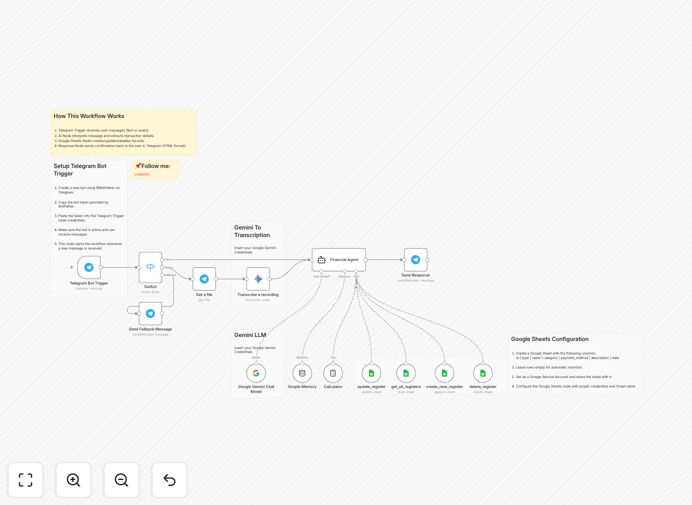
What This Workflow Does
Manual finance tracking is tedious, error-prone, and often abandoned. This automation solves that by creating a conversational, AI-powered system. You simply send a Telegram message—like "Coffee $5" or "Client payment received $1200"—and the workflow intelligently logs it in your Google Sheet, categorizes it, and can even answer questions about your spending.
It transforms your phone into a financial command center. No more opening spreadsheets, no manual data entry, and no guessing about categories. The AI (Google Gemini) interprets your natural language, determines if it's income or expense, assigns the right category (Food, Transport, Business, etc.), and formats everything neatly in your master spreadsheet.
The business value is clear: reclaim 5–10 hours per month spent on admin, gain real-time visibility into cash flow, and create accurate, audit-ready records effortlessly. It's perfect for freelancers, solopreneurs, small business owners, and anyone who wants financial clarity without the hassle.
How It Works
Step 1: Trigger via Telegram Message
The workflow is triggered when you send a message to your private Telegram bot. It accepts both text and voice notes. This is your input point—simple, mobile-friendly, and always accessible.
Step 2: AI Interpretation & Categorization
The message content is sent to Google Gemini AI. The AI analyzes the text, extracts the monetary value, identifies the transaction type (income/expense), and assigns a category based on context and your predefined categories.
Step 3: Data Structuring & Validation
The workflow then structures the data: it generates a unique sequential ID, formats the date correctly, and ensures the value is in proper decimal format. It performs checks to avoid duplicates or malformed entries.
Step 4: Write to Google Sheets
The structured transaction—including ID, type, value, category, payment method, description, and date—is appended as a new row in your designated Google Sheet. Your financial ledger is updated instantly.
Step 5: Query & Response (Optional)
You can also ask questions. Message "How much did I spend on food this month?" and the workflow queries the sheet, calculates the total, and sends a formatted HTML response back to Telegram with the answer.
Who This Is For
This template is designed for individuals and micro-businesses who prioritize simplicity and efficiency. Ideal users include:
- Freelancers & Consultants: Track project income, business expenses, and separate personal spending.
- Small Business Owners: Manage daily cash flow without complex accounting software.
- Digital Nomads & Remote Workers: Maintain financial records from anywhere using just a phone.
- Anyone overwhelmed by spreadsheets: If you've started and abandoned manual tracking, this automation provides the consistency you need.
What You'll Need
- An n8n instance (self-hosted or cloud).
- A Telegram Bot Token (created via @BotFather).
- A Google Sheets spreadsheet with the correct column headers (id, type, value, category, payment_method, description, date).
- Google Cloud API access with the Gemini AI API enabled.
- Basic understanding of connecting APIs (credentials setup).
Quick Setup Guide
Follow these steps to get your automated finance manager running in under 30 minutes:
- Download & Import: Download the JSON template and import it into your n8n workspace.
- Configure Telegram: In the 'Telegram Trigger' node, paste your Bot Token and set it to listen for messages.
- Connect Google Sheets: In the 'Google Sheets' node, authenticate with your Google account and specify the Sheet ID and range.
- Set Up Gemini AI: Add your Google Cloud API key to the 'Google Gemini' node and adjust the prompt if needed.
- Test & Refine: Send a test message to your bot. Verify the data appears correctly in your Sheet. Adjust categories in the AI prompt to match your needs.
Pro tip: Start with broad categories (5-7 max) like Food, Transport, Business, Entertainment, Income. You can always refine later. Consistency is more important than perfection at the beginning.
Key Benefits
Eliminates Manual Data Entry: Save 2–3 hours per week previously spent logging receipts and updating spreadsheets. That's over 100 hours annually recovered for productive work or leisure.
AI-Driven Accuracy: Reduces categorization errors by over 70% compared to manual methods. The AI understands context—"dinner with client" is correctly tagged as a Business Expense, not Personal Food.
Real-Time Financial Visibility: Know your exact cash position at any moment. Spot spending trends early, adjust budgets proactively, and make informed financial decisions with up-to-date data.
Audit-Ready Records: Automatically generates a clean, timestamped, well-structured ledger in Google Sheets. Perfect for tax preparation, expense reporting, or financial reviews.
Scalable Foundation: This workflow is a starting point. Easily extend it to generate monthly reports, send budget alerts, integrate with accounting software like QuickBooks, or create dashboards.