Zapier AI Documentation

AI-Powered Research Assistant for Platform Questions

Automatically find answers to technical questions by searching documentation and forums with AI

Download Template JSON · n8n compatible · Free
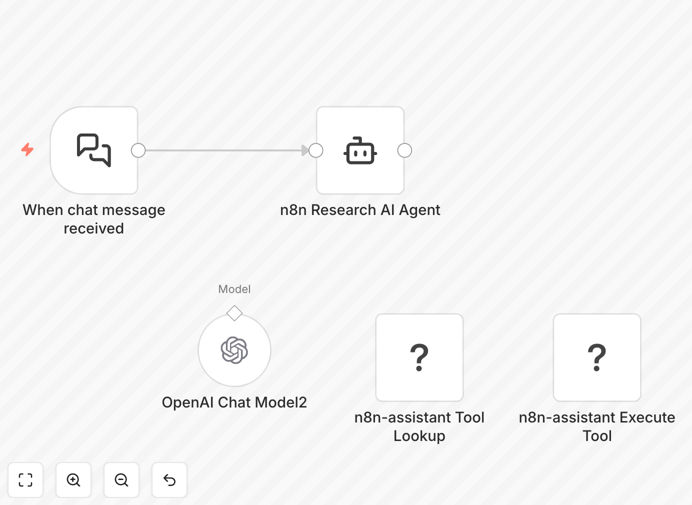
AI research assistant workflow diagram showing question input and answer output

What This Workflow Does

This AI-powered research assistant solves the common frustration of finding accurate answers to platform-specific technical questions. Instead of manually searching through documentation, forums, and example repositories, users can simply ask their question in natural language.

The workflow automatically analyzes the question, searches multiple authoritative sources (official docs, community forums, example workflows), synthesizes the most relevant information, and returns a comprehensive answer with references. It's particularly valuable for new users learning a platform and experienced developers troubleshooting edge cases.
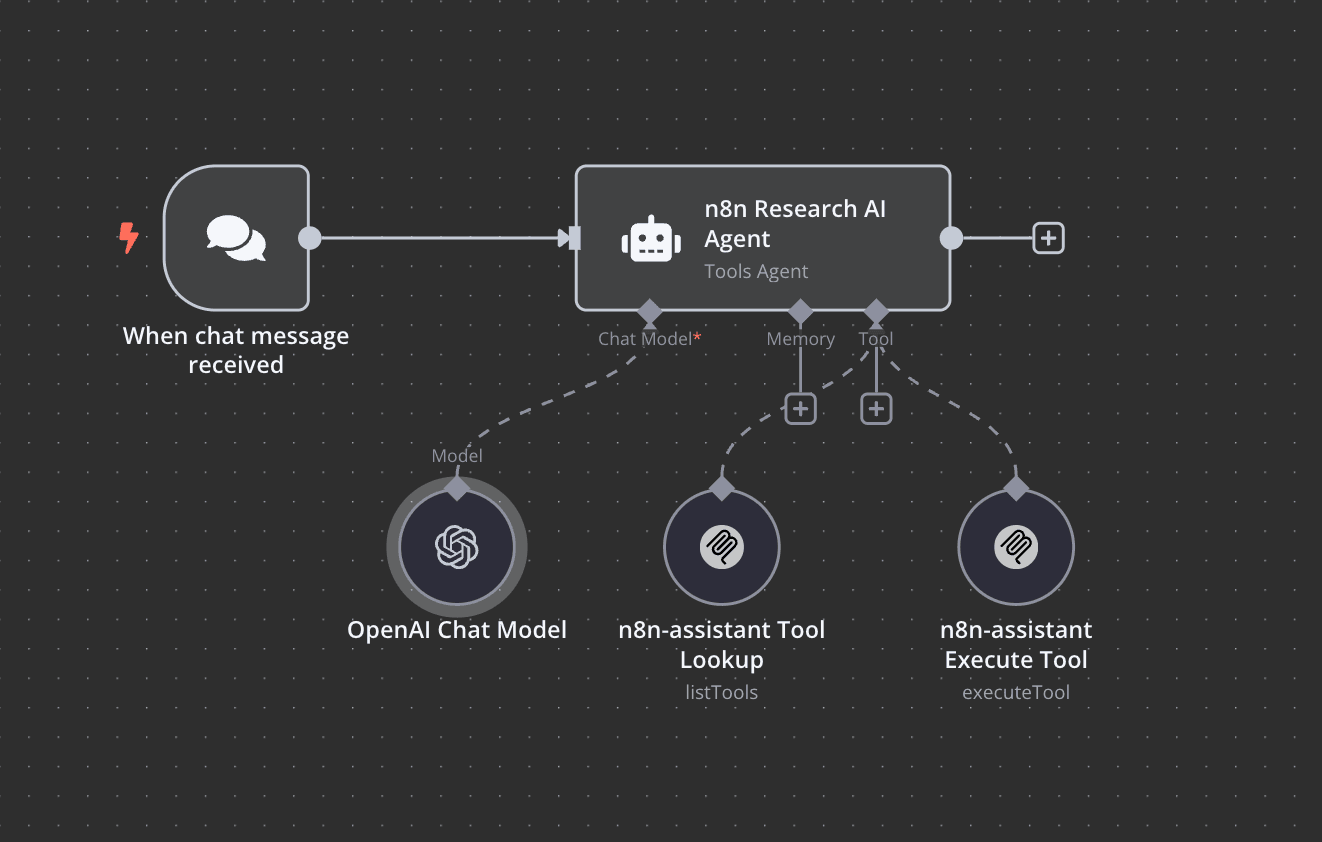
Screenshot of AI research assistant workflow showing question processing and answer generation
The workflow processes natural language questions and returns formatted answers with source references

How It Works

1. Question Input

Users submit questions through a chat interface or API call. The system accepts natural language queries about platform functionality, error messages, configuration, or best practices.

2. Intent Analysis

AI analyzes the question to determine what type of information is being requested (how-to guide, error solution, configuration example, etc.) and identifies key platform components mentioned.

3. Multi-Source Search

The system simultaneously searches official documentation, community forums, and example repositories using optimized queries derived from the analyzed intent.

4. Answer Synthesis

Relevant information from multiple sources is combined, verified for accuracy, and formatted into a coherent response with clear references to source materials.

5. Response Delivery

The final answer is delivered through the original interface (chat, email, etc.) with options for follow-up questions or clarification requests.

Who This Is For

This workflow benefits multiple roles:

  • New platform users learning how to accomplish specific tasks
  • Technical support teams handling common troubleshooting questions
  • Implementation consultants needing quick access to best practices
  • Development teams solving integration challenges
  • Technical writers maintaining up-to-date documentation

What You'll Need

  1. Access to an AI language model API (OpenAI, Anthropic, etc.)
  2. Credentials for your platform's documentation and community APIs
  3. Basic understanding of workflow automation concepts
  4. Optional: Custom knowledge base or internal documentation sources

Quick Setup Guide

  1. Download and import the workflow template into your automation platform
  2. Configure API connections for your AI provider and documentation sources
  3. Set up your preferred input method (chat interface, webhook, etc.)
  4. Test with sample questions and refine search parameters as needed
  5. Deploy to your team or integrate with existing support systems

Pro tip: Start with a limited set of documentation sources and expand as you refine the workflow's accuracy. Too many sources initially can reduce answer quality.

Key Benefits

80% faster resolution for technical questions compared to manual research. Team members spend less time searching and more time implementing solutions.

Consistent answers based on official documentation and verified community solutions, reducing reliance on individual team members' institutional knowledge.

24/7 availability for global teams, with responses that improve over time as the system learns from corrections and follow-up questions.

Knowledge retention as the system maintains a searchable archive of all questions and answers, creating an institutional knowledge base.

Scalable support that handles increasing question volume without requiring proportional growth in support staff.

Frequently Asked Questions

Common questions about AI research automation and technical documentation

AI can analyze natural language questions, understand context, and retrieve relevant information from multiple sources simultaneously. This saves hours of manual searching through documentation and forums by providing precise answers with source references.

Unlike traditional search, AI research assistants understand the intent behind questions and can synthesize information from different documentation sections to provide complete solutions. They also learn from corrections to improve future responses.

Automating research reduces resolution time for technical questions by 70-80%, ensures consistent answers, and allows teams to focus on implementation rather than troubleshooting. It also creates a knowledge base that improves over time.

For organizations, this means faster onboarding for new hires, reduced support costs, and more accurate information sharing across teams. The system becomes more valuable as it accumulates historical question-answer pairs.

Modern AI models like GPT-4o achieve 85-90% accuracy for technical queries when properly configured with domain-specific knowledge sources. Accuracy improves when the system can reference official documentation and verified community solutions.

The key is implementing verification steps that check answers against multiple sources and flag potential inconsistencies. Well-designed systems will indicate confidence levels and source references for each answer.

AI assistants excel at answering how-to questions, configuration examples, error message explanations, and API usage scenarios. They perform best when questions are specific and reference actual platform components or features.

For optimal results, frame questions with clear context about what you're trying to accomplish and any relevant error messages or constraints. Avoid overly broad questions that could have multiple valid interpretations.

The most effective systems continuously update their knowledge base by monitoring official release notes and community discussions. Some can even detect when their answers might be outdated based on version-specific context.

Advanced implementations may include version-aware searching that considers when documentation changed and whether community solutions apply to current platform versions. This prevents recommending deprecated approaches.

Ensure your solution doesn't expose sensitive data in queries, uses encrypted connections, and complies with your organization's AI usage policies. Self-hosted options provide more control over data retention and processing.

Key security measures include: scrubbing sensitive information from questions, implementing query logging controls, restricting access to internal documentation, and regularly auditing what information the system can access.

Yes! GrowwStacks specializes in building tailored AI research assistants for specific platforms and documentation sets. We can create custom workflows that integrate with your internal knowledge bases while maintaining security and compliance.

Our team will work with you to identify the most valuable documentation sources, implement appropriate security controls, and train the system on your specific use cases. We also provide ongoing optimization as your platform evolves.

  • Custom integration with internal wikis and documentation
  • Role-based access controls for sensitive information
  • Continuous learning from your team's corrections

Need a Custom AI Research Automation?

This free template is a starting point. Our team builds fully tailored automation systems for your specific business needs.