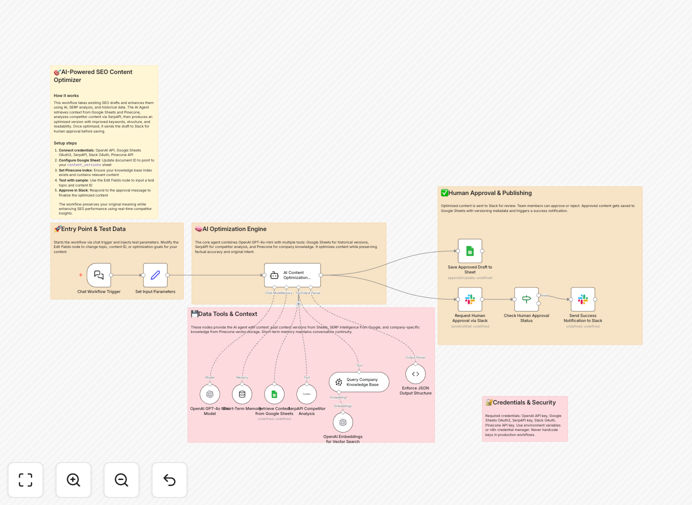
What This Workflow Does
Creating SEO-optimized content that actually ranks is a time-consuming, manual process. Writers juggle keyword research, competitor analysis, tone consistency, and editorial reviews—often across multiple tools. This leads to bottlenecks, inconsistent quality, and missed publishing deadlines.
This automation solves that by creating a seamless pipeline from draft to approved publication. It uses AI to enhance content based on real-time SERP data and historical performance, maintains version control in Google Sheets, and integrates a mandatory human approval step in Slack. The result is a scalable system that produces higher-quality content in half the time.
How It Works
Step 1: Trigger & Context Gathering
The workflow is triggered manually or via a chat command, passing the topic and content ID. It immediately retrieves previous versions from Google Sheets and pulls relevant company knowledge from a Pinecone vector database to ensure brand consistency.
Step 2: Competitive SERP Intelligence
Using SerpAPI, the workflow analyzes the top 10 ranking pages for the target keyword. It extracts headings, meta descriptions, featured snippets, and "People Also Ask" questions to understand what Google rewards for that search intent.
Step 3: AI-Powered Optimization
An AI agent (GPT-4o-mini) rewrites the draft using the gathered context and SERP insights. It improves structure, SEO elements, readability, and keyword coverage without altering the core message, outputting a strictly formatted JSON draft.
Step 4: Human-in-the-Loop Approval
The optimized draft is sent to a designated Slack channel. Team members can review, suggest edits, and click "Approve" or "Reject." The workflow pauses until approval is received, ensuring editorial control.
Step 5: Version Tracking & Publication
Once approved, the final version is saved back to Google Sheets with a new version number, SEO metadata, and a timestamp. A success notification is sent to Slack, closing the loop.
Pro tip: Use the Pinecone knowledge base to store your brand voice guidelines, product details, and common messaging. This ensures the AI's optimizations always align with your brand, even as your team scales.
Who This Is For
This workflow is ideal for content teams, marketing agencies, SaaS companies, and any business that relies on content for growth. Specifically:
- SEO Content Teams: Publishing multiple blog posts weekly who need to ensure every piece is optimized.
- Marketing Agencies: Managing content for multiple clients and needing scalable, consistent processes.
- In-House Marketing Departments: Looking to reduce the time from brief to publication while improving quality.
- Startups & Scale-ups: With limited resources that need to maximize the impact of every content piece.
- Editorial Teams: That require a clear audit trail of changes and approvals for compliance.
What You'll Need
- An OpenAI API key with access to GPT-4o-mini or a similar model.
- A Google Cloud Project with OAuth 2.0 credentials enabled for the Google Sheets API.
- A Slack workspace with a bot token possessing
chat:writeandchannels:readpermissions. - A SerpAPI account and API key for fetching search engine results.
- A Pinecone account with an existing vector index containing your company knowledge (optional but recommended).
- A pre-configured Google Sheet with columns for content ID, version, draft, SEO fields, and status.
- An active n8n instance (Cloud or self-hosted) to import and run the workflow.
Quick Setup Guide
Follow these steps to get this automation running in your n8n environment in under 30 minutes.
- Download & Import: Click the "Download Template" button above and import the JSON file into your n8n instance.
- Configure Credentials: In n8n, set up credentials for OpenAI, Google Sheets (OAuth2), Slack, SerpAPI, and Pinecone.
- Update Resource IDs: Replace the placeholder Google Sheet ID in the "Google Sheets" nodes with your own sheet's ID. Update the Slack channel ID for approvals.
- Test the Trigger: Use the "Set Input Parameters" node to simulate a content ID and topic. Execute the workflow once manually to verify data flow.
- Deploy & Automate: Once tested, activate the workflow. You can now trigger it via n8n's UI, schedule it, or connect it to a Chat Trigger for on-demand optimization.
Pro tip: Start by testing with a single, simple article topic. Verify the SERP data is relevant and the AI output matches your expectations before scaling to your full content calendar.
Key Benefits
Cut content production time by 60%. By automating research, initial optimization, and version tracking, your team can focus on strategy and high-level editing instead of manual tasks.
Improve SEO performance consistently. Every piece of content is analyzed against real-time competitor data, ensuring it's built to rank from the first draft, leading to better organic traffic over time.
Maintain flawless brand consistency. The integration of a knowledge base (Pinecone) means the AI always references your latest brand guidelines, product details, and tone of voice.
Create a transparent, auditable process. Every change is logged in Google Sheets with a version history. The Slack approval step provides clear accountability and prevents errors from going live.
Scale content output without scaling headcount. This system acts as a force multiplier for your existing team, allowing you to publish more high-quality content without hiring more writers.