Telegram AI Agent Bright Data Data Extraction n8n

AI-Powered Telegram Bot for Data Extraction with Bright Data MCP

Turn natural language requests into automated web scraping and data collection. This intelligent workflow connects Telegram, AI, and Bright Data's MCP tools to extract information on demand.

Download Template JSON · n8n compatible · Free
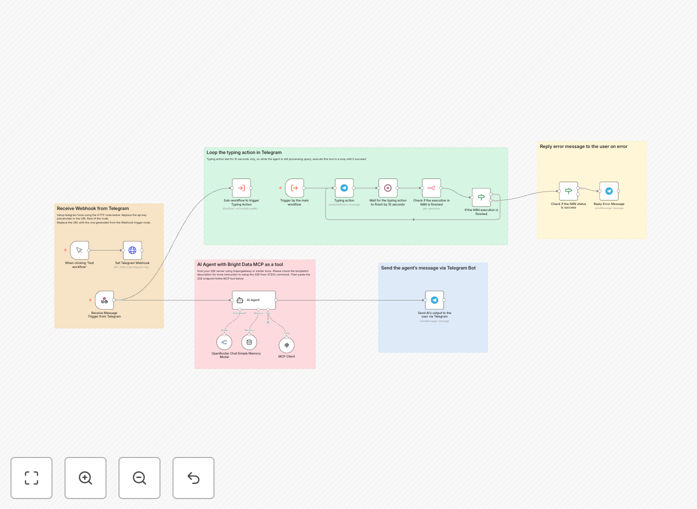
Visual diagram of an AI-powered Telegram bot workflow integrating with Bright Data MCP for data extraction

What This Workflow Does

This automation solves a common business bottleneck: the need for quick, reliable data from the web without technical complexity. Manually scraping websites, dealing with anti-bot measures, and structuring data is time-consuming and requires developer resources.

This template bridges that gap by creating an intelligent Telegram bot. Users simply message the bot what they need—like "get the latest prices for laptops on Amazon" or "find contact info for SaaS companies in Berlin." The AI interprets the request, selects the correct Bright Data MCP tool (like Web Unlocker or Scraping Browser), executes the extraction, and returns clean, structured data directly to the chat.

It transforms data gathering from a manual, technical task into a conversational, self-service tool for sales, marketing, research, and operations teams.

How It Works

The workflow acts as a smart middleware layer between a user's natural language request and powerful data extraction tools.

Step 1: User Request via Telegram

A team member sends a request to your dedicated Telegram bot. This could be a salesperson looking for lead information or a researcher needing competitor pricing.

Step 2: AI Intent Classification & Tool Selection

The message triggers the workflow. An AI agent (configured with OpenRouter or similar) analyzes the query. It references a list of available Bright Data MCP tools and determines which tool matches the request and what parameters are needed.

Step 3: Dynamic Tool Execution

The workflow dynamically calls the selected Bright Data MCP tool via a Server-Sent Events (SSE) server (like Supergateway or Smithery). This handles the complex web scraping, proxy rotation, and JavaScript rendering required to get the data.

Step 4: Data Processing & Response

The raw extracted data is cleaned, formatted, and sent back as a clear response in the Telegram chat. The workflow can also store the results in a database or Google Sheet for later use.

Pro tip: Use the built-in memory nodes to enable multi-turn conversations. The bot can remember context from previous messages, allowing for follow-up questions like "show me more details" or "filter to just the pricing."

Who This Is For

This template is ideal for businesses and teams that rely on external data but lack the time or technical expertise to build and maintain scrapers.

Market Research & Competitive Intelligence Teams: Quickly gather pricing, feature lists, or content from competitor websites on demand.

Sales & Business Development: Enrich leads by pulling company details, news, or key contacts directly from a Telegram chat while prospecting.

Content & SEO Agencies: Extract data for content ideation, backlink analysis, or SERP monitoring through simple commands.

Startups & Product Teams: Prototype data-driven features or gather user feedback from public forums and review sites without writing code.

Operations & Executive Assistants: Automate routine data lookup tasks, such as pulling shipping rates, event information, or supplier details.

What You'll Need

  1. An n8n instance: Either a self-hosted n8n setup or a n8n.cloud account.
  2. Telegram Bot Token: Created via BotFather on Telegram.
  3. AI Model API Key: An API key from OpenRouter, OpenAI, or a compatible provider for the agent.
  4. Bright Data MCP Access: A Bright Data account with API token. Optional Web Unlocker or Browser Zone credentials for advanced scraping.
  5. SSE Server: A running instance of Supergateway or a Smithery.ai configuration to connect n8n to Bright Data's MCP tools.

Quick Setup Guide

Follow these steps to import and configure this powerful automation.

  1. Import the Template: Download the JSON file using the button above. In your n8n dashboard, go to "Workflows" and use the "Import from File" option to load it.
  2. Configure Bright Data MCP: Set up your SSE server connection. You can run Supergateway on a cloud service (Render, Railway) or locally. Input your Bright Data API token and zone details into the environment variables.
  3. Set Up the AI Agent: In the "AI Agent" node, add your OpenRouter (or other model) API key. Adjust the system prompt if needed to better fit your use case.
  4. Connect Telegram: In the "HTTP Request" node labeled "Set Telegram Webhook," replace the placeholder with your actual bot token and the webhook URL generated by n8n's Webhook node.
  5. Test & Activate: Turn on the workflow. Send a test message to your Telegram bot (e.g., "Find the CEO of GrowwStacks"). The bot should process the request and return data.

Important: For production use, consider adding error handling nodes, rate limiting, and user authentication to the Telegram bot to manage access and ensure reliability.

Key Benefits

Democratize Data Access: Empower non-technical team members to get the data they need instantly, without waiting for a developer or learning complex tools.

Reduce Scraping Overhead: Bright Data's infrastructure handles proxies, CAPTCHAs, and blocking, so you get reliable data without maintaining your own scraping stack.

Scale Conversations into Automation: Turn ad-hoc data requests from team chats into automated, repeatable processes. What starts as a one-off question becomes a scalable workflow.

Improve Data Accuracy & Speed: Eliminate manual copy-paste errors and reduce data gathering time from hours to seconds, leading to faster decision-making.

Future-Proof Your Tech Stack: This template uses the emerging MCP standard, making it easier to integrate future AI-native tools and data sources as the ecosystem grows.

Frequently Asked Questions

Common questions about AI-powered data extraction and automation

An AI-powered Telegram bot for data extraction is an automated system that allows users to request specific data or information through natural language messages on Telegram. The bot uses AI to understand the request, then triggers a backend workflow (using tools like Bright Data MCP) to scrape, collect, and return the data directly in the chat. It turns complex web scraping and data gathering into simple conversational commands.

This eliminates the need for manual searches, writing custom scripts, or using multiple tools. For example, a salesperson can ask, "Find the latest funding round for tech startups in London," and receive a formatted list within seconds.

Bright Data MCP (Model Context Protocol) is a suite of tools that provides structured access to web data at scale. It helps automation by offering reliable proxies, unlocking mechanisms, and data collection APIs that handle anti-bot measures. In this workflow, MCP tools are integrated so the AI can dynamically select and execute the right data extraction method based on the user's request, bypassing the need for manual scripting.

Think of it as a toolbox for the internet. Instead of your team figuring out how to scrape each unique website, MCP provides standardized, powerful tools (like a "Scraping Browser" or "Web Unlocker") that the AI can use on command. This dramatically reduces development time and increases success rates for data collection projects.

Key business use cases include competitive intelligence gathering, lead generation and enrichment, market research, price monitoring, content aggregation for reports, and customer support automation. Teams can request real-time data on competitors, prospects, or market trends via a simple Telegram message instead of running manual searches or building custom scrapers.

For instance, a marketing team can monitor competitor blog posts and social mentions. A finance team can track commodity prices or currency rates. An executive assistant can pull together briefing documents from various news sources before a meeting. The common thread is turning unstructured web data into actionable business intelligence on demand.

No, you don't need advanced coding skills. The template is built in n8n, a visual workflow automation platform. Basic technical knowledge is helpful for configuring API keys and webhook URLs, but the logic is pre-built. The AI handles the interpretation of natural language, and Bright Data MCP tools handle the complex data extraction, so you interact purely through conversation.

The setup involves more configuration than coding. You'll need to obtain API keys, deploy a small gateway server (one-click on many platforms), and connect the nodes. Detailed instructions are included, and many steps can be completed by copying and pasting commands or URLs.

The workflow uses an AI agent (like OpenRouter) that is prompted with the available Bright Data MCP tools. When a user sends a message, the AI classifies the intent, matches it to the appropriate tool (e.g., 'scrape product prices from X website'), and structures the parameters needed. The workflow then executes the tool and returns the results. The AI acts as a smart router between the user's request and the technical execution.

This is powered by a system prompt that describes each tool's function. For example, the AI learns that a "Scraping Browser" tool is for interactive sites, while a "Dataset" tool is for querying pre-collected data. This allows it to make intelligent decisions without you having to specify the technical method.

Telegram provides a familiar, accessible, and mobile-friendly interface for teams. It supports rich media, group chats, and has a robust bot API. Using Telegram means your data extraction tool is always in your pocket, allows for easy sharing of results within teams, and reduces the need for a custom dashboard. It's low-friction and enables quick, conversational interaction with automation.

Compared to building a web app, a Telegram bot has near-zero onboarding—users already know how to chat. It also enables asynchronous, persistent conversations where context is maintained, making it ideal for complex, multi-step data inquiries that might evolve over time.

Yes, absolutely. The core architecture—AI interpreting a request, selecting a tool, and executing it—is platform-agnostic. The Telegram node in this template can be replaced with a Slack, Discord, WhatsApp, or even a custom webhook trigger. The business logic remains the same, making it easy to deploy the same intelligent data extraction assistant on the communication tools your team already uses.

This flexibility is a key strength. You can start with Telegram for simplicity and later expand to a Slack bot for internal teams or integrate it into a customer-facing chat widget. The n8n platform has dedicated nodes for all major messaging services, allowing for a straightforward swap.

Yes, GrowwStacks specializes in building custom AI automation solutions tailored to specific business processes. While this template provides a foundation, we can design a system that integrates with your internal data sources, uses proprietary tools, operates at your required scale, and includes custom logic for data validation, formatting, and delivery. We handle the complexity so you get a turnkey solution.

Our team can help you scope the project, select the right combination of AI models and data tools, build robust error handling and monitoring, and deploy the automation into your existing infrastructure. This is ideal for businesses that need to automate complex, high-value data workflows that go beyond generic web scraping.

  • Integration with internal CRMs, databases, and APIs
  • Custom data parsing, enrichment, and reporting logic
  • High-volume, reliable scraping with managed infrastructure
  • Ongoing support and optimization as your needs change

Need a Custom AI Data Extraction Automation?

This free template is a starting point. Our team builds fully tailored automation systems for your specific business needs.