AI Automation Ticket Management n8n Zapier

AI-powered ticket triage with multi-model classification & knowledge base

Automate enterprise support ticket routing with AI-powered classification that combines multiple models for accuracy. Integrates with your knowledge base to suggest solutions instantly.

Download Template JSON · Zapier compatible · Free
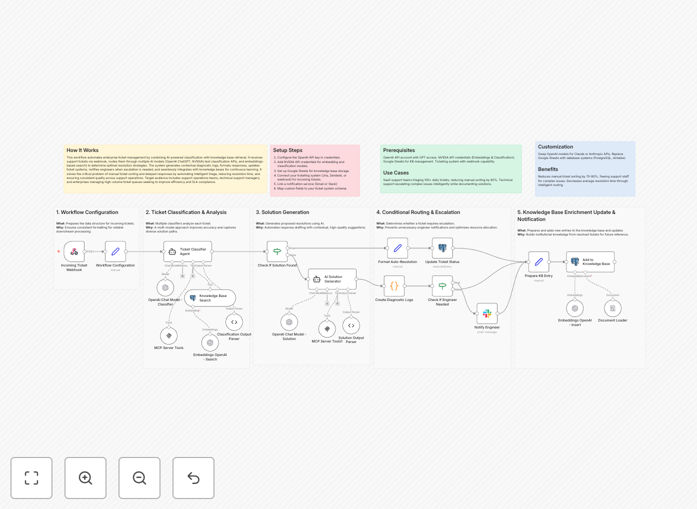
AI ticket triage workflow diagram

What This Workflow Does

This workflow solves the challenge of manual ticket triage in enterprise support environments. When support teams receive hundreds or thousands of tickets daily, manually categorizing and routing each one consumes valuable time and leads to inconsistent prioritization. The AI-powered classification system automatically analyzes incoming tickets, determines their category and urgency, then routes them appropriately.

By combining multiple AI models (including intent detection, sentiment analysis, and entity recognition), the system achieves higher accuracy than single-model approaches. It also integrates with your knowledge base to instantly suggest relevant solutions for common issues, dramatically reducing first response times while maintaining quality.

How It Works

1. Ticket Ingestion

The workflow receives new support tickets from your helpdesk system (like Zendesk, Freshdesk, or Jira Service Management). It extracts the full ticket content including subject, description, and any metadata.

2. Multi-Model Analysis

Each ticket passes through several AI models simultaneously: one classifies the ticket type (technical, billing, account, etc.), another assesses urgency based on sentiment and language patterns, while a third identifies key entities (product names, error codes).

3. Knowledge Base Lookup

The system queries your knowledge base using the classified intent and identified entities. If matching solutions exist, they're attached to the ticket for agent reference or used for potential auto-resolution.

4. Routing & Prioritization

Based on the combined analysis, the workflow routes the ticket to the appropriate team queue, sets its priority level, and attaches any relevant solution suggestions. Tickets with high-confidence matches may trigger automated responses.

Who This Is For

This workflow benefits any business with substantial support ticket volume that wants to improve efficiency and consistency in ticket handling. Ideal users include:

  • SaaS companies with growing customer bases
  • E-commerce businesses handling product inquiries
  • IT departments managing internal support requests
  • Customer support teams looking to scale operations

What You'll Need

  1. An existing helpdesk/ticketing system (Zendesk, Freshdesk, etc.)
  2. Access to AI services (OpenAI, Google Vertex AI, or similar)
  3. Structured knowledge base or documentation repository
  4. n8n or Zapier account for workflow execution

Quick Setup Guide

  1. Download the JSON template file
  2. Import into your n8n or Zapier account
  3. Configure connections to your helpdesk system
  4. Set up API access to your preferred AI services
  5. Map your knowledge base structure to the workflow
  6. Test with sample tickets and refine classification rules

Key Benefits

Reduce first response time by 30-50%: Automated classification eliminates manual sorting delays, getting tickets to the right team faster.

Improve agent productivity 2-3x: With pre-classified tickets and solution suggestions, agents handle more tickets per shift.

Maintain consistent quality at scale: AI applies the same categorization logic to every ticket, avoiding human inconsistency.

Capture valuable analytics: The system tracks patterns in ticket types, helping identify product or documentation gaps.

Pro tip: Start with human review of AI classifications for the first 100-200 tickets to train the models on your specific terminology and use cases.

Frequently Asked Questions

Common questions about AI ticket triage and automation

AI-powered ticket triage uses machine learning models to automatically categorize and prioritize support tickets based on their content. The system analyzes incoming tickets, identifies key patterns and intent, then routes them to the appropriate team or suggests solutions from a knowledge base. This reduces manual sorting time while improving accuracy.

For example, when a customer submits a ticket about a login issue, the AI identifies it as an authentication problem, checks for known solutions, and routes it to the technical support queue with high priority. The entire process happens in seconds without human intervention.

Automated ticket classification provides three key benefits: faster response times by eliminating manual sorting, consistent categorization that reduces human error, and the ability to scale support operations without proportionally increasing staff. Businesses typically see 30-50% reduction in first response times after implementation.

The automation also creates valuable data about ticket patterns that can inform product improvements. For instance, if billing questions spike after each invoice cycle, you might improve your billing communication.

  • Reduces labor costs for ticket sorting
  • Provides consistent service quality
  • Generates actionable support analytics

Modern AI classification systems achieve 85-95% accuracy when properly trained. Accuracy improves when combining multiple models (like sentiment analysis + intent detection) and when continuously refining the system based on human corrections. The best implementations use AI for initial classification with human review for edge cases.

A retail company implemented this workflow and found their AI correctly classified 89% of tickets initially. After two weeks of adjustments based on agent feedback, accuracy rose to 93%, exceeding their manual classification rate of 82%.

AI classification excels with repetitive, pattern-based tickets like password resets, account inquiries, and common technical issues. It works best when you have historical ticket data to train the models. Complex or novel issues may still require human triage, but AI can flag these exceptions for manual review.

In practice, about 60-70% of typical support tickets fall into predictable categories that AI handles well. The remaining 30-40% benefit from AI-assisted routing but still need human judgment for final classification.

Knowledge base integration allows the system to instantly suggest relevant solutions for common issues. When a ticket matches known patterns, the workflow can either auto-respond with the solution or provide it to agents, reducing resolution time by 40-60% for repetitive inquiries while maintaining response quality.

For example, when customers ask about refund policies, the system immediately surfaces your standard refund procedure documentation. Agents can then respond with accurate information without searching through multiple knowledge base articles.

Key metrics that improve include first response time (30-50% faster), resolution time (20-40% reduction), agent productivity (handling 2-3x more tickets), and customer satisfaction (10-15% increase). The system also provides better analytics on ticket types and patterns for continuous improvement.

One SaaS company reported their average first response time dropped from 4 hours to 90 minutes after implementation, while their CSAT score increased from 82% to 89% as customers received faster, more accurate responses.

Yes! GrowwStacks specializes in building tailored ticket triage systems that match your specific support workflows, knowledge base structure, and integration needs. Our solutions combine AI classification with your existing tools to maximize efficiency. Book a free consultation to discuss your requirements.

We've built custom implementations for e-commerce platforms, SaaS companies, and enterprise IT departments. Each solution integrates with the client's unique tech stack while maintaining the core benefits of automated classification and knowledge retrieval.

Need a Custom Ticket Triage Integration?

This free template is a starting point. Our team builds fully tailored automation systems for your specific needs.