Zendesk OpenAI Supabase RAG n8n

AI-powered Zendesk support responses with RAG, OpenAI, and Supabase knowledge base

Automate first responses to new tickets with AI-generated answers from your knowledge base

Download Template JSON · n8n compatible · Free
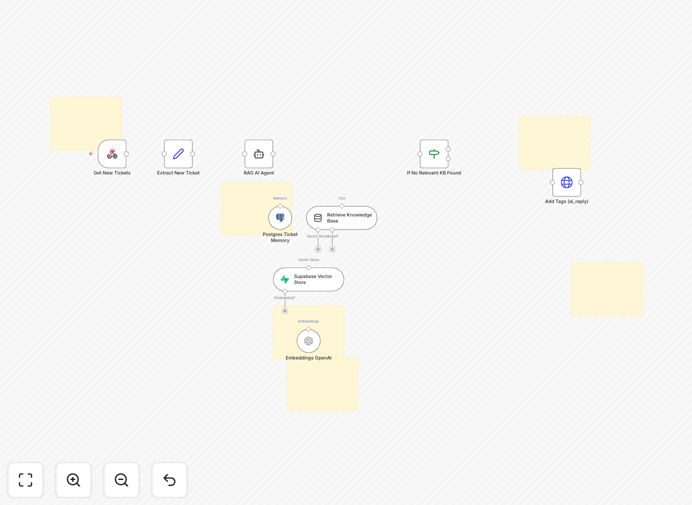
AI-powered Zendesk support workflow diagram

What This Workflow Does

This n8n workflow automates the first response to new Zendesk support tickets by leveraging AI and your company's knowledge base stored in Supabase. Using Retrieval-Augmented Generation (RAG) with OpenAI, it provides accurate, context-aware responses that reduce response times while maintaining quality.

The system automatically analyzes incoming tickets, searches your knowledge base for relevant information, and generates human-like responses that can be reviewed by agents before sending or automatically posted based on your configuration. This cuts down on repetitive ticket responses while ensuring answers stay aligned with your documentation.

How It Works

1. New ticket detection

The workflow triggers when a new ticket is created in Zendesk via webhook. It captures all relevant ticket details including customer information, subject, and description.

2. Knowledge base retrieval

The system queries your Supabase knowledge base using semantic search to find the most relevant articles and documentation related to the ticket content.

3. AI response generation

OpenAI processes the ticket content along with retrieved knowledge base content to generate a contextually appropriate response using RAG techniques for accuracy.

4. Response posting

The generated response is either automatically posted to Zendesk or queued for agent review, depending on your configuration settings.

Who This Is For

This workflow is ideal for customer support teams using Zendesk who want to:

  • Reduce first response times for common questions
  • Maintain consistent answers across support agents
  • Leverage existing knowledge base content more effectively
  • Scale support operations without proportionally increasing staff
  • Provide 24/7 initial responses even when agents aren't available

What You'll Need

  1. An active Zendesk account with admin access
  2. OpenAI API key (GPT-3.5 or GPT-4)
  3. Supabase database with your knowledge base content
  4. n8n instance (self-hosted or cloud)
  5. Basic understanding of API connections

Quick Setup Guide

  1. Download the JSON template file
  2. Import into your n8n instance
  3. Configure Zendesk webhook connection
  4. Connect your OpenAI API credentials
  5. Set up Supabase database connection
  6. Test with sample tickets and refine prompts
  7. Deploy to production environment

Key Benefits

Reduce first response time by 80%: AI can generate initial responses within seconds of ticket creation, dramatically improving customer satisfaction metrics.

Cut support costs by 30-50%: Automating common queries allows your team to focus on complex issues that truly require human expertise.

Improve answer consistency: Every customer gets responses based on your latest knowledge base content, eliminating outdated or inconsistent information.

Scale support effortlessly: Handle ticket volume spikes without additional hiring by automating initial responses.

Continuous improvement: The system learns from your knowledge base updates automatically, always providing the most current information.

Frequently Asked Questions

Common questions about AI-powered customer support automation

AI enhances support quality by providing consistent, accurate responses based on your knowledge base. The RAG approach ensures answers are grounded in your documentation rather than generic information. This maintains brand voice and reduces errors while allowing human agents to focus on complex cases.

For example, when a customer asks about a specific product feature, the AI retrieves exact documentation rather than making assumptions. This leads to more precise answers and fewer follow-up questions. The system also learns from agent corrections to continuously improve.

  • Reduces human error in repetitive responses
  • Maintains consistent brand voice and terminology
  • Provides citations from your knowledge base

AI automation works best for common, well-documented questions that represent 40-60% of typical support volume. These include FAQs, password resets, order status checks, basic troubleshooting, and policy questions. The system excels at information retrieval from structured knowledge bases.

A SaaS company might automate responses to common feature questions, while an ecommerce business could handle shipping inquiries. Complex or emotional issues still require human agents. The key is identifying high-volume, low-complexity tickets that follow predictable patterns.

  • Start with your top 20 most common questions
  • Focus on factual rather than emotional inquiries
  • Gradually expand as confidence in the system grows

Retrieval-Augmented Generation (RAG) combines information retrieval with text generation. Instead of relying solely on the AI's training data, it first searches your knowledge base for relevant content, then generates responses based on that specific information. This produces more accurate, up-to-date answers than standard AI alone.

For instance, if your product documentation changes, RAG immediately reflects those updates in responses. Standard AI might continue giving outdated information until its next training cycle. RAG also provides source references, increasing transparency and allowing agents to verify information.

  • Grounds responses in your specific documentation
  • Updates instantly when knowledge base changes
  • Reduces hallucination of incorrect information

AI support automation typically delivers ROI within 3-6 months through reduced handling time, increased agent productivity, and improved customer satisfaction. Companies see 30-50% reductions in first response time and 20-40% decreases in ticket volume as customers get instant, accurate answers to common questions.

A mid-sized business handling 5,000 tickets/month might save $15,000-$25,000 monthly in support costs while improving CSAT scores by 10-15 points. The system also scales effortlessly during peak periods without additional staffing costs.

  • Reduces cost per ticket by 30-70%
  • Improves agent satisfaction by eliminating repetitive work
  • Scales support capacity instantly during surges

Brand consistency comes from three key elements: training the AI on your existing support responses, structuring prompts with brand guidelines, and grounding responses in your knowledge base. The RAG approach ensures answers reflect your documentation's tone and terminology rather than generic phrasing.

You can further refine responses by creating style guides for the AI, setting response templates for common questions, and implementing human review for sensitive topics. Over time, the system learns preferred phrasing patterns from agent approvals and edits.

  • Provide examples of ideal responses during setup
  • Create brand voice guidelines for the AI
  • Implement human review for high-stakes communications

Yes, modern AI like GPT-4 can process and respond in multiple languages with high accuracy. When combined with a multilingual knowledge base, the system can provide support in dozens of languages while maintaining consistency across all translations. This eliminates the need for separate support teams for each language.

A global ecommerce company might use this to handle Spanish, French, and German tickets with the same workflow. The AI detects the ticket language automatically and responds appropriately, while supervisors can monitor quality across all languages through translation tools.

  • Detects and responds in customer's preferred language
  • Maintains single source of truth in knowledge base
  • Reduces need for multilingual support staff

Absolutely! GrowwStacks specializes in building tailored AI automation solutions for customer support teams. We can create a custom workflow that integrates with your specific tech stack, follows your unique business processes, and addresses your particular support challenges.

Our team will analyze your ticket history, knowledge base structure, and support goals to design an AI solution that maximizes efficiency while maintaining your brand voice. We handle everything from initial consultation to deployment and ongoing optimization.

  • Custom-built for your support workflows
  • Seamless integration with your existing systems
  • Ongoing tuning and improvement

Need a Custom AI Support Automation?

This free template is a starting point. Our team builds fully tailored automation systems for your specific needs.