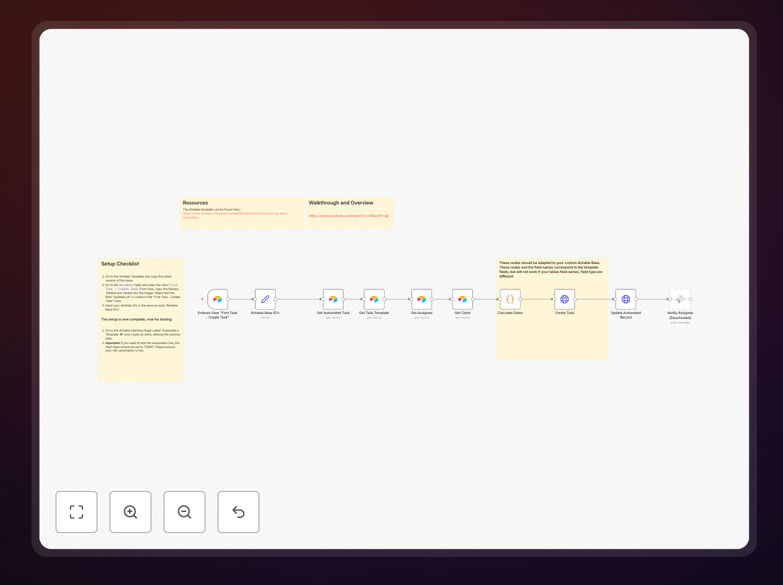
What This Workflow Does
Manual task creation is one of the biggest time-wasters in project management. This automation solves that problem by automatically generating recurring tasks in Airtable based on your predefined schedules. Whether you need weekly team check-ins, monthly reporting, quarterly reviews, or custom date-based tasks, this workflow handles it all without human intervention.
The template connects to your Airtable base, reads configuration tables that define task frequency, assignees, descriptions, and due dates, then creates the appropriate tasks at the right time. It's particularly valuable for agencies, product teams, operations departments, and any business that operates on regular cycles but struggles with manual task management.
How It Works
1. Schedule Trigger
The workflow activates on a schedule you define—daily, weekly, or at any interval. It checks if any recurring tasks need to be created based on the current date and your configuration.
2. Configuration Reading
It reads from your Airtable configuration table that defines all recurring task templates: task names, descriptions, assigned team members, frequency (daily, weekly, monthly, custom), and any specific conditions.
3. Date Calculation & Logic
The automation calculates the next occurrence date based on your frequency rules, accounting for weekends, holidays, or specific day-of-week requirements. It applies your business logic to determine exactly when and what to create.
4. Task Creation in Airtable
New task records are created in your main Airtable tasks table with all the correct fields populated: title, description, assignee, due date, priority, and any custom fields your process requires.
5. Notification & Logging
Optionally, the workflow can send notifications to Slack, email, or other channels to inform teams about newly created tasks. It also logs all activities for audit purposes.
Who This Is For
This automation is ideal for project managers, team leads, operations specialists, and business owners who use Airtable for task and project management. Specifically:
- Marketing agencies managing recurring client deliverables and campaign schedules
- Software teams handling regular sprint planning, code reviews, and maintenance tasks
- Operations teams overseeing weekly equipment checks, monthly reporting, or quarterly audits
- Consultants & freelancers managing client follow-ups, invoice reminders, and project milestones
- HR departments automating employee onboarding sequences, review cycles, and training schedules
What You'll Need
- An Airtable account with a base containing your tasks table and a configuration table for recurring task templates
- n8n instance (cloud or self-hosted) with Airtable node credentials configured
- Basic understanding of your task frequency requirements (daily, weekly, monthly, custom patterns)
- Your Airtable API key and base ID for connection
- Optional: Slack, email, or other notification channels if you want automated alerts
Pro tip: Start with just 2-3 critical recurring tasks to test the automation. Once you're confident it's working correctly, gradually add more task types. This minimizes risk and helps you refine the process.
Quick Setup Guide
- Download the template using the button above and import it into your n8n instance
- Configure Airtable connections by adding your API key and base ID to the Airtable nodes
- Map your tables by updating the table names and field mappings to match your Airtable base structure
- Set the schedule by adjusting the Schedule Trigger node to run at your preferred frequency (daily is common for recurring tasks)
- Test with a single task by running the workflow manually first to ensure it creates tasks correctly
- Activate the workflow once testing is complete and monitor the first few automatic runs
Key Benefits
Save 5-15 hours per week that would otherwise be spent manually creating and assigning recurring tasks. For a team of 5, this translates to 25-75 hours monthly recovered for higher-value work.
Eliminate human error in task scheduling. Never miss a weekly report, forget a monthly invoice, or assign a task to the wrong person again. The automation follows your rules perfectly every time.
Improve team accountability with consistent, timely task creation. Team members receive their assignments exactly when needed, with all relevant details pre-populated for clarity.
Scale your processes without adding administrative overhead. As your business grows and task complexity increases, the automation handles the additional load without requiring more management time.
Create perfect audit trails of all task creation activities. Know exactly when each recurring task was generated, by which automation, and with what parameters for compliance and reporting.