What This Workflow Does
Managing a cohesive, engaging social media presence across multiple platforms is a massive time sink. Creating platform-specific content, scheduling posts, analyzing performance, and adjusting strategy can consume dozens of hours each week. This workflow eliminates that manual burden by acting as a virtual, AI-powered social media department.
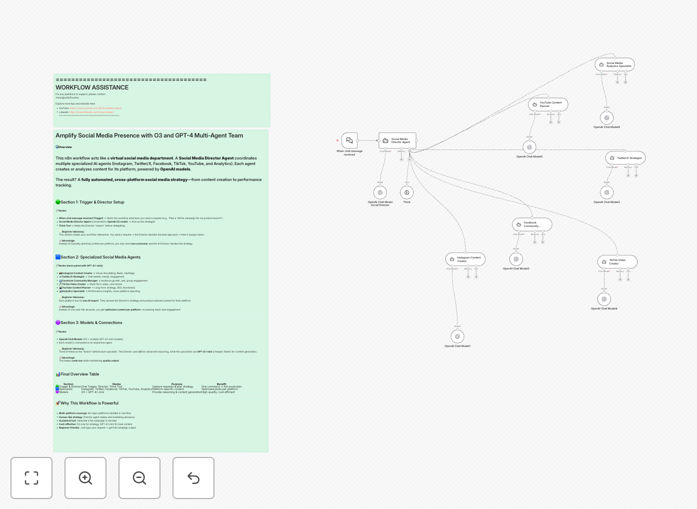
You provide a single strategic command (e.g., "Launch a product awareness campaign for our new SaaS tool"). The workflow's Social Media Director Agent (powered by OpenAI's O3 model) analyzes the request, devises a cross-platform strategy, and delegates tasks to a team of specialized AI agents. Each agent—Instagram Creator, Twitter Strategist, Facebook Manager, TikTok Video Creator, YouTube Planner, and Analytics Specialist—generates optimized content and insights for its specific platform using GPT-4.1-mini.
The result is a complete, ready-to-execute social media campaign generated in minutes, not days. It bridges the gap between high-level strategy and granular, platform-specific execution automatically.
How It Works
The automation mimics a human marketing team's workflow but at machine speed and scale.
1. Strategy & Briefing
The process starts when you send a chat message with your campaign goal. The Social Media Director Agent receives this prompt. It uses the advanced reasoning capabilities of the O3 model to break down your objective, identify target audiences per platform, define key messages, and establish success metrics.
2. Task Delegation & Specialized Creation
The Director uses a Think Tool node to reason through the best approach, then dispatches specific instructions to each platform agent. For example, it tells the Instagram agent to focus on visual storytelling and Reels concepts, while instructing the Twitter agent to craft viral tweet threads. Each specialist agent uses the cost-effective GPT-4.1-mini model to generate content that matches both the overall strategy and its platform's unique format and audience expectations.
3. Consolidation & Output
All generated content—captions, visual ideas, video concepts, hashtag sets, and performance analysis frameworks—is compiled into a unified report. The workflow outputs a structured campaign plan you can review, edit, and then push to your social media management tools or calendars for publishing.
Who This Is For
This template is ideal for small business owners, marketing managers, content creators, and solo entrepreneurs who need to maintain an active, professional social media presence but lack a dedicated team. It's perfect for agencies managing multiple client accounts, startups with limited marketing budgets, and anyone who wants to experiment with AI-driven content strategy without hiring specialists for each platform.
If you're currently spending hours each week brainstorming posts, copying content between platforms, or struggling to keep up with trends, this automation provides a force multiplier for your efforts.
What You'll Need
- An n8n instance (cloud or self-hosted).
- An OpenAI API key with access to the O3 and GPT-4.1-mini models.
- Basic understanding of your social media goals and brand voice.
- (Optional) Connections to social media publishing tools like Buffer, Hootsuite, or direct platform APIs to automate posting.
Pro tip: Start by using the workflow in "planning mode" for a week. Let it generate the content and strategy, but review and post manually. This lets you refine the AI's output and ensure it aligns perfectly with your brand before full automation.
Quick Setup Guide
- Download & Import: Click the "Download Template" button above and import the JSON file into your n8n workspace.
- Configure Credentials: In the n8n editor, add your OpenAI API key to the credential manager and connect it to all the AI Model nodes (Director and each specialist).
- Customize the Trigger: Set up the initial "When chat message received" trigger. This could be a manual trigger for testing, or connect it to a Slack/Discord channel, a form submission, or a schedule.
- Tailor the Prompts: Open each AI Agent node and adjust the system prompts. Input your brand details, tone of voice, target audience, and any specific campaign rules.
- Test & Iterate: Run the workflow with a sample command like "Plan a one-week content series for our new eco-friendly product launch." Review the output, tweak the agent instructions, and run again until the quality meets your standards.
- Connect to Destinations (Optional): Add nodes after each content agent to send the output to your preferred tools—like a Google Sheet for review, a Notion page for approval, or directly to social media scheduling APIs.
Key Benefits
Eliminate Content Brainstorming Bottlenecks: Go from a blank slate to a multi-platform content calendar in under 5 minutes. The AI team handles the ideation, allowing you to focus on high-level strategy and community engagement.
Maintain Consistent Brand Voice Everywhere: The Director Agent ensures all platform-specific content adheres to your core messaging, creating a cohesive brand experience whether a user sees you on TikTok or LinkedIn.
Dramatically Reduce Operational Costs: This system replicates the output of a small social media team. For the cost of an OpenAI API subscription, you save thousands per month in potential salaries or agency fees.
Scale Content Production Instantly: Launching on a new platform? Simply add another specialized agent to the workflow. Need a last-minute campaign for a trending topic? Trigger the workflow and get a full plan in minutes.
Data-Informed Strategy from the Start: The integrated Analytics Specialist agent provides performance frameworks and metrics tracking suggestions, ensuring every campaign is built with measurement in mind.