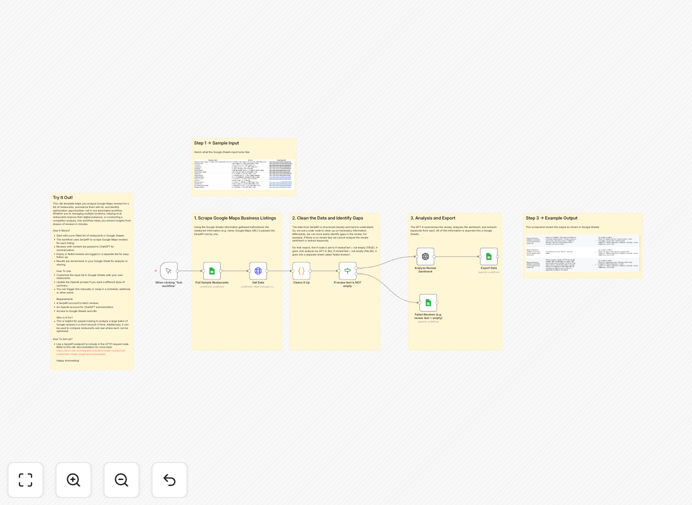
What This Workflow Does
Managing customer feedback across multiple Google Business listings is a manual, time-intensive task that most businesses neglect. This automation solves that by turning scattered reviews into structured, actionable insights.
The workflow systematically collects Google Maps reviews for a list of restaurants (or any businesses), uses AI to summarize the sentiment and key themes, and logs everything in a Google Sheet for easy analysis. It identifies common complaints, highlights praise, and flags locations needing immediate attention—transforming raw feedback into a strategic asset.
Whether you're a multi-location restaurant group, a local marketing agency managing client reputations, or conducting competitor research, this workflow delivers consistent insights at scale, saving 10–20 hours of manual review reading per month.
How It Works
Step 1: Input & Trigger
The workflow starts with a Google Sheet containing your list of business names and locations. You can trigger it manually, on a schedule (e.g., weekly), or via webhook.
Step 2: Scrape Reviews via SerpAPI
For each business, an HTTP Request node calls the SerpAPI endpoint to fetch the latest Google Maps reviews—including text, star rating, date, and reviewer name.
Step 3: Filter & Prepare Data
The workflow filters out empty or irrelevant reviews, structures the data, and prepares batches for AI processing.
Step 4: AI Summarization with GPT-4
Reviews with substantial content are sent to OpenAI's GPT-4 with a custom prompt asking for sentiment analysis, theme categorization, and actionable insights.
Step 5: Output to Google Sheets
Summarized insights, raw ratings, and any failed queries are written back to separate tabs in your Google Sheet, creating a live dashboard of customer feedback.
Who This Is For
Multi-location businesses: Restaurants, retail chains, service providers who need consolidated feedback across all outlets.
Marketing & Reputation Agencies: Teams managing Google Business Profiles for multiple clients who require efficient reporting.
Competitive Intelligence Analysts: Professionals who systematically track competitor strengths and weaknesses via public reviews.
Product Managers & CX Teams: Anyone responsible for improving customer experience based on authentic, unsolicited feedback.
What You'll Need
- SerpAPI account: For programmatically accessing Google Maps review data.
- OpenAI API key: For GPT-4 summarization and analysis capabilities.
- Google Sheets access: A Google account to read input lists and write results.
- n8n instance: Self-hosted or cloud account to run the workflow.
Pro tip: Start with a small batch of 5–10 locations to test the workflow and refine your AI prompt before scaling to hundreds of listings. Adjust the prompt to focus on industry-specific themes (e.g., "wait time," "food freshness," "staff friendliness").
Quick Setup Guide
- Download the template using the button above and import it into your n8n instance.
- Create your input Google Sheet with columns for Business Name and Location/Address.
- Configure credentials: Add your SerpAPI and OpenAI API keys in n8n's credentials management.
- Map your Google Sheet: Update the Google Sheets node with your spreadsheet ID and tab names.
- Test with one business: Run the workflow manually for a single entry to verify data flow and AI output.
- Schedule automation: Set the trigger to run weekly or monthly for continuous insight gathering.
Key Benefits
Save 15–20 hours monthly by eliminating manual review reading and note-taking. What used to be a tedious weekly task now runs unattended.
Uncover hidden trends across locations that individual managers might miss. Spot regional issues or nationwide praise patterns.
Improve response times to negative feedback by automatically flagging low-rated reviews for immediate follow-up.
Benchmark against competitors by inputting their locations and comparing sentiment scores and common themes.
Create data-driven reports for stakeholders with clean, AI-summarized insights instead of raw review dumps.