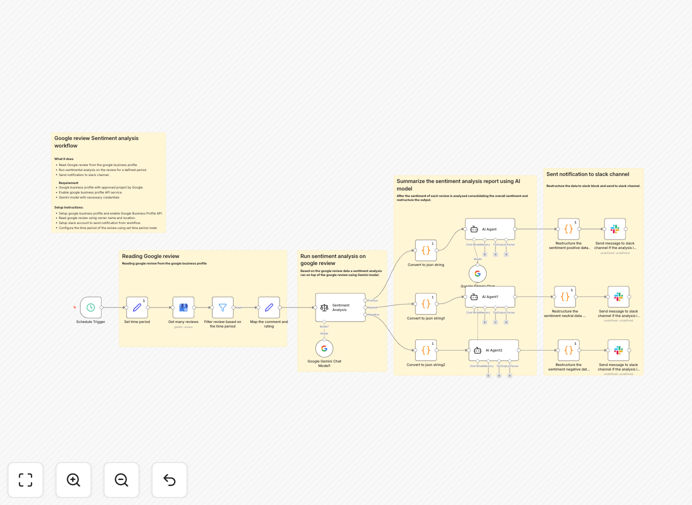
What This Workflow Does
This automation solves the critical business problem of manually monitoring and interpreting customer reviews. Businesses with Google Business Profiles receive reviews daily, but without systematic analysis, valuable feedback gets lost or reactions are delayed. This workflow automatically fetches new reviews, applies AI-powered sentiment analysis to understand customer emotions, and delivers structured reports directly to your team's Slack channel.
The system transforms raw review data into actionable intelligence. It identifies positive sentiment trends you can amplify, detects negative patterns requiring immediate attention, and provides quantitative metrics about your reputation performance. Instead of team members checking reviews sporadically, everyone receives consistent, analyzed insights where they already collaborate.
How It Works
Step 1: Fetch Google Business Reviews
The workflow connects to the Google Business Profile API using your authenticated credentials. It retrieves reviews for your specified business location within your chosen time period—whether daily, weekly, or custom intervals. Each review includes the customer's text, star rating, timestamp, and other metadata.
Step 2: Analyze Sentiment with Gemini AI
Each review passes through Google's Gemini AI model configured for sentiment analysis. The AI evaluates emotional tone, identifies key themes (service, product, pricing), and assigns sentiment scores. It detects nuanced language that simple keyword matching would miss, providing deeper understanding than basic positive/negative categorization.
Step 3: Structure Insights into JSON Summary
The analyzed data consolidates into a structured JSON format containing metrics like average sentiment score, positive/negative ratio, trending topics, and representative quotes. This standardized output enables consistent reporting and easy integration with other systems like CRMs or dashboards.
Step 4: Format for Slack Block Kit Delivery
The JSON data transforms into Slack's Block Kit format—a rich messaging structure that creates visually appealing, interactive reports within Slack. This formatting includes sections, dividers, sentiment indicators, and actionable buttons for team engagement.
Step 5: Deliver to Designated Slack Channel
The formatted report sends automatically to your chosen Slack channel, notifying relevant team members. The workflow can tag specific departments based on sentiment patterns—for example, alerting customer service about negative service feedback or marketing about positive product mentions.
Pro tip: Configure the workflow to run daily at 9 AM so your team starts each day with fresh customer insights. Set up separate Slack channels for different sentiment levels—critical alerts for negative reviews in one channel, positive highlights for morale in another.
Who This Is For
This automation benefits any business with a Google Business Profile seeking to systematize reputation management. Ideal users include:
- Multi-location businesses needing consolidated review monitoring across all locations
- Customer service teams requiring immediate alerts about negative experiences
- Marketing departments tracking brand sentiment and competitive positioning
- Small business owners without dedicated staff for daily review checking
- Service industries (restaurants, retail, hospitality) where online reputation directly impacts revenue
- Product managers gathering customer feedback for development prioritization
What You'll Need
- Google Business Profile API access with project approval in Google Cloud Console
- Enabled Google Business Profile API service for your Google Cloud project
- Gemini API credentials from Google AI Studio with appropriate quota
- Slack workspace with permissions to create incoming webhooks or install apps
- Designated Slack channel for receiving sentiment reports
- n8n instance (cloud or self-hosted) with network access to required APIs
Quick Setup Guide
- Import the template into your n8n instance using the downloaded JSON file
- Configure Google Business Profile credentials in the first node with your API keys and business location ID
- Set the time period in the Schedule Trigger node—daily is recommended for most businesses
- Connect your Gemini AI credentials in the sentiment analysis node with your API key
- Add Slack webhook or bot token in the final node, specifying your target channel
- Test with historical data by temporarily adjusting the time period to analyze past reviews
- Activate the workflow and monitor initial reports in Slack for accuracy
Key Benefits
Save 5-10 hours weekly previously spent manually reading and categorizing reviews. This automation eliminates the tedious task of checking multiple platforms, allowing staff to focus on acting on insights rather than gathering them.
Respond 80% faster to negative feedback by receiving immediate Slack alerts. Rapid response to critical reviews demonstrates customer commitment and often leads to revised reviews when issues are resolved promptly.
Identify sentiment trends across weeks or months that sporadic manual checking would miss. Consistent analysis reveals whether specific changes (new staff, pricing, products) positively or negatively impact customer perception.
Centralize customer insights in Slack where teams already collaborate, eliminating context switching between platforms. This integration creates a single source of truth for customer feedback accessible during relevant discussions.
Scale reputation management across multiple locations with consistent analysis standards. The same rigorous sentiment evaluation applies to all business locations, enabling fair comparisons and identification of best practices.