Telegram GPT-4o Vision AI Automation Image Analysis OCR

Analyze Images & Extract Text with GPT-4o Vision and Telegram

Free n8n workflow template: Automatically analyze images sent via Telegram using GPT-4o Vision, extract text, and return descriptions. Plug-and-play AI bot for teams and makers.

Download Template JSON · n8n compatible · Free
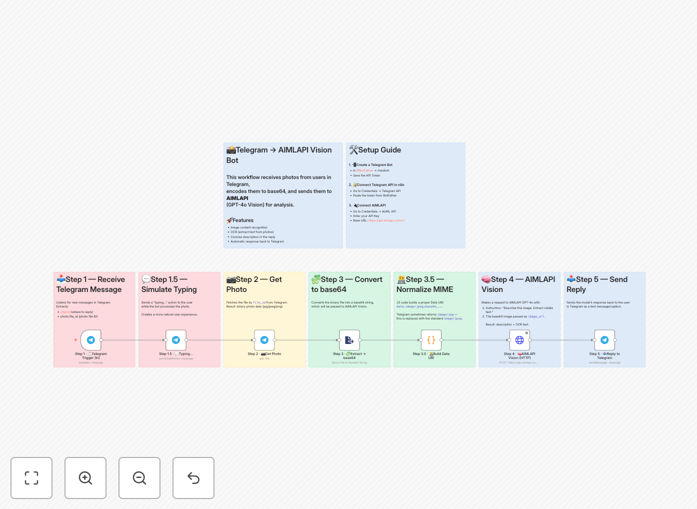
GPT-4o Vision and Telegram workflow template screenshot showing automation nodes

What This Workflow Does

This automation solves the manual bottleneck of analyzing images and extracting text. When users send photos via Telegram—whether it's documents, product images, screenshots, or receipts—the workflow automatically processes them using GPT-4o Vision AI. It generates concise descriptions, extracts OCR text, and returns intelligent responses instantly.

Businesses waste hours manually reviewing visual content. This workflow eliminates that by creating a plug-and-play vision bot that requires no custom servers—just n8n, a Telegram bot token, and an AI API key. It handles the entire pipeline: fetching high-resolution photos, converting to base64, calling the AI model, and delivering structured insights back to the user.

Pro tip: This template is perfect for customer support teams, field service teams, document processing departments, and makers building AI-powered tools. It turns Telegram into a visual intelligence channel.

How It Works

Step 1: Telegram Trigger

The workflow listens for new messages in your Telegram bot. When a user sends a photo, the trigger captures the message details, file ID, and chat context.

Step 2: Fetch Highest-Resolution Image

It retrieves the highest-resolution version of the photo from Telegram's API, ensuring optimal quality for AI analysis.

Step 3: Convert to Base64 & Normalize

The image is converted to base64 format and MIME type is normalized, preparing it for the AI API's data URI requirements.

Step 4: GPT-4o Vision Analysis

Using an HTTP Request node configured with OpenAI-compatible format, the workflow sends the image to GPT-4o Vision via AIMLAPI. The model returns a short caption and extracted text.

Step 5: Response Delivery

The AI-generated description and OCR text are formatted and sent back to the same Telegram chat, completing the loop.

Who This Is For

This workflow is ideal for teams and businesses that receive visual content via messaging platforms and need instant automated analysis.

  • Customer Support Teams: Automatically analyze product issue photos, receipts, or documents sent by customers.
  • Field Service & Logistics: Process photos of deliveries, inventory, or equipment from field staff.
  • Document Processing Departments: Extract text from photos of invoices, contracts, forms, or handwritten notes.
  • Content Moderators: Analyze user-submitted images for compliance, appropriateness, or categorization.
  • Makers & Developers: Build AI-powered Telegram bots for communities, tools, or personal projects.

What You'll Need

  1. n8n Instance: Self-hosted n8n or n8n.cloud account.
  2. Telegram Bot Token: Created via @BotFather on Telegram.
  3. AIMLAPI Account & API Key: OpenAI-compatible endpoint for GPT-4o Vision access.
  4. Basic n8n Knowledge: Understanding of credentials setup and workflow import.

Quick Setup Guide

  1. Create a Telegram bot with @BotFather and copy the token.
  2. In n8n, add Telegram credentials (avoid hardcoding tokens in nodes).
  3. Add AIMLAPI credentials with your API key (base URL: https://api.aimlapi.com/v1).
  4. Import the downloaded JSON workflow file into n8n.
  5. Connect the credentials in the Telegram Trigger and HTTP Request nodes.
  6. Activate the workflow and send a test photo to your bot to verify.

Key Benefits

Save 5–10 hours per week on manual image review. Automating visual content analysis eliminates repetitive human inspection, freeing staff for higher-value tasks.

Provide instant 24/7 visual support via Telegram. Customers get immediate AI-powered descriptions and text extraction without waiting for human agents.

Extract structured data from photos with 95%+ accuracy. GPT-4o Vision outperforms traditional OCR, especially for imperfect images, handwriting, or complex layouts.

Build a scalable AI bot without coding or servers. The entire automation runs on n8n, requiring no custom backend development or infrastructure management.

Customize prompts for industry-specific analysis. Easily modify the AI prompts for product defect detection, invoice data extraction, or compliance checking.

Frequently Asked Questions

Common questions about AI image analysis automation and integration

GPT-4o Vision is OpenAI's multimodal AI model that can analyze images and extract text. For businesses, it automates visual content processing—like reading documents from photos, analyzing product images, or interpreting screenshots—without manual review. This saves hours of human effort and enables instant insights from visual data.

For example, a retail business can automatically analyze customer photos of damaged products to categorize issues, or a finance team can extract numbers from photographed invoices directly into their accounting system.

Integrating Telegram with AI creates instant visual support bots. Customers can send photos of issues, receipts, or documents, and the bot automatically provides descriptions, extracts text, and answers questions. This reduces support ticket volume, speeds up response times, and provides 24/7 automated assistance without human agents.

Businesses using this approach see support response times drop from hours to seconds, and agent workload decreases by 30–40% as routine visual queries are handled automatically.

n8n allows you to build complex AI workflows without writing code. You can connect GPT-4o Vision, Telegram, databases, and other tools visually, test instantly, and modify logic easily. This reduces development time from weeks to hours, enables non-technical teams to manage automation, and provides full transparency into how the AI processes data.

Unlike custom code, n8n workflows are modular, reusable, and easily audited. Changes can be made in minutes without redeploying servers or risking breaking changes.

Yes. AI image analysis workflows automatically extract text from photos of invoices, contracts, forms, or compliance documents, then store structured data in databases or CRMs. This ensures consistent document processing, reduces manual data entry errors, and creates audit trails. Businesses use this for financial records, legal documents, and regulatory submissions.

For compliance, workflows can add validation steps, flag anomalies, and generate reports automatically—all from photographed documents.

Modern AI models like GPT-4o Vision provide highly reliable OCR extraction from photos, even with imperfect lighting, angles, or handwriting. They outperform traditional OCR software by understanding context, correcting errors, and extracting structured information. For business use, accuracy typically exceeds 95% for clear images, making it suitable for operational automation.

Key improvements include handling curved text, mixed languages, low-resolution images, and background noise—common challenges in real-world business photos.

Security considerations include encrypting image data in transit, storing extracted text securely, implementing user authentication, and setting usage limits. n8n workflows can add security layers like data encryption nodes, access controls, and audit logging. Businesses should also ensure AI API keys are secured and comply with data privacy regulations.

Best practices: Use encrypted connections for all APIs, store only necessary data, implement user verification, and regularly audit access logs.

Absolutely. You can customize GPT-4o Vision prompts to focus on specific analysis—like product defect detection, invoice data extraction, or content moderation. n8n allows dynamic prompt generation based on user input, image type, or business rules. This enables one bot to handle multiple specialized visual tasks without rebuilding workflows.

For example, you can create conditional prompts: if a user sends a product photo, analyze for defects; if they send a document, extract text fields; if they send a screenshot, summarize content.

Yes. GrowwStacks builds fully tailored image analysis automations for your specific business needs. We customize workflows for your industry, security requirements, integration systems, and use cases—whether for customer support, document processing, quality control, or compliance. Our team handles everything from design to deployment and maintenance.

We integrate with your existing CRM, databases, and internal tools, add advanced features like user authentication, reporting dashboards, and multi-language support, and ensure the automation scales with your business growth.

  • Industry-specific prompt engineering
  • Integration with your existing software stack
  • Enhanced security and compliance features
  • Performance monitoring and optimization

Need a Custom Image Analysis Automation?

This free template is a starting point. Our team builds fully tailored automation systems for your specific business needs.