Meta Ads Google Gemini Google Sheets Marketing Analytics

Analyze Meta ads daily with Google Gemini and Google Sheets

Automate your ad performance analysis with AI-powered insights directly in your spreadsheet

Download Template JSON · n8n compatible · Free
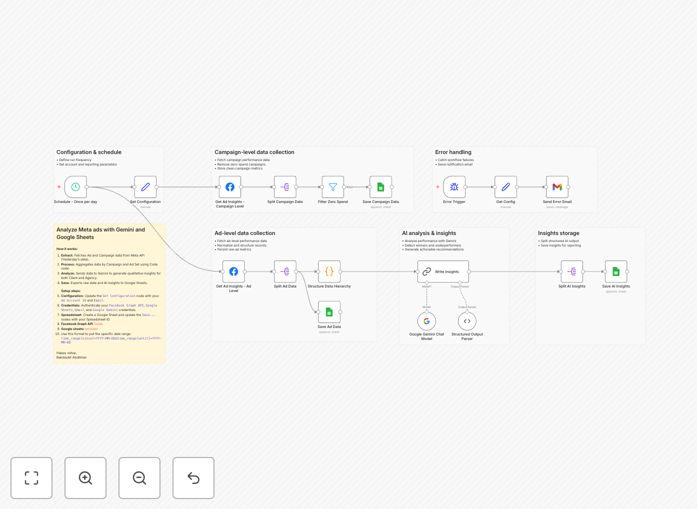
Meta ads analysis automation workflow diagram

What This Workflow Does

This automation eliminates the tedious manual process of exporting Meta ads data, analyzing performance metrics, and creating reports. Instead, it automatically pulls your daily ad performance data, processes it through Google Gemini's AI analysis capabilities, and delivers structured insights directly into Google Sheets.

The workflow transforms raw ad metrics into actionable intelligence by identifying trends, spotting underperforming campaigns, and suggesting optimization opportunities. It saves marketing teams hours each week while providing more consistent and data-driven decision-making capabilities.

How It Works

1. Daily Meta Ads Data Extraction

The workflow connects to your Meta Ads account through the API and pulls key performance metrics for your selected campaigns. It gathers data like impressions, clicks, conversions, CPC, ROAS, and more.

2. AI-Powered Analysis with Google Gemini

The raw data gets sent to Google Gemini where AI models analyze performance trends, compare against historical benchmarks, and identify statistically significant changes in campaign metrics.

3. Structured Insights in Google Sheets

The analyzed data gets formatted into clear, actionable insights and written directly into your designated Google Sheet. The output includes performance summaries, optimization recommendations, and flagged issues.

Who This Is For

This workflow is ideal for:

  • Digital marketing agencies managing multiple client accounts
  • E-commerce businesses running Meta ads campaigns
  • Marketing teams needing daily performance snapshots
  • Growth teams that want AI-powered ad optimization suggestions
  • Businesses looking to reduce manual reporting work

What You'll Need

  1. Active Meta Ads account with API access
  2. Google Gemini API credentials
  3. Google Sheets document prepared with the right column structure
  4. n8n account to host the workflow
  5. Basic understanding of Meta ads metrics

Quick Setup Guide

  1. Download the JSON template file
  2. Import into your n8n instance
  3. Connect your Meta Ads and Google Gemini API credentials
  4. Configure your target Google Sheet URL
  5. Set your preferred schedule (daily recommended)
  6. Test with a small campaign first

Key Benefits

Save 5+ hours weekly by eliminating manual data exports, analysis, and reporting. The automation handles everything from data collection to insight generation.

Get AI-powered optimization suggestions that go beyond basic metrics. Gemini identifies patterns humans might miss and provides data-backed recommendations.

Maintain consistent reporting standards across your team with automated, standardized outputs that follow the same format every time.

Catch performance issues faster with daily automated checks that flag statistically significant changes in your campaign metrics.

Scale your analysis capabilities without adding headcount. The system can analyze hundreds of campaigns as easily as it handles a few.

Frequently Asked Questions

Common questions about Meta ads analysis automation

AI-powered analysis goes beyond simple metric tracking by identifying complex patterns and correlations in your ad performance data. While humans might spot obvious trends, AI can detect subtle relationships between different variables that impact campaign success.

For example, Gemini might discover that your ads perform significantly better when shown to users who previously engaged with your Instagram content, even if that wasn't part of your targeting strategy. These insights allow for more sophisticated optimization than manual analysis alone.

  • Detects micro-trends invisible to human analysts
  • Considers hundreds of variables simultaneously
  • Provides probabilistic predictions for different strategies

The workflow generates several categories of insights including performance diagnostics, optimization suggestions, and predictive analytics. It evaluates metrics like CTR, conversion rates, ROAS, and frequency to provide actionable recommendations.

Common outputs include identifying underperforming ad sets that need pausing, suggesting bid adjustments based on conversion probabilities, and flagging creative fatigue before it impacts performance. The AI also benchmarks your campaigns against industry standards for your vertical.

  • Creative performance analysis
  • Audience targeting effectiveness
  • Budget allocation recommendations

Daily analysis provides the best balance between responsiveness and data stability. While weekly analysis might miss short-term trends, hourly checks could lead to overreacting to normal fluctuations. Daily analysis catches meaningful changes while allowing enough time for statistical significance.

For high-budget campaigns ($5k+/day), running analysis twice daily (morning/evening) can be beneficial. The key is aligning analysis frequency with your ability to implement changes - there's no value in daily insights if you only optimize weekly.

  • Daily recommended for most businesses
  • Twice daily for high-spend accounts
  • Weekly sufficient for small, stable campaigns

Yes, the workflow can be configured to analyze historical data alongside daily updates. This provides context for your current performance by comparing against past benchmarks. Historical analysis typically looks back 30-90 days, depending on your campaign longevity.

When analyzing historical data, the AI identifies seasonal patterns, learns your account's typical performance cycles, and establishes more accurate benchmarks. This results in better-informed recommendations that account for your specific business rhythms.

  • 30-90 day lookback recommended
  • Identifies seasonal patterns
  • Creates account-specific benchmarks

While Meta's native insights provide basic performance metrics, this workflow delivers deeper, cross-campaign analysis with actionable recommendations. The key differentiators are the integration of Google Gemini's advanced AI models and the ability to customize outputs for your specific business goals.

Meta's insights are platform-centric and generic, while this solution lets you define what "success" means for your business. It can prioritize metrics that matter most to you, whether that's ROAS, lead quality, or brand lift, and provide recommendations accordingly.

  • Customized to your KPIs
  • Cross-campaign comparisons
  • Actionable optimization steps

The recommendations are statistically validated predictions based on your historical performance data. While not perfect, they typically show 70-85% accuracy when tested against actual outcomes. The AI improves over time as it learns from your campaign adjustments and results.

We recommend implementing suggestions as controlled tests (e.g., applying changes to 20% of budget) rather than full rollouts initially. This lets you validate the AI's predictions while limiting risk. Most users find the recommendations become increasingly accurate after 2-3 weeks of use.

  • 70-85% prediction accuracy
  • Improves with more data
  • Start with small tests

Absolutely! GrowwStacks specializes in building tailored automation solutions for digital marketing teams. We can customize this workflow to your specific reporting needs, integrate additional data sources, or create entirely new automations for your Meta ads management.

Our team works with you to understand your unique KPIs, reporting requirements, and team workflows. We then build a solution that fits seamlessly into your operations, whether you need simple automated reports or complex AI-driven optimization systems.

  • Custom KPIs and metrics
  • Multi-platform integrations
  • Team-specific reporting formats

Need a Custom Meta Ads Integration?

This free template is a starting point. Our team builds fully tailored automation systems for your specific needs.