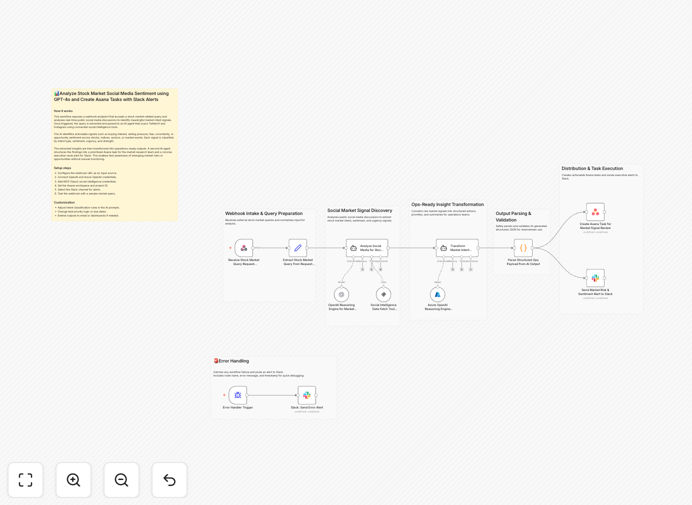
What This Workflow Does
Manually monitoring social media and news for stock market sentiment is slow, inconsistent, and misses critical signals. This automation solves that by providing a real-time intelligence system that listens to public discussions, understands investor intent using advanced AI, and instantly converts those insights into actionable tasks and alerts.
The workflow acts as your 24/7 market analyst. It accepts a stock, sector, or event query via a webhook, scans platforms like Twitter/X and Instagram for relevant chatter, uses GPT-4o to classify the sentiment (bullish, bearish, fearful, opportunistic), assesses urgency, and then creates a prioritized Asana task for your research team while sending a concise summary to a designated Slack channel for leadership visibility.
Built-in error handling ensures reliability, and the entire process eliminates hours of manual screening, giving your team a proactive edge in identifying risks and opportunities based on crowd psychology and emerging narratives.
How It Works
1. Receive & Parse Market Query
A webhook trigger accepts an external POST request containing the stock market query (e.g., “$TSLA”, “tech sector”, “Fed meeting”). The workflow extracts and normalizes this input for the analysis engine.
2. Social Media Intelligence Gathering
Using connected tools, the workflow scans public social media platforms for recent discussions related to the query. It filters for posts indicating buying interest, selling pressure, fear, uncertainty, or speculative opportunity.
3. AI-Powered Sentiment & Intent Classification
Each collected signal is processed by GPT-4o (or Azure OpenAI). The AI agent classifies the intent type, sentiment score, urgency level, and signal strength, transforming raw text into structured, quantifiable insights.
4. Transform Insights into Actionable Payload
The structured AI output is parsed and validated. The workflow builds a clean JSON payload containing the priority, a summary of key signals, recommended actions, and context for the operations team.
5. Create Prioritized Asana Task
A task is automatically created in your specified Asana project. It includes the sentiment summary, source links, urgency flag, and due date, ensuring your market or research team can immediately investigate.
6. Send Executive Alert to Slack
A concise, formatted alert is posted to a designated Slack channel. This gives leadership instant visibility into high-priority market risks or emerging opportunities without needing to check Asana or email.
7. Comprehensive Error Handling
If any step fails, a detailed error alert is sent to Slack with context, enabling fast debugging and ensuring the system maintains operational integrity.
Pro tip: Start by monitoring a few high-volatility stocks or sectors you already follow. This lets you validate the AI’s sentiment accuracy against your own intuition before scaling to broader coverage.
Who This Is For
This automation is ideal for investment teams, hedge fund analysts, market research firms, and financial operations staff who need to track public sentiment as a leading indicator. It’s also valuable for corporate strategy teams monitoring sentiment around their own company or competitors, and active retail investors who want to systemize their social listening. Founders and executives in fintech or wealth management can use this to build differentiated, data-driven services for their clients.
What You'll Need
- A self-hosted n8n instance (this workflow uses tools not supported on n8n Cloud).
- OpenAI API key or Azure OpenAI credentials for GPT-4o access.
- Credentials for a social intelligence/MCP tool (like Xpoz) to fetch data from Twitter/X and Instagram.
- Asana OAuth access with permissions to create tasks in your target project.
- Slack API token with permissions to post messages to your chosen channel.
- Basic understanding of webhooks to trigger the workflow with your queries.
Quick Setup Guide
Follow these steps to deploy this intelligence system in your environment:
- Download & Import: Click the download button above to get the JSON file. In your n8n instance, go to Workflows → Import from File and select the downloaded template.
- Configure Credentials: In the workflow canvas, set up credentials for OpenAI/Azure OpenAI, your social intelligence tool, Asana, and Slack. Use the credential dropdowns on each node.
- Set Resource IDs: In the Asana node, enter your specific Workspace ID and Project ID where tasks should be created. In the Slack node, specify the channel ID for alerts.
- Test the Webhook: Activate the workflow. Copy the Webhook node’s unique URL. Use a tool like Postman or curl to send a POST request with a JSON body like
{"query": "$AAPL"}. - Validate Output: Check your Asana project for the newly created task and your Slack channel for the alert. Review the content for accuracy.
- Adjust & Scale: Tweak the AI prompts in the “Agent” nodes to refine sentiment classification for your specific needs. You can then duplicate the workflow to monitor multiple queries simultaneously.
Pro tip: Use n8n’s “Schedule Trigger” node to run this workflow automatically every 30 minutes for a persistent watchlist, instead of relying solely on manual webhook calls.
Key Benefits
Turn hours of manual monitoring into instant, actionable intelligence. This workflow can scan and analyze hundreds of social posts in seconds, a task that would take a human analyst all day, freeing your team for higher-value research and decision-making.
Gain a proactive edge with real-time sentiment detection. Catch shifting investor moods and emerging narratives on social media before they are reflected in price charts or traditional news outlets, allowing for earlier position adjustments or risk management.
Ensure critical signals never get lost with automated task creation. Every analyzed signal with sufficient urgency automatically becomes a tracked Asana task with context, eliminating the risk of good insights being forgotten in a chat log or email thread.
Keep leadership instantly informed with streamlined Slack alerts. Executives and portfolio managers receive clean, summarized alerts in Slack, providing visibility into market dynamics without requiring them to log into another system or wait for a report.
Build a scalable, consistent market intelligence foundation. Unlike human analysts who have good and bad days, this automation provides unbiased, 24/7 coverage that can be easily scaled to cover more assets or sectors without linear cost increases.