What This Workflow Does
When customers submit support requests with screenshots, support teams spend valuable time manually inspecting each image, interpreting the problem, and typing descriptions into ticketing systems. This workflow eliminates that manual bottleneck.
It automatically analyzes uploaded screenshots using GPT-4o Vision AI to extract key details like error messages, UI elements, configuration issues, or visual anomalies. The extracted information is then structured and used to create detailed tickets in Zendesk for support agents or linked issues in Jira for engineering teams.
The result is a seamless pipeline from customer screenshot submission to fully populated, actionable tickets—reducing resolution time, improving accuracy, and freeing support staff from repetitive visual review tasks.
How It Works
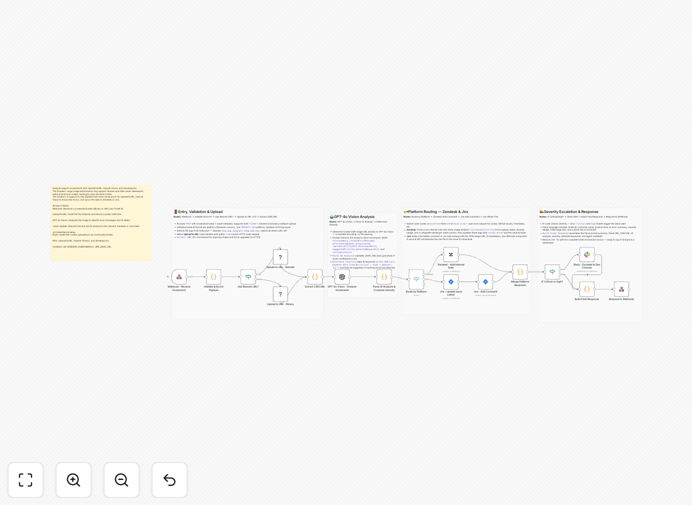
Step 1: Screenshot Submission & Hosting
A customer or internal user submits a screenshot via a webhook, upload form, or email attachment. The image is temporarily hosted via UploadToURL to provide a accessible URL for AI processing.
Step 2: AI Vision Analysis
The workflow sends the screenshot URL to GPT-4o Vision with specific prompts to extract relevant information: error codes, software state, visible settings, user interface context, and any text present in the image.
Step 3: Data Structuring & Routing
The AI's analysis is parsed into structured fields: issue type, severity, description, suggested category. Based on predefined rules, the workflow determines whether to create a support ticket in Zendesk or a development issue in Jira.
Step 4: Ticket Creation & Notification
The workflow creates the ticket in the selected system (Zendesk or Jira) with all extracted details, attaches the original screenshot for reference, and sends notifications to relevant teams or the original submitter.
Who This Is For
This automation is ideal for software companies, SaaS providers, IT support departments, and customer service teams that regularly receive visual problem reports.
Support Teams: Reduce manual screenshot review and accelerate ticket creation with accurate, AI-extracted descriptions.
Development Teams: Get better bug reports from users with structured visual data that clearly shows UI issues or error states.
Product Managers: Gather consistent feedback from user screenshots to identify common UI problems or feature requests.
Remote Teams: Enable distributed support staff to handle visual tickets efficiently without needing to be experts in every software interface.
What You'll Need
- n8n instance (cloud or self-hosted) with workflow execution capabilities.
- UploadToURL account or similar service for temporary image hosting.
- OpenAI API access with GPT-4o Vision capabilities.
- Zendesk or Jira account with API credentials for ticket creation.
- Webhook endpoint or form to receive screenshot submissions from users.
- Basic understanding of your support ticket fields and categorization logic.
Pro tip: Start with a simple categorization rule: if the AI detects "error code" or "crash," route to Jira; if it detects "configuration" or "how-to," route to Zendesk. You can refine these rules later.
Quick Setup Guide
- Import the template: Download the JSON file and import it into your n8n workspace.
- Configure credentials: Set up connections for UploadToURL, OpenAI, Zendesk, and Jira in n8n's credential manager.
- Adjust routing logic: Modify the "If" nodes to match your ticket routing preferences between Zendesk and Jira.
- Test with sample screenshots: Use a few test screenshots (error messages, UI glitches) to verify the AI extraction and ticket creation works correctly.
- Deploy the webhook: Activate the workflow and provide the webhook URL to your support team or integrate it with your existing submission forms.
- Monitor and refine: Review the first few automated tickets to ensure accuracy, then tweak AI prompts or routing rules as needed.
Key Benefits
⏱️ Save 5–10 minutes per screenshot ticket. Support agents no longer need to manually inspect images and write descriptions—the AI does it instantly with structured output.
📈 Improve ticket accuracy and consistency. AI extraction ensures all relevant details are captured uniformly, reducing miscommunication between support and engineering teams.
🔀 Automate routing between support and development. Based on AI analysis, tickets are automatically directed to Zendesk for support issues or Jira for technical bugs, streamlining handoffs.
📊 Gather actionable product insights. Structured data from user screenshots becomes a valuable source for identifying common UI problems, error patterns, and feature requests.
🌐 Enable scalable remote support. Distributed teams can handle visual tickets efficiently without deep product expertise, as the AI provides context and interpretation.