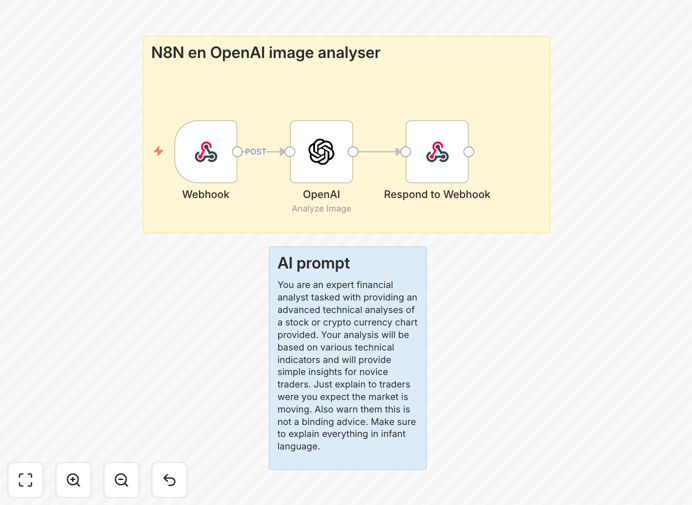
What This Workflow Does
This automation system bridges TradingView technical charts with AI-powered analysis through a custom Chrome extension. It captures chart screenshots, sends them to n8n for processing with OpenAI's visual analysis capabilities, and returns actionable trading insights.
The solution solves the challenge of consistently interpreting complex chart patterns by applying AI's pattern recognition at scale. Traders get objective, data-driven analysis without emotional bias, available 24/7 to identify opportunities.

How It Works
1. Chart Capture
The Chrome extension captures TradingView chart screenshots with one click, preserving all technical indicators and drawing tools visible on the chart.

2. Secure Transmission
Screenshots are securely transmitted to your n8n instance via encrypted webhook, maintaining data privacy while enabling cloud or self-hosted processing.
3. AI Analysis
OpenAI's visual processing identifies chart patterns, trend lines, support/resistance levels, and other technical indicators, providing written analysis in plain English.
4. Actionable Output
The system delivers formatted analysis to your preferred channels (email, Slack, trading journal) with configurable alert thresholds for potential trading signals.
Who This Is For
This workflow benefits:
- Day traders needing consistent technical analysis across multiple charts
- Investment firms automating preliminary chart screening
- Algorithmic trading systems incorporating AI signals
- Educators demonstrating technical analysis concepts
- Trading journal systems documenting decision rationale
What You'll Need
- n8n instance (cloud or self-hosted)
- OpenAI API key with vision capabilities
- The provided Chrome extension installed
- TradingView account (free tier sufficient)
- Destination for alerts (email, Slack, etc.)
Pro tip: For highest accuracy, train the AI with examples of your preferred chart setups and annotation styles before full deployment.
Quick Setup Guide
- Download and import the JSON workflow into your n8n instance
- Configure the webhook URL in the Chrome extension settings
- Add your OpenAI API key in the n8n workflow credentials
- Set up your preferred notification channels
- Test with sample charts to validate analysis quality
- Deploy the extension to your trading team (if applicable)
Key Benefits
24/7 Market Monitoring: The system works around the clock, analyzing charts even when you're not actively trading.
Emotion-Free Analysis: Remove human bias from technical interpretation while retaining final decision control.
Customizable Alerts: Configure specific pattern recognition thresholds that match your trading strategy.
Knowledge Retention: Build an institutional knowledge base of chart patterns and their outcomes over time.
Multi-Platform Ready: The architecture supports expansion to other charting platforms beyond TradingView.