YouTube Google Sheets Market Research Content Strategy n8n

Automate YouTube Video Research & Virality Scoring

Discover trending content, analyze engagement metrics, and export insights to Google Sheets—fully automated with n8n.

Download Template JSON · n8n compatible · Free
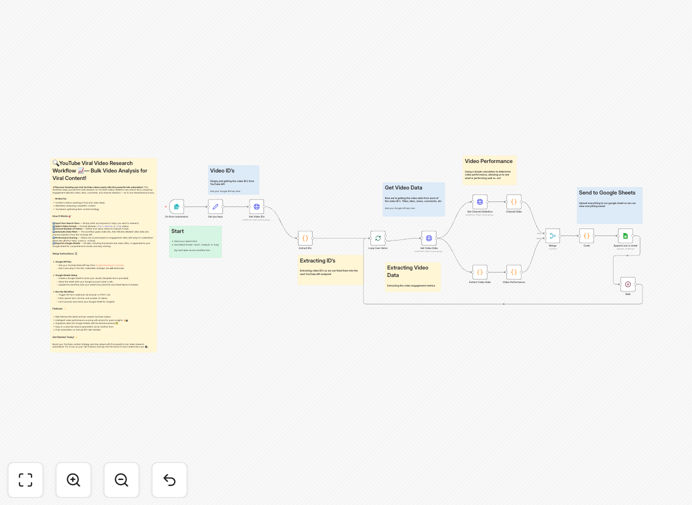
YouTube video analysis automation workflow interface showing data flowing to Google Sheets

What This Workflow Does

Manual YouTube research is time-consuming and inconsistent. This n8n automation transforms hours of manual analysis into a fully automated process that systematically discovers, evaluates, and documents viral video opportunities.

The workflow performs bulk research on YouTube videos based on your search terms, analyzes engagement data (views, likes, comments, channel statistics), calculates performance scores, and exports everything to Google Sheets with visual indicators. It helps content creators, marketers, and agencies identify what's working in their niche, benchmark against competitors, and make data-driven content decisions.

Instead of guessing what might go viral, you get actionable intelligence showing exactly which topics, formats, and channels are gaining traction—with all data organized and ready for strategic planning.

How It Works

1. Input & Search Configuration

The workflow starts with a simple form or manual trigger where you specify your search term, desired video format (short, medium, or long), and the number of videos to analyze. This configuration determines the scope and focus of your research.

2. YouTube Data Collection

Using the YouTube Data API, the automation fetches video IDs based on your search criteria, then retrieves detailed metadata for each video including view counts, likes, comments, publication dates, and channel statistics.

3. Engagement Scoring & Analysis

Each video is automatically scored based on engagement rates and performance metrics. The system applies intuitive labels like 🚀 HOLY HELL (high viral potential), 📈 Growing, or 💀 Dead to help you quickly identify opportunities.

4. Google Sheets Export

All analyzed data—including video titles, URLs, thumbnails, metrics, and scores—is appended to your designated Google Sheet. This creates a searchable, sortable database of video intelligence that updates automatically with each run.

Who This Is For

This automation is ideal for content creators, YouTube channel managers, digital marketers, and agencies who need to stay ahead of trends. If you're spending hours each week manually checking what's trending in your niche, this workflow eliminates that grunt work.

Businesses using YouTube for marketing or competitor analysis will find particular value in the systematic data collection and scoring. The Google Sheets output makes it easy to share insights with teams or incorporate into broader content calendars and strategy documents.

What You'll Need

  1. n8n instance (cloud or self-hosted)
  2. YouTube Data API v3 key from Google Cloud Console
  3. Google Sheets with edit permissions for service account
  4. Google Service Account credentials for Sheets API access
  5. Basic understanding of n8n workflow import/export

Pro tip: When setting up your YouTube API key, enable the "YouTube Data API v3" specifically. The free tier provides sufficient quota for most research needs unless analyzing thousands of videos daily.

Quick Setup Guide

Follow these steps to implement this YouTube research automation:

  1. Import the template into your n8n instance using the downloaded JSON file
  2. Configure YouTube API credentials in n8n's credential manager
  3. Set up Google Sheets connection with your service account credentials
  4. Update the Google Sheet ID in the workflow to point to your destination spreadsheet
  5. Test with a simple search term like "AI tutorials" to verify data flows correctly
  6. Schedule the workflow to run weekly or monthly for ongoing research

The workflow includes clear comments at each configuration point. Most users can have it running in under 15 minutes with basic API setup experience.

Key Benefits

Save 5-10 hours weekly on manual YouTube research and data entry. What used to take an afternoon now happens automatically while you focus on creating content.

Make data-driven content decisions with actual engagement metrics rather than gut feelings. Identify exactly which topics and formats resonate with audiences in your niche.

Track competitor performance systematically instead of sporadic checking. Build a historical database of what works (and what doesn't) across your competitive landscape.

Scale your research effortlessly from analyzing 10 videos to 100+ with no additional time investment. The automation handles the volume while you analyze the insights.

Integrate with your existing workflow through Google Sheets export. Use the data in reports, content calendars, or feed it into other business intelligence tools.

Frequently Asked Questions

Common questions about YouTube research automation and integration

Automating YouTube research saves hours of manual work each week, allowing creators to focus on production. It provides data-driven insights into what's trending, competitor performance, and audience engagement patterns, which are critical for strategic content planning and maximizing channel growth.

Without automation, most creators rely on sporadic checking of trending pages or manual spreadsheet tracking—both inefficient and inconsistent approaches that miss important patterns.

The most important metrics are engagement rate (likes + comments relative to views), view velocity (how quickly a video gains views), and audience retention. A high engagement rate often signals strong viewer connection, while view velocity indicates trending potential.

This workflow calculates these automatically and adds contextual scoring. It also considers channel authority and consistency, which are often overlooked but crucial for understanding sustainable success versus one-hit wonders.

The automation fetches video data via the YouTube API, processes it to calculate engagement scores, and then appends the structured results directly to a Google Sheet. This creates a living database of video performance that can be sorted, filtered, and visualized without manual copying.

Each run adds new rows with timestamps, allowing you to track performance over time. The Sheets integration means your entire team can access the insights without needing n8n access, and you can build dashboards or connect the data to other tools.

Yes, absolutely. By searching for topics your competitors cover or analyzing their specific video IDs, you can benchmark their performance against yours. Track their engagement patterns, upload frequency, and which topics generate the most interaction to inform your own content strategy.

The workflow can be modified to monitor specific channel IDs rather than search terms, giving you ongoing competitive intelligence. This helps identify content gaps in your own strategy and opportunities to differentiate.

Visual scoring makes data instantly actionable. Instead of interpreting raw numbers, you get an at-a-glance assessment of viral potential. This helps prioritize which video ideas to pursue, which formats work best, and what content patterns are worth replicating in your own channel strategy.

The emoji system creates intuitive categories that team members can understand without data training. It transforms complex metrics into simple, business-ready insights that drive faster decision-making.

For active channels, run analysis weekly to catch emerging trends. For strategic planning, monthly deep dives into your niche are valuable. The workflow can be scheduled in n8n to run automatically, ensuring you always have fresh data without manual intervention.

Consider running more frequent but smaller analyses during product launches or campaign periods, and broader quarterly reviews for long-term strategy. The automation's flexibility lets you adjust frequency based on your specific needs and resources.

Common mistakes include focusing only on view count (ignoring engagement), not considering video length vs. retention, and analyzing videos in isolation without channel context. This workflow helps avoid these by providing comprehensive metrics and comparative scoring across multiple data points.

Other pitfalls include ignoring audience demographics, failing to track performance over time, and not correlating external factors like seasonality or current events. Automated analysis with consistent methodology eliminates these subjective biases.

Yes, GrowwStacks specializes in building custom YouTube and social media research automations. We can create tailored solutions that monitor specific competitors, track branded mentions, analyze sentiment in comments, or integrate with your existing CRM and marketing tools.

Our team will work with you to understand your specific goals, whether that's tracking industry trends, monitoring campaign performance, or generating content ideas. We build on proven templates like this one but customize them to your exact workflow and data requirements.

  • Competitor monitoring with alerting for new uploads
  • Sentiment analysis of video comments
  • Integration with your content calendar or project management tools
  • Custom scoring algorithms based on your business metrics

Need a Custom YouTube Research Automation?

This free template is a starting point. Our team builds fully tailored automation systems for your specific business needs.