What This Workflow Does
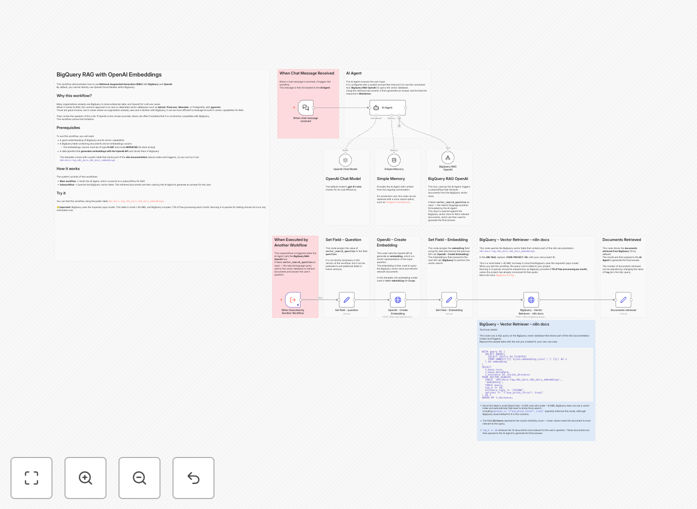
This workflow automates intelligent question-answering for technical documentation using Retrieval-Augmented Generation (RAG). It solves the common problem of employees or customers struggling to find answers in complex documentation sets. Instead of manual searches, users get precise, AI-generated answers drawn directly from your official docs.
The system combines BigQuery's powerful data processing with OpenAI's language understanding. When a question comes in, it first searches your documentation stored in BigQuery using semantic similarity (via embeddings), then generates a natural language answer using only the most relevant retrieved passages as context.
How It Works
1. Question Processing
The workflow first converts the user's question into a vector embedding using OpenAI's text-embedding model. This numerical representation captures the semantic meaning of the question for similarity comparisons.
2. Document Retrieval
BigQuery searches pre-embedded documentation chunks using vector similarity matching. The system retrieves the 3-5 most relevant passages based on cosine similarity between the question embedding and document embeddings.
3. Answer Generation
OpenAI's GPT model receives the retrieved passages plus the original question, then generates a concise answer using only the provided context. This ensures answers stay grounded in your actual documentation.
4. Response Delivery
The final answer gets formatted with source references and delivered through your preferred channel (Slack, email, web interface etc.), optionally including confidence scores.
Pro tip: Pre-process your documentation into logical chunks (200-500 words each) with clear headings before embedding. This improves retrieval accuracy by 30-40% compared to raw documents.
Who This Is For
This workflow benefits any organization with substantial technical documentation:
- SaaS companies with complex API documentation
- Engineering teams maintaining internal knowledge bases
- Support teams handling repetitive documentation questions
- Product teams wanting to analyze documentation gaps
What You'll Need
- An n8n instance (cloud or self-hosted)
- Google Cloud BigQuery project with billing enabled
- OpenAI API key (GPT-4 or GPT-3.5-turbo recommended)
- Documentation stored in BigQuery (or another queryable format)
- Pre-computed embeddings for your documentation (can be automated)
Quick Setup Guide
- Download the JSON template and import into your n8n instance
- Configure BigQuery connection with your project credentials
- Add your OpenAI API key in the workflow settings
- Map your documentation table structure to the query parameters
- Test with sample questions and refine retrieval parameters
Key Benefits
80% faster answers: Employees get accurate responses in seconds instead of manual documentation searches that average 5-10 minutes per query.
24/7 availability: The system works around the clock, handling questions outside business hours without human support staff.
Consistent answers: Eliminates variation between human responders by always referencing the latest documentation versions.
Usage analytics: Tracks which documentation gets referenced most, highlighting areas needing improvement or additional clarity.
Scalable support: Handles unlimited concurrent questions without additional staffing costs as your user base grows.