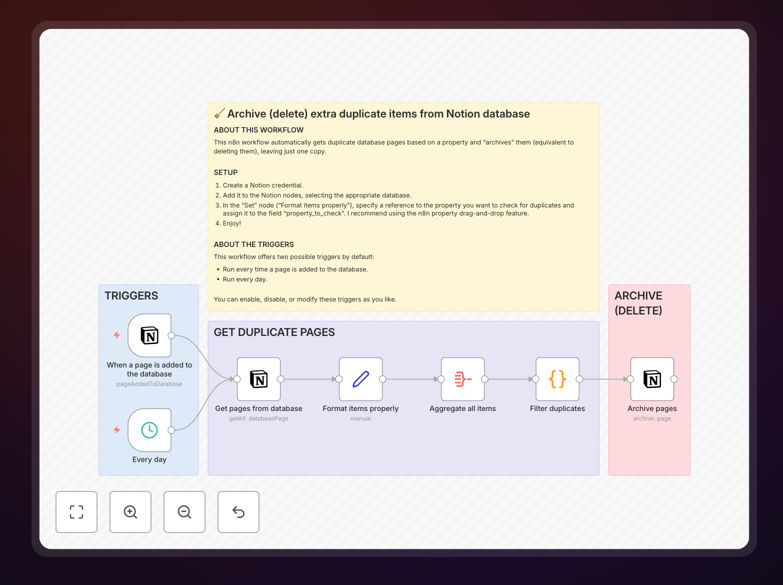
What This Workflow Does
This n8n workflow automatically identifies and removes duplicate entries from your Notion databases, helping you maintain clean, organized information. Duplicates creep into databases through manual entry errors, multiple imports, or collaborative editing - this automation solves that problem at scale.
The workflow scans your specified Notion database, compares entries based on your chosen matching criteria, and either archives or deletes the duplicates while preserving your original data. It handles the tedious comparison work so you don't have to manually search for duplicates.
How It Works
1. Database Connection Setup
The workflow first authenticates with your Notion account using an integration token, then connects to your specified database. You'll need to provide your database ID and configure which properties should be used for duplicate detection.
2. Duplicate Detection
The automation retrieves all entries from your database and compares them using your defined matching rules. You can choose exact matching (identical property values) or fuzzy matching (similar titles or partial matches).
3. Duplicate Handling
For each set of duplicates found, the workflow either archives the newer entries (moving them to a separate database) or deletes them entirely based on your configuration. You can choose to preserve the oldest entry, newest entry, or merge data from duplicates.
4. Reporting
After processing, the workflow generates a report showing how many duplicates were found and handled. This can be sent to your email, saved in Notion, or logged to another system.
Who This Is For
This workflow is ideal for Notion power users managing content databases, CRM systems, task trackers, or any database where duplicates degrade usability. Teams collaborating in shared databases will particularly benefit from automated deduplication.
Content managers, researchers, and knowledge workers who aggregate information from multiple sources into Notion will find this workflow saves hours of manual cleanup time each month.
What You'll Need
- An n8n instance (cloud or self-hosted)
- Notion account with admin access to the target database
- A Notion integration token with write permissions
- The database ID of your target Notion database
- Basic understanding of n8n workflow configuration
Quick Setup Guide
- Download the JSON template file
- Import it into your n8n instance
- Configure the Notion node with your integration token
- Set your target database ID in the workflow settings
- Define your duplicate matching criteria (which properties to compare)
- Choose archive or delete action for duplicates
- Test with a small dataset first, then run on your full database
Pro tip: Create a backup of your Notion database before first run. Start with archiving rather than deleting to verify the workflow identifies duplicates correctly.
Key Benefits
Save hours of manual cleanup: What would take hours of scrolling and comparing is handled automatically in minutes.
Improve database performance: Removing duplicates reduces database bloat and speeds up filtered views and searches.
Maintain data integrity: Automated deduplication ensures your reports and dashboards show accurate information.
Customizable matching: Tailor the duplicate detection to your specific database structure and needs.
Scheduled maintenance: Set the workflow to run weekly or monthly to keep your database clean continuously.