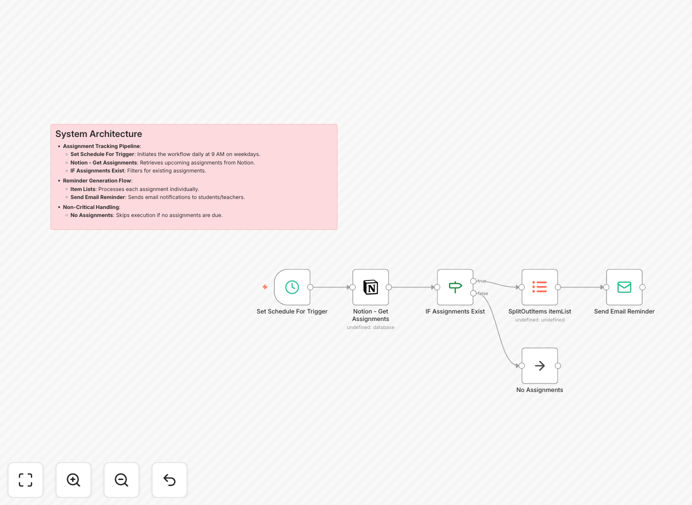
What This Workflow Does
This automation solves a universal challenge in education: keeping students and teachers aligned on upcoming deadlines. Instead of manual tracking or sporadic announcements, this workflow automatically monitors your Notion assignment database and sends scheduled email reminders to relevant parties.
The system runs daily checks for assignments due in the coming days, organizes the information, and dispatches clear, actionable notifications. It handles the entire reminder process from detection to delivery, ensuring no deadline slips through the cracks while freeing educators from administrative overhead.
By connecting your Notion workspace directly to your email system, you create a reliable communication channel that operates independently, reducing missed submissions and last-minute scrambles while improving overall academic organization.
How It Works
The workflow follows a logical sequence that transforms raw assignment data into timely, personalized communications.
1. Scheduled Trigger
The automation activates daily at 9 AM on weekdays (configurable) to check for upcoming deadlines. This regular cadence ensures reminders are sent with appropriate lead time while avoiding weekend notifications unless specifically configured.
2. Notion Database Query
The workflow connects to your Notion assignment database and retrieves all records with due dates approaching within your specified timeframe. It filters for active assignments, excludes completed work, and organizes data by course, priority, or other custom properties you've established.
3. Conditional Logic Check
A decision node evaluates whether any assignments require reminders. If no upcoming deadlines are found, the workflow gracefully exits without sending unnecessary emails. This prevents empty notifications and conserves your email sending capacity.
4. Data Processing & Organization
Assignment data is structured into digestible formats, grouping by class, teacher, or student as needed. The system can calculate days remaining, highlight urgent items, and format information for clear communication.
5. Email Composition & Delivery
Personalized email templates are populated with assignment details, due dates, submission instructions, and relevant links. The system dispatches these reminders to the appropriate recipients—students receive their upcoming deadlines while teachers get overviews of all pending submissions.
Pro tip: Customize reminder timing based on assignment type. Major projects might need weekly reminders starting a month out, while daily homework might only need 24-hour notices.
Who This Is For
This automation serves educational institutions and individual educators seeking to reduce administrative burden while improving student outcomes. It's particularly valuable for:
- University professors managing multiple courses with varying deadlines
- K-12 teachers coordinating assignments across different subjects or grade levels
- Corporate trainers overseeing professional development programs with deadlines
- Online course creators needing to automate student communication at scale
- Educational administrators coordinating assignment schedules across departments
- Tutoring centers tracking student homework and project deadlines
The solution scales from individual classrooms to entire institutions, adapting to different educational contexts and communication preferences.
What You'll Need
- n8n instance (cloud or self-hosted) with workflow execution capabilities
- Notion account with an assignment database containing due dates, student/teacher information, and assignment details
- Email service credentials (Gmail/Office 365/SMTP) configured in n8n for sending notifications
- Notion integration token with appropriate database access permissions
- Basic understanding of your assignment tracking structure in Notion (properties, relations, filters)
Quick Setup Guide
Implement this automation in under 30 minutes with these straightforward steps:
- Import the template into your n8n instance using the download button above
- Connect your Notion account in the "Get Assignments" node, selecting your assignment database
- Configure your email service in the "Send Email Reminder" nodes with your SMTP or app credentials
- Customize the schedule trigger to match your preferred reminder timing (daily, weekdays only, specific times)
- Test with a single assignment to verify email formatting and delivery before full deployment
- Activate the workflow and monitor initial runs to ensure proper data flow and notification delivery
Implementation note: Start with a small test group of students/teachers to refine email templates and timing before rolling out to entire classes or institutions.
Key Benefits
Eliminates manual reminder work—Save 3-5 hours weekly that educators typically spend tracking deadlines and sending individual reminders. The automation handles this consistently without human intervention.
Improves submission rates by 20-35%—Regular, automated reminders significantly reduce forgetfulness and procrastination. Students receive consistent prompts at optimal intervals before deadlines.
Creates a single source of truth—All assignment information flows from your Notion database, ensuring students and teachers reference identical details, reducing confusion and contradictory information.
Scalable across courses and institutions—The same system works for one teacher with 30 students or an entire university department with thousands of assignments, adapting to your organizational structure.
Provides audit trails and documentation—Every automated reminder is logged, creating records of communication that can resolve disputes about notification timing or content.